Topic: Trying to upgrade from 6 year old Roland FP-30x

I have used a Roland FP-30x for 6 years with Pianoteq, and I have always been pleased with the default velocity curve -- it's been a joy to play.  But it's time to upgrade my keyboard as its beginning to show its age.  So, of course, I ordered the new FP-40 assuming it would be a nice upgrade with the same key action but the benefit of up firing speakers if I should ever use the onboard speakers (I don't as I pump Pianoteq thru a Focusrite 4i4 to Adam Audio T7V studio monitors).  Unfortunately, they have messed with the super light, light, medium, hard and very hard key touch sensitivity so that the lows and high registers reach higher volumes easier and that you have to pound the mids to get higher volumes.  Since this is not a linear curve, messing with Pianoteq velocity curves will not solve the problem as it applies the curve to all keys.  Dropping the on-board touch sensitivity to light was the closest I could get to replicate the FP-30x but it's still unacceptable.  Needless to say, the keyboard was returned.  Now I have obtained Nuvola GX from Costco which looks pretty much like the FP-30x and I thought was just a rebranded FP-30x.  I like that the black keys are less slip resistant, but alas, it too suffers the same fate as the new FP-40 when it comes to using it as a MIDI controller for Pianoteq.  Do I really have to buy another FP-30x to get a linear velocity curve?  I considered the Studiologic MKII but there are reports of it freezing when fussing with the knobs and buttons.  I could also go the FP-90x which I hear has a better key action but what about its onboard velocity curve -- anyone just using the default linear curve with Pianoteq and the FP-90x? But this is a $2000+ solution!   What about the Roland A88 MKII controller and its touch sensitivity with pianoteq -- default Pianoteq velocity curve ok with this controller?  This is a $1300 solution if it works.  Any ideas people?

Re: Trying to upgrade from 6 year old Roland FP-30x

pianoteqlover1 wrote:

I have used a Roland FP-30x for 6 years with Pianoteq, and I have always been pleased with the default velocity curve -- it's been a joy to play.  But it's time to upgrade my keyboard as its beginning to show its age.  So, of course, I ordered the new FP-40 assuming it would be a nice upgrade with the same key action but the benefit of up firing speakers if I should ever use the onboard speakers (I don't as I pump Pianoteq thru a Focusrite 4i4 to Adam they have messed with the super light, light, medium, hard and very hard key touch sensitivity so that the lows and high registers reach higher volumes easier and that you have to pound the mids to get higher volumes.  Since this is not a linear curve, messing with Pianoteq velocity curves will not solve the problem as it applies the curve to all keys.  Dropping the on-board touch sensitivity to light was the closest I could get to replicate the FP-30x but it's still unacceptable.  Needless to say, the keyboard was returned.  Now I have obtained Nuvola GX from Costco which looks pretty much like the FP-30x and I thought was just a rebranded FP-30x.  I like that the black keys are less slip resistant, but alas, it too suffers the same fate as the new FP-40 when it comes to using it as a MIDI controller for Pianoteq.  Do I really have to buy another FP-30x to get a linear velocity curve?  I considered the Studiologic MKII but there are reports of it freezing when fussing with the knobs and buttons.  I could also go the FP-90x which I hear has a better key action but what about its onboard velocity curve -- anyone just using the default linear curve with Pianoteq and the FP-90x? But this is a $2000+ solution!   What about the Roland A88 MKII controller and its touch sensitivity with pianoteq -- default Pianoteq velocity curve ok with this controller?  This is a $1300 solution if it works.  Any ideas people?

Have you tried using the Roland Piano Designer app? It gives more control over touch sensitivity.

Re: Trying to upgrade from 6 year old Roland FP-30x

pianoteqlover1 wrote:

... Unfortunately, they have messed with the super light, light, medium, hard and very hard key touch sensitivity so that the lows and high registers reach higher volumes easier and that you have to pound the mids to get higher volumes.  Since this is not a linear curve, messing with Pianoteq velocity curves will not solve the problem as it applies the curve to all keys. ... Any ideas people?

Yeah-- This is something I've been looking at lately. You might want to check it out too (just MacOS or Windows, no Linux version it seems).

VelPro
https://springbeats.com/velpro/

Additionally or alternatively, if your version of Pianoteq includes the NoteEdit feature, you can also try adjusting the volume and hammer hardness (and/or other parameters) for note ranges (like bass or treble) or for individual "problem" notes/keys.

--

Last edited by Stephen_Doonan (29-09-2026 22:52)
--
Linux, Mac OS, Pianoteq Pro, Organteq, Vidal MIDI controller

Re: Trying to upgrade from 6 year old Roland FP-30x

Since this is a key-dependent velocity issue, I would advise you to adjust the Velocity Offset of each note independently using the Note Edit feature (Note Edit of the Velocity Offset is available in Pianoteq Standard and above). This should allow you to correct the overall velocity differences of the different keys.

If Velocity Offset is not sufficient for your needs and you want to go deeper, the next thing you could do after that would be to adjust the Hammer Hardness note-edit curves in the piano, mezzo and forte range (this options requires Pianoteq Pro).

Re: Trying to upgrade from 6 year old Roland FP-30x

Alexis Thibault wrote:

Since this is a key-dependent velocity issue, I would advise you to adjust the Velocity Offset of each note independently using the Note Edit feature (Note Edit of the Velocity Offset is available in Pianoteq Standard and above). This should allow you to correct the overall velocity differences of the different keys.

If Velocity Offset is not sufficient for your needs and you want to go deeper, the next thing you could do after that would be to adjust the Hammer Hardness note-edit curves in the piano, mezzo and forte range (this options requires Pianoteq Pro).


Thanks for the responses.  While it was interesting seeing what Pianoteq itself could do to solve the problem by playing around with curves along with note editing, I cannot get the Nuvola GX to work with my workflow.  I had both my old 30x side by side with the plugged into the same Pianoteq instance.  The fact that the old 30x still sounded betters with no modification is very telling.  I've decide to re-buy the 30x as its probably going to go the way of the dodo soon, and I have no complaints with it and its the cheapest solution (assuming Roland hasn't messed with the touch sensitivity in the last 6 years on it)  Also, I work with other VSTs inside Reaper so any other expressive VST are going to present similar problems but will have none of the tools Pianoteq provides.

Re: Trying to upgrade from 6 year old Roland FP-30x

pianoteqlover1 wrote:
Alexis Thibault wrote:

Since this is a key-dependent velocity issue, I would advise you to adjust the Velocity Offset of each note independently using the Note Edit feature (Note Edit of the Velocity Offset is available in Pianoteq Standard and above). This should allow you to correct the overall velocity differences of the different keys.

If Velocity Offset is not sufficient for your needs and you want to go deeper, the next thing you could do after that would be to adjust the Hammer Hardness note-edit curves in the piano, mezzo and forte range (this options requires Pianoteq Pro).


Thanks for the responses.  While it was interesting seeing what Pianoteq itself could do to solve the problem by playing around with curves along with note editing, I cannot get the Nuvola GX to work with my workflow.  I had both my old 30x side by side with the plugged into the same Pianoteq instance.  The fact that the old 30x still sounded betters with no modification is very telling.  I've decide to re-buy the 30x as its probably going to go the way of the dodo soon, and I have no complaints with it and its the cheapest solution (assuming Roland hasn't messed with the touch sensitivity in the last 6 years on it)  Also, I work with other VSTs inside Reaper so any other expressive VST are going to present similar problems but will have none of the tools Pianoteq provides.

as mentioned above Velpro is agnostic of any VST and you can create curves by zones on your keyboard for various VST's . Also GIG performer allows you to divide your keyboard in zones and has a dedicated velocity curve editor by zone with a nice smooth function to perfect your curves.

Re: Trying to upgrade from 6 year old Roland FP-30x

Pianistically wrote:
pianoteqlover1 wrote:

Thanks for the responses.  While it was interesting seeing what Pianoteq itself could do to solve the problem by playing around with curves along with note editing, I cannot get the Nuvola GX to work with my workflow.  I had both my old 30x side by side with the plugged into the same Pianoteq instance.  The fact that the old 30x still sounded betters with no modification is very telling.  I've decide to re-buy the 30x as its probably going to go the way of the dodo soon, and I have no complaints with it and its the cheapest solution (assuming Roland hasn't messed with the touch sensitivity in the last 6 years on it)  Also, I work with other VSTs inside Reaper so any other expressive VST are going to present similar problems but will have none of the tools Pianoteq provides.

as mentioned above Velpro is agnostic of any VST and you can create curves by zones on your keyboard for various VST's . Also GIG performer allows you to divide your keyboard in zones and has a dedicated velocity curve editor by zone with a nice smooth function to perfect your curves.

What troubles me about MIDI software solutions is this: once you’re in the MIDI realm, there are only 127 possible velocity values. To map 127 values onto 127 values, you either change nothing, or some multiple input values get mapped to the same output values while other output values go unused. You necessarily lose resolution.

So it seems to me it must always be preferable to get the velocity curves right in the keyboard hardware itself, where it can (presumably) read and process raw sensor values, before it gets “downgraded” to 127-step MIDI velocity.

That does raise a question, though. Internally, when Pianoteq implements a velocity curve, the input is 127-step MIDI, but is the output 127 discrete steps (as it appears on the graph), or does Pianoteq internally map the output to a finer resolution and interpolate smoothly between points?

Last edited by Coises (02-10-2026 16:59)

Re: Trying to upgrade from 6 year old Roland FP-30x

Coises wrote:

That does raise a question, though. Internally, when Pianoteq implements a velocity curve, the input is 127-step MIDI, but is the output 127 discrete steps (as it appears on the graph), or does Pianoteq internally map the output to a finer resolution and interpolate smoothly between points?

We will never know. In Pianoteq there is no MIDI output behind the MIDI remapper to watch the results (on my wishlist, as long it would not cost more than ca. 1 ms latency or is opt-in). And even if, it remains obscure if the audioprocessing internally is using these rounded integer output values OR interpolated floating point numbers.

Would be nice to have a "robot finger" to objectively check the MIDI response of the FP-30x vs. FP-40.

Re: Trying to upgrade from 6 year old Roland FP-30x

Coises wrote:
Pianistically wrote:
pianoteqlover1 wrote:

Thanks for the responses.  While it was interesting seeing what Pianoteq itself could do to solve the problem by playing around with curves along with note editing, I cannot get the Nuvola GX to work with my workflow.  I had both my old 30x side by side with the plugged into the same Pianoteq instance.  The fact that the old 30x still sounded betters with no modification is very telling.  I've decide to re-buy the 30x as its probably going to go the way of the dodo soon, and I have no complaints with it and its the cheapest solution (assuming Roland hasn't messed with the touch sensitivity in the last 6 years on it)  Also, I work with other VSTs inside Reaper so any other expressive VST are going to present similar problems but will have none of the tools Pianoteq provides.

as mentioned above Velpro is agnostic of any VST and you can create curves by zones on your keyboard for various VST's . Also GIG performer allows you to divide your keyboard in zones and has a dedicated velocity curve editor by zone with a nice smooth function to perfect your curves.

What troubles me about MIDI software solutions is this: once you’re in the MIDI realm, there are only 127 possible velocity values. To map 127 values onto 127 values, you either change nothing, or some multiple input values get mapped to the same output values while other output values go unused. You necessarily lose resolution.

So it seems to me it must always be preferable to get the velocity curves right in the keyboard hardware itself, where it can (presumably) read and process raw sensor values, before it gets “downgraded” to 127-step MIDI velocity.

That does raise a question, though. Internally, when Pianoteq implements a velocity curve, the input is 127-step MIDI, but is the output 127 discrete steps (as it appears on the graph), or does Pianoteq internally map the output to a finer resolution and interpolate smoothly between points?

Indeed , I agree with you , any non linear curve reduces mathematically the number of discrete values going into the engine; Unfortunately, mechanical actions are not perfect, so in many cases it is a necessary trade off.Does pianoteq smooth the curve afterwards ?  I don't know but I doubt it as it would imply that the user would lose total control on the velocity curve; some apparent gaps introduced by the user could be on purpose either to fix  keyboard action/sensor issues or for specific voicing control in certain dynamic regions.  A smooth curve fonction controlled by the user in software like VI Labs Modern D or GG performer midi blocks has the advantage of being triggered by the user himself , so he stays in full control of the midi transform function from beginning to end .  I wish Pianoteq would introduce a similar UI for the curves and the possibility to change the curve shape and values by midi region. The current velocity offset  ( similar to the Kawai VPC1 internal solution ) is not truly satisfying, as it affects all values  of the dynamic range, so if one user wants to be able to reach velocity 127 and applies a positive upset , it also affects the lower velocities and affect ppp, pp dynamics .

Last edited by Pianistically (Yesterday 09:23)

Re: Trying to upgrade from 6 year old Roland FP-30x

Pianistically wrote:

[...]the number of discrete values going into the engine.

We don't even know for sure, that "discrete" values are going into the engine after the MIDI mapper.

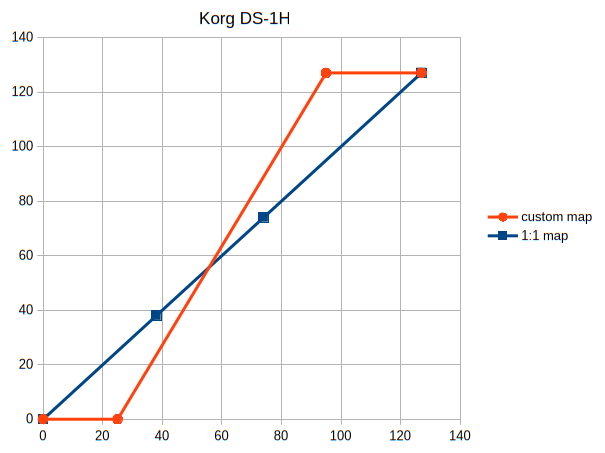
An arbitrary illustration with the damper pedal curve from a recent thread. A user remapped the four discrete pedal values [0; 38; 74; 127] of a Korg Digital Piano to the orange curve. The interpolated values on the orange curve can be calculated and they are [0; 23.5; 88.9, 127]. When the audioengine is not limited to the MIDI-protocol, it can use the non-whole numbers 23.5 and 88.9 directly for the audio sustain level.

If the input of the audioprocessing is (unnecessarily) limited to the MIDI resolution, the numbers 23.5 an 88.9 have to be rounded beforehand, for example to 24 and 89.

We can only guess, what happens internally.

https://i.postimg.cc/ZKqPB5s2/a-custom-midi-map-for-Korg-DS-1H-pedal.png

Re: Trying to upgrade from 6 year old Roland FP-30x

groovy wrote:
Pianistically wrote:

[...]the number of discrete values going into the engine.

We don't even know for sure, that "discrete" values are going into the engine after the MIDI mapper.

An arbitrary illustration with the damper pedal curve from a recent thread. A user remapped the four discrete pedal values [0; 38; 74; 127] of a Korg Digital Piano to the orange curve. The interpolated values on the orange curve can be calculated and they are [0; 23.5; 88.9, 127]. When the audioengine is not limited to the MIDI-protocol, it can use the non-whole numbers 23.5 and 88.9 directly for the audio sustain level.

If the input of the audioprocessing is (unnecessarily) limited to the MIDI resolution, the numbers 23.5 an 88.9 have to be rounded beforehand, for example to 24 and 89.

We can only guess, what happens internally.

https://i.postimg.cc/ZKqPB5s2/a-custom-midi-map-for-Korg-DS-1H-pedal.png

yes that’s for sure , midi 1.0 is just the protocol to transport user midi input + user midi transformation to the engine . Within the engine , the engine does its own cooking . However one thing is sure , a non linear curve will reduce the original 127 possible values to a number 127-x  , x depending on the transform curve , so no matter how much transformation is done within the engine , you still can only generate (127-x ) different engine sounds . The only exception would be if aleatory adjustments using randomisation algorithm are applied to further change the final value .

Re: Trying to upgrade from 6 year old Roland FP-30x

Of course, that has been completely out of question. Nice description again.
My point has been the transport of values after a MIDI-1.0 value has reached the MIDI interface input.

With engine I meant the audioengine, what Pianoteq is in the core. Audio levels can be processed with higher resolution than whole numbers. When a MIDI mapper interpolates, then non-whole numbers are possible (see my example). What happens from this point on, is intransparent. Probably the non-whole numbers are just rounded, but we don't know.

Re: Trying to upgrade from 6 year old Roland FP-30x

groovy wrote:

Of course, that has been completely out of question. Nice description again.
My point has been the transport of values after a MIDI-1.0 value has reached the MIDI interface input.

With engine I meant the audioengine, what Pianoteq is in the core. Audio levels can be processed with higher resolution than whole numbers. When a MIDI mapper interpolates, then non-whole numbers are possible (see my example). What happens from this point on, is intransparent. Probably the non-whole numbers are just rounded, but we don't know.

  that’s a very interesting technical actually . If you take case 1 where you define all points on the curve ( ie 127 values , not necessarily different , but still 127 points on the curve will reduce) you would expect pianoteq to consider any of the 127 as ‘what the user intends ) whereby if you enter only 8 to 10 points , the output values in between may not be integer values as you rightly mention , so one would  expect pianoteq to consider the calculated non integer value as an input .

Re: Trying to upgrade from 6 year old Roland FP-30x

Here's the interesting part when comparing the FP-40 and Nuvola GX with my old FP-30x -- they sound perfect with Rolands onboard engine thru their speakers.  So I would recommend this keyboard to people that aren't going to use them as MIDI controllers.  So they must be doing something strange in their software to get it to work for their native sounds.  I think my testing shows their must be some kind of compression going on for the mid range notes (By this I mean two different physical velocities producing the same MIDI value -- at least what Pianoteq is seeing). Also perhaps "expansion" in the low and high range notes (maybe gaps in the curve to get to high velocity values quicker)  But I am confused here -- how can it be? And what would be the reason to change from a linear or uniform touch sensitivity to something completely different?  My therory -- maybe to make the low and high notes "pop" sort of like setting you EQ on  a stereo system  to "Classic Rock"  or "Pop" settings.  But I actually didn't detect this on their own sounds -- it seemed uniform to me.  I am completely stumped here.

In terms of the "Robo- testing",  just play a song from memory on both pianos hooked up via a USB hub to the same instance of Pianoteq (it can recognize 2 at the same time).  You will often play it exactly the same.  The quick test I showed my piano teacher was a trill at soft and fortissimo -- the dynamic range on the FP40 and GX were compromised (dynamic range not as great).

Re: Trying to upgrade from 6 year old Roland FP-30x

pianoteqlover1 wrote:

Here's the interesting part when comparing the FP-40 and Nuvola GX with my old FP-30x -- they sound perfect with Rolands onboard engine thru their speakers.  So I would recommend this keyboard to people that aren't going to use them as MIDI controllers.  So they must be doing something strange in their software to get it to work for their native sounds.  I think my testing shows their must be some kind of compression going on for the mid range notes (By this I mean two different physical velocities producing the same MIDI value -- at least what Pianoteq is seeing). Also perhaps "expansion" in the low and high range notes (maybe gaps in the curve to get to high velocity values quicker)  But I am confused here -- how can it be? And what would be the reason to change from a linear or uniform touch sensitivity to something completely different?  My therory -- maybe to make the low and high notes "pop" sort of like setting you EQ on  a stereo system  to "Classic Rock"  or "Pop" settings.  But I actually didn't detect this on their own sounds -- it seemed uniform to me.  I am completely stumped here.

Roland says, “The FP-40 uses the same PHA-4 keyboard as the FP-30X, with touch response that’s been fine-tuned to match the updated sound engine.” (https://www.youtube.com/watch?v=c9zlm9wiORY&t=131s) Unfortunately, it appears they didn’t bother to create a way to bypass this when using it as a MIDI controller.

Re: Trying to upgrade from 6 year old Roland FP-30x

@pianoteqlover1

You can test / counter-check your hypothesis with the 500 g drop test, that has been discussed several times in this forum.

In short: Write down the MIDI velocity for each white key resulting from a 500 g weight placed at the front of the key. Example:  https://forum.modartt.com/viewtopic.php...0#p1007510

Background: 500 g is a good approximation for a constant acceleration with 9.81 m/s2. A balanced MIDI velocity will result in a constant velocity for all tested keys (± standard deviation).

Re: Trying to upgrade from 6 year old Roland FP-30x

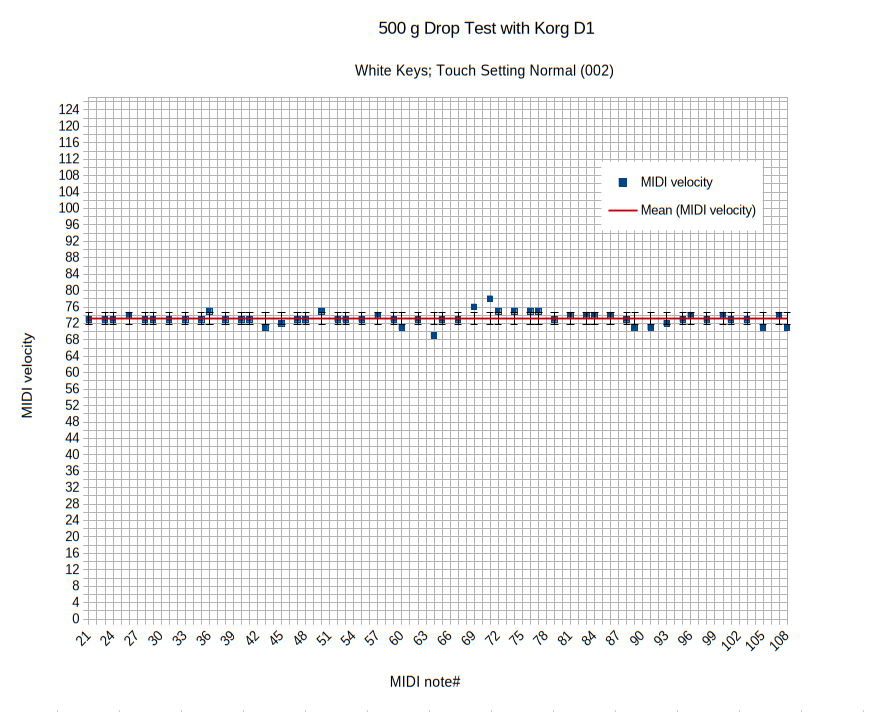
... good occasion to do that drop test with a Korg D1 Stagepiano, that I already had planned for this weekend. Here it is for comparison if you like:

https://i.postimg.cc/QMtvZHDT/Korg-D1-500-g-drop-test-white-keys-touch-normal-002.png