
Topic: Raspberry Pi with controls and screen as Pianoteq Box

Hi,

I've been running Pianoteq on a Raspi for a bit (still amazed that it's even possible!) -- but missed having some physical controls, as my piano, a Korg D1, has no MIDI sliders nor rotary encoders.

So I built myself this pianoteq-in-a-box-with-knobs:
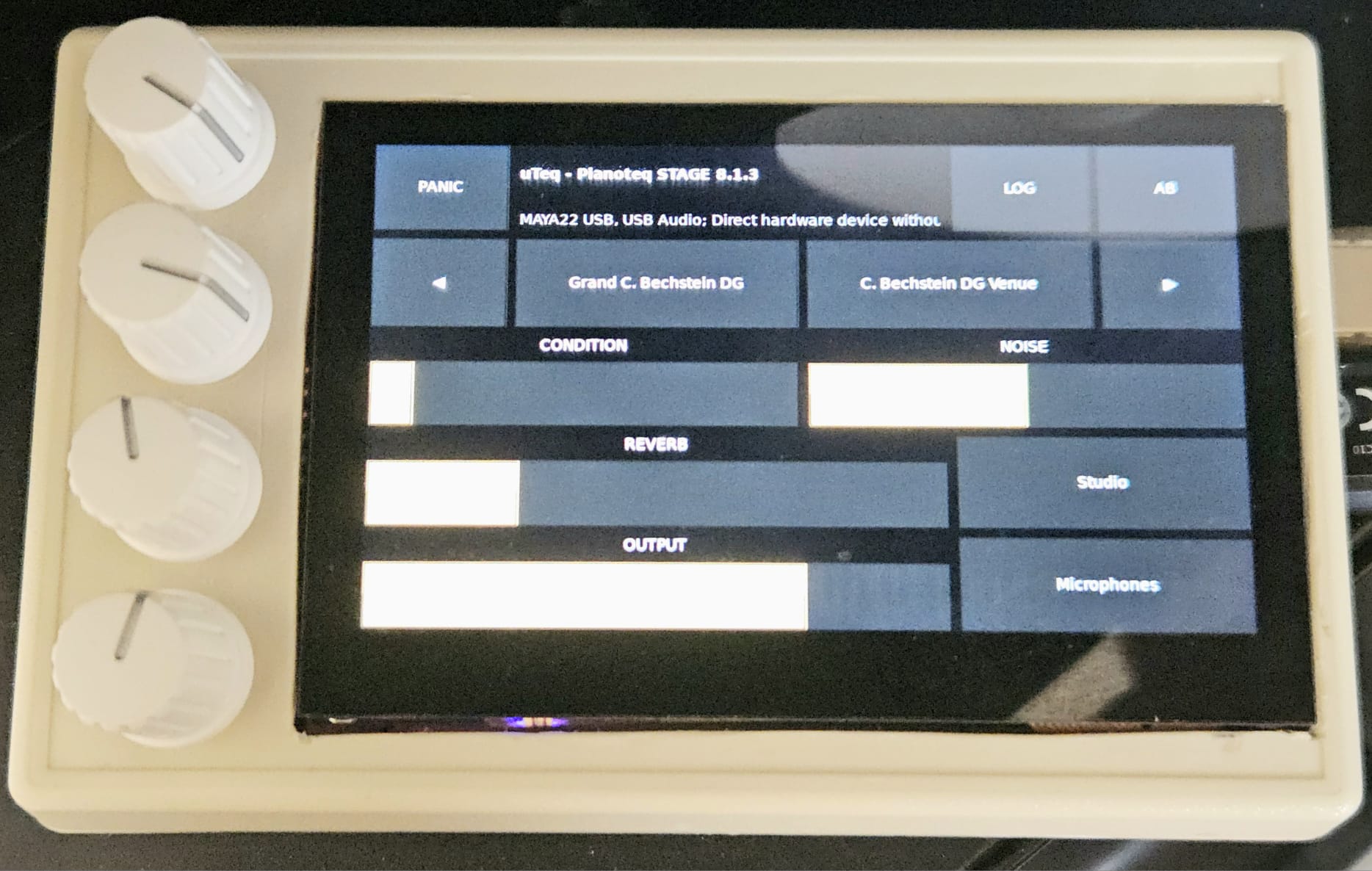
pianoteq in a box

The interface you see has been working for a couple years for me, but it's only this week (and with LLM help) that I finally put the finishing touches on it.

It's written in Rust and FLTK for minimal CPU usage, talks to Pianoteq 8 (not tested with 9!) over JSONRPC and controls ALSA volume directly. The encoders are connected over the I2C bus.

I am not committing to maintaining the code, but thought maybe someone could still find it useful for their own setup, so here it is:

https://github.com/polymeris/uteq

Next goal: make a decent-looking enclosure
Last edited by cpolymeris (16-04-2026 11:18)

Re: Raspberry Pi with controls and screen as Pianoteq Box

This is fantastic, thanks for sharing! I'm currently using the standalone GUI with the compact interface on a Pi, but it's a bit fiddly on such a small screen, having physical controls is so much nicer.

Re: Raspberry Pi with controls and screen as Pianoteq Box

cpolymeris wrote:

Hi,

I've been running Pianoteq on a Raspi for a bit (still amazed that it's even possible!) -- but missed having some physical controls, as my piano, a Korg D1, has no MIDI sliders nor rotary encoders.

So I built myself this pianoteq-in-a-box-with-knobs:

pianoteq in a box

The interface you see has been working for a couple years for me, but it's only this week (and with LLM help) that I finally put the finishing touches on it.

It's written in Rust and FLTK for minimal CPU usage, talks to Pianoteq 8 (not tested with 9!) over JSONRPC and controls ALSA volume directly. The encoders are connected over the I2C bus.

I am not committing to maintaining the code, but thought maybe someone could still find it useful for their own setup, so here it is:

https://github.com/polymeris/uteq

Next goal: make a decent-looking enclosure
Great project! I very much like the choice of items being controlled and the form-factor.

I'm interested in knowing a couple more things:

1) What OS are you running? Is it the standard Raspberry PI 64-bit? Any optimisations?
2) How do you manage power - in particular shutdown? I would love to know if you have managed true read-only operation for a simple power-down.

I'm building something that also uses the Adafruit 4x encoders. It controls Pianoteq, plus a few more sound engines (bare-metal MiniDexed and a few Wav Trigger Pro's), so using a Teensy 4.1 for the midi IO, logic and 40x2 display. Some months away with the usual challenges of work...

Thanks for sharing your project, it looks very slick.

Re: Raspberry Pi with controls and screen as Pianoteq Box

1) What OS are you running? Is it the standard Raspberry PI 64-bit? Any optimisations?

I think it's standard. It's been ~2(?) years since I setup pianoteq on the raspi, so I don't remember the details on how I configured the OS.

I do remember I tried an IQAudio extension board "hat" first for audio output -- I couldn't get it to work reliabily, I had latency issues.
Then, I first tried building the GUI with egui (an inmediate-mode rendering GUI toolkit), but that would eat too much CPU.


2) How do you manage power - in particular shutdown? I would love to know if you have managed true read-only operation for a simple power-down.

That's a good idea. For now I basically never turn it off -- if I have to, I'll ssh into it and shutdown from the command line. Side effect of this is that the UI elements get burnt into the LCD, temporarily.

I'm building something that also uses the Adafruit 4x encoders.

One thing I would change in this design is to look for encoders with a higher "resolution" (more clicks per rotation).

Re: Raspberry Pi with controls and screen as Pianoteq Box

cpolymeris wrote:

1) What OS are you running? Is it the standard Raspberry PI 64-bit? Any optimisations?

I think it's standard. It's been ~2(?) years since I setup pianoteq on the raspi, so I don't remember the details on how I configured the OS.

I do remember I tried an IQAudio extension board "hat" first for audio output -- I couldn't get it to work reliabily, I had latency issues.
Then, I first tried building the GUI with egui (an inmediate-mode rendering GUI toolkit), but that would eat too much CPU.


2) How do you manage power - in particular shutdown? I would love to know if you have managed true read-only operation for a simple power-down.

That's a good idea. For now I basically never turn it off -- if I have to, I'll ssh into it and shutdown from the command line. Side effect of this is that the UI elements get burnt into the LCD, temporarily.

Thanks again for sharing more on your great setup.

I'm building something that also uses the Adafruit 4x encoders.

One thing I would change in this design is to look for encoders with a higher "resolution" (more clicks per rotation).

Using SSH makes good sense and will incorporate your approach. Meantime, the idle power consumption is pretty low, so can see why this works for you.

I'm not surprised you have tried different audio hats. I started with a Blokas PiSound (good choice and low latency), but now experimenting with a HiFiBerry DAC8x to build some realistic sound fields using multiple mics - I really want to hear the localised hammers etc on speakers connected to the keybed, but extend to some more ambient speakers.

Last edited by TenorBrass (01-05-2026 18:01)