Topic: Some results with Kawai NV10

This isn’t a question really. It’s me sharing a few of the hard-work / experimental results I’ve got. After I’ve introduced myself, I will give you some Velocity Curves and bits of general advice related to using a Kawai NV10 as the keyboard for Pianoteq.

Just before I go any further, remember that you can Copy / Paste the Curve sets I have given below into Pianoteq; you don’t have to type in numbers.

I am an ex-pro classical pianist. I no longer have an acoustic piano but I do have “neighbours” and they don’t like “classical music” (or many other things, truth be told). My sole interest is in getting a high quality normal acoustic grand piano emulation with high quality headphones from a Kawai NV10. I’m not interested in heritage / wacky / weird stuff.

I quickly dismissed the Kawai’s internal voices as useless because of their limited dynamic range (ff .. fff only)

The biggest problem I’ve had to solve with Pianoteq is getting the FULL dynamic range smoothly from ppp to fff without any “sudden” jumps. (I found that setting the Dynamics value too high tended to cause that).

Obviously the main variable here is the keyboard velocity curve. To get this right you have to know exactly what touch response curve the Keyboard is going to send to Pianoteq. To measure this, I built a home-made key-energy calibration gadget which allowed me to measure the MIDI values generated by dropping a known weight (metal rod) from various known heights onto a key. I could calculate the energy with which the metal test rod hit the keys easily as Energy in Joules = Mass * Gravity * Height. However, we don’t really need the energy values themselves here; just the height will do (since the Mass and Gravity are both constants, the height alone can give you a valid relative set of values to work with).

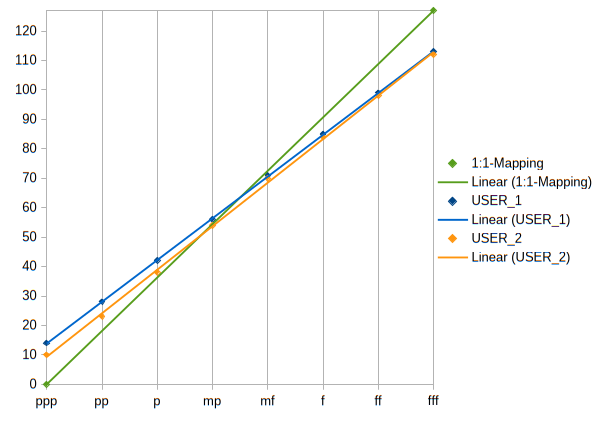
I set the Kawai key touch curve to the default diagonal line first.
ppp    pp    p    mp    mf    f    ff    fff
14    28    42    56    71    85    99    113

I did the tests several times on each of several keys and then average/guessed the best-fit values to eliminate maverick values / outliers and smooth the resulting curve a bit

I guessed that the Kawai would be outputting a roughly logarithmic curve and indeed, it does. The key word here is “roughly”.  Here is a table of one of the results:

The top row is the height in cm that I dropped the weight from.
The bottom row is the Midi value from the Kawai (shown by Pianoteq).

H cm   0.5 1    2    3    4    5    6    7    8    9    10    11    12    20
Midi       2     28    41    70    82    99    103    105    108    109    111    112    113    117
                                                       
The values for 2 and 4 are way out of line with the rest. I left them out and fed the remaining values into Maple and asked it to do a logarithmic fit. The pure log-fit function for the reduced set is:
32.3093037494015 + 34.1056973560305 * ln(t). It’s quite a “rough” fit !

However, the next step is to find an inverse function that Pianoteq can use to undo this curve and give you a smooth dynamic straight-line response. This is easy to work out and gives:
7 * (exp((n - 32.3)/34.1)). Where n is the Midi value from the Kawai. (The factor 7 converts the scaled energy value 0.5 .. 20 to “roughly” 7 bit range.)

Taking 13 points along the received Midi values range:

Midi value    10    20    30    40    50    60    70    80    90    100    110    120   
Convert to    3.6    4.9    6.5    8.8    11.7    15.8    21    28.4    38    50.8    68    92   
Round to            4    5    6    9    12    16    21    28    38    51    68    92   

This produces the basic Pianoteq curve values:

Velocity = [10, 20, 30, 40, 50, 60, 70, 80, 90, 100, 110, 120; 4, 5, 6, 9, 12, 16, 21, 28, 38, 51, 68, 92]

These values then need adjusting to the real world to allow for:
a) errors in the original energy curve data
b) the error of the log-fit curve on the original data
c) the arbitrary force / bit range multiplier of “roughly” 7

Playing with several presets from the Grotrian and Bluthner set, I found the following Velocity curves gave very good results:

Bluthner
Velocity = [0, 45, 57, 68, 79, 88, 94, 99, 104, 108, 112, 115; 0, 3, 5, 11, 19, 30, 42, 54, 68, 81, 99, 114]
Dynamics 42
Vol -7.5

Grotrian
Velocity = [0, 45, 57, 68, 79, 88, 94, 99, 104, 108, 112, 115; 0, 3, 5, 11, 19, 30, 42, 54, 68, 81, 99, 113]
Dynamics 40
Vol -10


Grotrian
Velocity = [1, 53, 63, 68, 73, 78, 83, 88, 93, 98, 103, 108, 112; 0, 1, 4, 7, 11, 16, 22, 31, 40, 53, 67, 87, 110]
Dynamics 39
Vol -10

Before I did all this calculation stuff, I did manage to get some quite convincing Velocity curves just by ear and experiment, but actually calculating a proper exponential curve and then munging that to sound good has given me a really nice, acoustic-piano-like dynamic range from the Kawai Keyboard. I’m glad I made the effort. It’s much better.

The two most vital other factors that come in are the Dynamics and Volume settings. The Dynamics settings I found are pretty non-negotiable at around 39 .. 42. I know it’s tempting to crank the Dynamics up and enjoy a billion db of dynamic range but the higher you go above about 42 the worse and less smooth the actual dynamic ramp gets; you find that two adjacent notes played with pretty well exactly the same force produce wildly different volumes and that is pants! The Volume settings, on the other hand, are obviously down to personal taste.

I found that once I had got a few real-life Velocity curves, I didn’t need to play with things like the hammer hardness so much – or even at all. I always set hammer / pedal noise to zero.

I did find that I had to play around a little with the dynamics of certain ranges of notes in the note-edit section of Pianoteq but not as much as I did before.

Another important thing in getting the feel of a real acoustic piano is the response of the Sustainer pedal. I did the bit-of-cardboard munge to the sustainer on my NV10 the day after it arrived – the huge dead-zone at the top of the pedal response was absolutely unacceptable. I simply followed the instruction in a YouTube video I found to do this.

The best sustain pedal curve seems to be:
Sustain Velocity = [0, 1, 4, 32, 55, 82, 98, 111, 127; 0, 43, 86, 93, 100, 109, 119, 126, 127]

I use a SoundBlaster unit to drive my headphones (DX300 Pro circa £270). I found that it’s best to simply disable all the clever stuff it can do and use it as an amplifier and headphone driver.

I have a very fast, 15-core Windows Tower running Pianoteq so I have been able to set all the sample rates and polyphony etc. as fast as possible.

I would love to dump the headphones and play around with getting real acoustic piano sounds using the Kawai’s internal speakers driven from Pianoteq but I would finish up having to murder my neighbours, so it’s not going to happen any time soon.

I have put a Bluthner-based preset in the fxp area of this forum that you might like to play with. 2024_03_18_Kawai_NV10_BlüthnerPlayer_H
Re: Some results with Kawai NV10

yeq30 wrote:

This isn’t a question really. It’s me sharing a few of the hard-work / experimental results I’ve got. After I’ve introduced myself, I will give you some Velocity Curves and bits of general advice related to using a Kawai NV10 as the keyboard for Pianoteq.

Just before I go any further, remember that you can Copy / Paste the Curve sets I have given below into Pianoteq; you don’t have to type in numbers.

I am an ex-pro classical pianist. I no longer have an acoustic piano but I do have “neighbours” and they don’t like “classical music” (or many other things, truth be told). My sole interest is in getting a high quality normal acoustic grand piano emulation with high quality headphones from a Kawai NV10. I’m not interested in heritage / wacky / weird stuff.

I quickly dismissed the Kawai’s internal voices as useless because of their limited dynamic range (ff .. fff only)

The biggest problem I’ve had to solve with Pianoteq is getting the FULL dynamic range smoothly from ppp to fff without any “sudden” jumps. (I found that setting the Dynamics value too high tended to cause that).

Obviously the main variable here is the keyboard velocity curve. To get this right you have to know exactly what touch response curve the Keyboard is going to send to Pianoteq. To measure this, I built a home-made key-energy calibration gadget which allowed me to measure the MIDI values generated by dropping a known weight (metal rod) from various known heights onto a key. I could calculate the energy with which the metal test rod hit the keys easily as Energy in Joules = Mass * Gravity * Height. However, we don’t really need the energy values themselves here; just the height will do (since the Mass and Gravity are both constants, the height alone can give you a valid relative set of values to work with).

I set the Kawai key touch curve to the default diagonal line first.
ppp    pp    p    mp    mf    f    ff    fff
14    28    42    56    71    85    99    113

I did the tests several times on each of several keys and then average/guessed the best-fit values to eliminate maverick values / outliers and smooth the resulting curve a bit

I guessed that the Kawai would be outputting a roughly logarithmic curve and indeed, it does. The key word here is “roughly”.  Here is a table of one of the results:

The top row is the height in cm that I dropped the weight from.
The bottom row is the Midi value from the Kawai (shown by Pianoteq).

H cm   0.5 1    2    3    4    5    6    7    8    9    10    11    12    20
Midi       2     28    41    70    82    99    103    105    108    109    111    112    113    117
                                                       
The values for 2 and 4 are way out of line with the rest. I left them out and fed the remaining values into Maple and asked it to do a logarithmic fit. The pure log-fit function for the reduced set is:
32.3093037494015 + 34.1056973560305 * ln(t). It’s quite a “rough” fit !

However, the next step is to find an inverse function that Pianoteq can use to undo this curve and give you a smooth dynamic straight-line response. This is easy to work out and gives:
7 * (exp((n - 32.3)/34.1)). Where n is the Midi value from the Kawai. (The factor 7 converts the scaled energy value 0.5 .. 20 to “roughly” 7 bit range.)

Taking 13 points along the received Midi values range:

Midi value    10    20    30    40    50    60    70    80    90    100    110    120   
Convert to    3.6    4.9    6.5    8.8    11.7    15.8    21    28.4    38    50.8    68    92   
Round to            4    5    6    9    12    16    21    28    38    51    68    92   

This produces the basic Pianoteq curve values:

Velocity = [10, 20, 30, 40, 50, 60, 70, 80, 90, 100, 110, 120; 4, 5, 6, 9, 12, 16, 21, 28, 38, 51, 68, 92]

These values then need adjusting to the real world to allow for:
a) errors in the original energy curve data
b) the error of the log-fit curve on the original data
c) the arbitrary force / bit range multiplier of “roughly” 7

Playing with several presets from the Grotrian and Bluthner set, I found the following Velocity curves gave very good results:

Bluthner
Velocity = [0, 45, 57, 68, 79, 88, 94, 99, 104, 108, 112, 115; 0, 3, 5, 11, 19, 30, 42, 54, 68, 81, 99, 114]
Dynamics 42
Vol -7.5

Grotrian
Velocity = [0, 45, 57, 68, 79, 88, 94, 99, 104, 108, 112, 115; 0, 3, 5, 11, 19, 30, 42, 54, 68, 81, 99, 113]
Dynamics 40
Vol -10


Grotrian
Velocity = [1, 53, 63, 68, 73, 78, 83, 88, 93, 98, 103, 108, 112; 0, 1, 4, 7, 11, 16, 22, 31, 40, 53, 67, 87, 110]
Dynamics 39
Vol -10

Before I did all this calculation stuff, I did manage to get some quite convincing Velocity curves just by ear and experiment, but actually calculating a proper exponential curve and then munging that to sound good has given me a really nice, acoustic-piano-like dynamic range from the Kawai Keyboard. I’m glad I made the effort. It’s much better.

The two most vital other factors that come in are the Dynamics and Volume settings. The Dynamics settings I found are pretty non-negotiable at around 39 .. 42. I know it’s tempting to crank the Dynamics up and enjoy a billion db of dynamic range but the higher you go above about 42 the worse and less smooth the actual dynamic ramp gets; you find that two adjacent notes played with pretty well exactly the same force produce wildly different volumes and that is pants! The Volume settings, on the other hand, are obviously down to personal taste.

I found that once I had got a few real-life Velocity curves, I didn’t need to play with things like the hammer hardness so much – or even at all. I always set hammer / pedal noise to zero.

I did find that I had to play around a little with the dynamics of certain ranges of notes in the note-edit section of Pianoteq but not as much as I did before.

Another important thing in getting the feel of a real acoustic piano is the response of the Sustainer pedal. I did the bit-of-cardboard munge to the sustainer on my NV10 the day after it arrived – the huge dead-zone at the top of the pedal response was absolutely unacceptable. I simply followed the instruction in a YouTube video I found to do this.

The best sustain pedal curve seems to be:
Sustain Velocity = [0, 1, 4, 32, 55, 82, 98, 111, 127; 0, 43, 86, 93, 100, 109, 119, 126, 127]

I use a SoundBlaster unit to drive my headphones (DX300 Pro circa £270). I found that it’s best to simply disable all the clever stuff it can do and use it as an amplifier and headphone driver.

I have a very fast, 15-core Windows Tower running Pianoteq so I have been able to set all the sample rates and polyphony etc. as fast as possible.

I would love to dump the headphones and play around with getting real acoustic piano sounds using the Kawai’s internal speakers driven from Pianoteq but I would finish up having to murder my neighbours, so it’s not going to happen any time soon.

I have put a Bluthner-based preset in the fxp area of this forum that you might like to play with. 2024_03_18_Kawai_NV10_BlüthnerPlayer_H
Thank you for sharing. Quite a methodic and rigorous approach ! Just a question regarding your measurement in the low velocities. Without any adjustment , how easy can you consistently generate velocity between let's say 8 and 28 on the NV10 with linear standard settings ?

Re: Some results with Kawai NV10

Pianistically wrote:
yeq30 wrote:

This isn’t a question really. It’s me sharing a few of the hard-work / experimental results I’ve got. After I’ve introduced myself, I will give you some Velocity Curves and bits of general advice related to using a Kawai NV10 as the keyboard for Pianoteq.

Just before I go any further, remember that you can Copy / Paste the Curve sets I have given below into Pianoteq; you don’t have to type in numbers.

I am an ex-pro classical pianist. I no longer have an acoustic piano but I do have “neighbours” and they don’t like “classical music” (or many other things, truth be told). My sole interest is in getting a high quality normal acoustic grand piano emulation with high quality headphones from a Kawai NV10. I’m not interested in heritage / wacky / weird stuff.

I quickly dismissed the Kawai’s internal voices as useless because of their limited dynamic range (ff .. fff only)

The biggest problem I’ve had to solve with Pianoteq is getting the FULL dynamic range smoothly from ppp to fff without any “sudden” jumps. (I found that setting the Dynamics value too high tended to cause that).

Obviously the main variable here is the keyboard velocity curve. To get this right you have to know exactly what touch response curve the Keyboard is going to send to Pianoteq. To measure this, I built a home-made key-energy calibration gadget which allowed me to measure the MIDI values generated by dropping a known weight (metal rod) from various known heights onto a key. I could calculate the energy with which the metal test rod hit the keys easily as Energy in Joules = Mass * Gravity * Height. However, we don’t really need the energy values themselves here; just the height will do (since the Mass and Gravity are both constants, the height alone can give you a valid relative set of values to work with).

I set the Kawai key touch curve to the default diagonal line first.
ppp    pp    p    mp    mf    f    ff    fff
14    28    42    56    71    85    99    113

I did the tests several times on each of several keys and then average/guessed the best-fit values to eliminate maverick values / outliers and smooth the resulting curve a bit

I guessed that the Kawai would be outputting a roughly logarithmic curve and indeed, it does. The key word here is “roughly”.  Here is a table of one of the results:

The top row is the height in cm that I dropped the weight from.
The bottom row is the Midi value from the Kawai (shown by Pianoteq).

H cm   0.5 1    2    3    4    5    6    7    8    9    10    11    12    20
Midi       2     28    41    70    82    99    103    105    108    109    111    112    113    117
                                                       
The values for 2 and 4 are way out of line with the rest. I left them out and fed the remaining values into Maple and asked it to do a logarithmic fit. The pure log-fit function for the reduced set is:
32.3093037494015 + 34.1056973560305 * ln(t). It’s quite a “rough” fit !

However, the next step is to find an inverse function that Pianoteq can use to undo this curve and give you a smooth dynamic straight-line response. This is easy to work out and gives:
7 * (exp((n - 32.3)/34.1)). Where n is the Midi value from the Kawai. (The factor 7 converts the scaled energy value 0.5 .. 20 to “roughly” 7 bit range.)

Taking 13 points along the received Midi values range:

Midi value    10    20    30    40    50    60    70    80    90    100    110    120   
Convert to    3.6    4.9    6.5    8.8    11.7    15.8    21    28.4    38    50.8    68    92   
Round to            4    5    6    9    12    16    21    28    38    51    68    92   

This produces the basic Pianoteq curve values:

Velocity = [10, 20, 30, 40, 50, 60, 70, 80, 90, 100, 110, 120; 4, 5, 6, 9, 12, 16, 21, 28, 38, 51, 68, 92]

These values then need adjusting to the real world to allow for:
a) errors in the original energy curve data
b) the error of the log-fit curve on the original data
c) the arbitrary force / bit range multiplier of “roughly” 7

Playing with several presets from the Grotrian and Bluthner set, I found the following Velocity curves gave very good results:

Bluthner
Velocity = [0, 45, 57, 68, 79, 88, 94, 99, 104, 108, 112, 115; 0, 3, 5, 11, 19, 30, 42, 54, 68, 81, 99, 114]
Dynamics 42
Vol -7.5

Grotrian
Velocity = [0, 45, 57, 68, 79, 88, 94, 99, 104, 108, 112, 115; 0, 3, 5, 11, 19, 30, 42, 54, 68, 81, 99, 113]
Dynamics 40
Vol -10


Grotrian
Velocity = [1, 53, 63, 68, 73, 78, 83, 88, 93, 98, 103, 108, 112; 0, 1, 4, 7, 11, 16, 22, 31, 40, 53, 67, 87, 110]
Dynamics 39
Vol -10

Before I did all this calculation stuff, I did manage to get some quite convincing Velocity curves just by ear and experiment, but actually calculating a proper exponential curve and then munging that to sound good has given me a really nice, acoustic-piano-like dynamic range from the Kawai Keyboard. I’m glad I made the effort. It’s much better.

The two most vital other factors that come in are the Dynamics and Volume settings. The Dynamics settings I found are pretty non-negotiable at around 39 .. 42. I know it’s tempting to crank the Dynamics up and enjoy a billion db of dynamic range but the higher you go above about 42 the worse and less smooth the actual dynamic ramp gets; you find that two adjacent notes played with pretty well exactly the same force produce wildly different volumes and that is pants! The Volume settings, on the other hand, are obviously down to personal taste.

I found that once I had got a few real-life Velocity curves, I didn’t need to play with things like the hammer hardness so much – or even at all. I always set hammer / pedal noise to zero.

I did find that I had to play around a little with the dynamics of certain ranges of notes in the note-edit section of Pianoteq but not as much as I did before.

Another important thing in getting the feel of a real acoustic piano is the response of the Sustainer pedal. I did the bit-of-cardboard munge to the sustainer on my NV10 the day after it arrived – the huge dead-zone at the top of the pedal response was absolutely unacceptable. I simply followed the instruction in a YouTube video I found to do this.

The best sustain pedal curve seems to be:
Sustain Velocity = [0, 1, 4, 32, 55, 82, 98, 111, 127; 0, 43, 86, 93, 100, 109, 119, 126, 127]

I use a SoundBlaster unit to drive my headphones (DX300 Pro circa £270). I found that it’s best to simply disable all the clever stuff it can do and use it as an amplifier and headphone driver.

I have a very fast, 15-core Windows Tower running Pianoteq so I have been able to set all the sample rates and polyphony etc. as fast as possible.

I would love to dump the headphones and play around with getting real acoustic piano sounds using the Kawai’s internal speakers driven from Pianoteq but I would finish up having to murder my neighbours, so it’s not going to happen any time soon.

I have put a Bluthner-based preset in the fxp area of this forum that you might like to play with. 2024_03_18_Kawai_NV10_BlüthnerPlayer_H

Thank you for sharing. Quite a methodic and rigorous approach ! Just a question regarding your measurement in the low velocities. Without any adjustment , how easy can you consistently generate velocity between let's say 8 and 28 on the NV10 with linear standard settings ?


Very good question. It was nearly impossible. The values varied widely in the bottom region. The slope of the Kawai's curve there is darned nearly vertical, all the way from 0 to about 50. What I did was loads of tests with a height of 0.5 cm then looked at the rest of the curve and did a pencil-best-fit. I actually doubt if the Kawai Keyboard is reliably / repeatably accurate below values of 50. However, on the bright side, this doesn't actually matter much as that region is right at the bottom of the human force-perception range. I don't think a human could reliably / repeatably play a value of, say, 16 or something. The important part of the curve starts at about 50 and that is where the Kawai starts to talk sense.

Re: Some results with Kawai NV10

yeq30 wrote:
Pianistically wrote:
yeq30 wrote:

This isn’t a question really. It’s me sharing a few of the hard-work / experimental results I’ve got. After I’ve introduced myself, I will give you some Velocity Curves and bits of general advice related to using a Kawai NV10 as the keyboard for Pianoteq.

Just before I go any further, remember that you can Copy / Paste the Curve sets I have given below into Pianoteq; you don’t have to type in numbers.

I am an ex-pro classical pianist. I no longer have an acoustic piano but I do have “neighbours” and they don’t like “classical music” (or many other things, truth be told). My sole interest is in getting a high quality normal acoustic grand piano emulation with high quality headphones from a Kawai NV10. I’m not interested in heritage / wacky / weird stuff.

I quickly dismissed the Kawai’s internal voices as useless because of their limited dynamic range (ff .. fff only)

The biggest problem I’ve had to solve with Pianoteq is getting the FULL dynamic range smoothly from ppp to fff without any “sudden” jumps. (I found that setting the Dynamics value too high tended to cause that).

Obviously the main variable here is the keyboard velocity curve. To get this right you have to know exactly what touch response curve the Keyboard is going to send to Pianoteq. To measure this, I built a home-made key-energy calibration gadget which allowed me to measure the MIDI values generated by dropping a known weight (metal rod) from various known heights onto a key. I could calculate the energy with which the metal test rod hit the keys easily as Energy in Joules = Mass * Gravity * Height. However, we don’t really need the energy values themselves here; just the height will do (since the Mass and Gravity are both constants, the height alone can give you a valid relative set of values to work with).

I set the Kawai key touch curve to the default diagonal line first.
ppp    pp    p    mp    mf    f    ff    fff
14    28    42    56    71    85    99    113

I did the tests several times on each of several keys and then average/guessed the best-fit values to eliminate maverick values / outliers and smooth the resulting curve a bit

I guessed that the Kawai would be outputting a roughly logarithmic curve and indeed, it does. The key word here is “roughly”.  Here is a table of one of the results:

The top row is the height in cm that I dropped the weight from.
The bottom row is the Midi value from the Kawai (shown by Pianoteq).

H cm   0.5 1    2    3    4    5    6    7    8    9    10    11    12    20
Midi       2     28    41    70    82    99    103    105    108    109    111    112    113    117
                                                       
The values for 2 and 4 are way out of line with the rest. I left them out and fed the remaining values into Maple and asked it to do a logarithmic fit. The pure log-fit function for the reduced set is:
32.3093037494015 + 34.1056973560305 * ln(t). It’s quite a “rough” fit !

However, the next step is to find an inverse function that Pianoteq can use to undo this curve and give you a smooth dynamic straight-line response. This is easy to work out and gives:
7 * (exp((n - 32.3)/34.1)). Where n is the Midi value from the Kawai. (The factor 7 converts the scaled energy value 0.5 .. 20 to “roughly” 7 bit range.)

Taking 13 points along the received Midi values range:

Midi value    10    20    30    40    50    60    70    80    90    100    110    120   
Convert to    3.6    4.9    6.5    8.8    11.7    15.8    21    28.4    38    50.8    68    92   
Round to            4    5    6    9    12    16    21    28    38    51    68    92   

This produces the basic Pianoteq curve values:

Velocity = [10, 20, 30, 40, 50, 60, 70, 80, 90, 100, 110, 120; 4, 5, 6, 9, 12, 16, 21, 28, 38, 51, 68, 92]

These values then need adjusting to the real world to allow for:
a) errors in the original energy curve data
b) the error of the log-fit curve on the original data
c) the arbitrary force / bit range multiplier of “roughly” 7

Playing with several presets from the Grotrian and Bluthner set, I found the following Velocity curves gave very good results:

Bluthner
Velocity = [0, 45, 57, 68, 79, 88, 94, 99, 104, 108, 112, 115; 0, 3, 5, 11, 19, 30, 42, 54, 68, 81, 99, 114]
Dynamics 42
Vol -7.5

Grotrian
Velocity = [0, 45, 57, 68, 79, 88, 94, 99, 104, 108, 112, 115; 0, 3, 5, 11, 19, 30, 42, 54, 68, 81, 99, 113]
Dynamics 40
Vol -10


Grotrian
Velocity = [1, 53, 63, 68, 73, 78, 83, 88, 93, 98, 103, 108, 112; 0, 1, 4, 7, 11, 16, 22, 31, 40, 53, 67, 87, 110]
Dynamics 39
Vol -10

Before I did all this calculation stuff, I did manage to get some quite convincing Velocity curves just by ear and experiment, but actually calculating a proper exponential curve and then munging that to sound good has given me a really nice, acoustic-piano-like dynamic range from the Kawai Keyboard. I’m glad I made the effort. It’s much better.

The two most vital other factors that come in are the Dynamics and Volume settings. The Dynamics settings I found are pretty non-negotiable at around 39 .. 42. I know it’s tempting to crank the Dynamics up and enjoy a billion db of dynamic range but the higher you go above about 42 the worse and less smooth the actual dynamic ramp gets; you find that two adjacent notes played with pretty well exactly the same force produce wildly different volumes and that is pants! The Volume settings, on the other hand, are obviously down to personal taste.

I found that once I had got a few real-life Velocity curves, I didn’t need to play with things like the hammer hardness so much – or even at all. I always set hammer / pedal noise to zero.

I did find that I had to play around a little with the dynamics of certain ranges of notes in the note-edit section of Pianoteq but not as much as I did before.

Another important thing in getting the feel of a real acoustic piano is the response of the Sustainer pedal. I did the bit-of-cardboard munge to the sustainer on my NV10 the day after it arrived – the huge dead-zone at the top of the pedal response was absolutely unacceptable. I simply followed the instruction in a YouTube video I found to do this.

The best sustain pedal curve seems to be:
Sustain Velocity = [0, 1, 4, 32, 55, 82, 98, 111, 127; 0, 43, 86, 93, 100, 109, 119, 126, 127]

I use a SoundBlaster unit to drive my headphones (DX300 Pro circa £270). I found that it’s best to simply disable all the clever stuff it can do and use it as an amplifier and headphone driver.

I have a very fast, 15-core Windows Tower running Pianoteq so I have been able to set all the sample rates and polyphony etc. as fast as possible.

I would love to dump the headphones and play around with getting real acoustic piano sounds using the Kawai’s internal speakers driven from Pianoteq but I would finish up having to murder my neighbours, so it’s not going to happen any time soon.

I have put a Bluthner-based preset in the fxp area of this forum that you might like to play with. 2024_03_18_Kawai_NV10_BlüthnerPlayer_H

Thank you for sharing. Quite a methodic and rigorous approach ! Just a question regarding your measurement in the low velocities. Without any adjustment , how easy can you consistently generate velocity between let's say 8 and 28 on the NV10 with linear standard settings ?


Very good question. It was nearly impossible. The values varied widely in the bottom region. The slope of the Kawai's curve there is darned nearly vertical, all the way from 0 to about 50. What I did was loads of tests with a height of 0.5 cm then looked at the rest of the curve and did a pencil-best-fit. I actually doubt if the Kawai Keyboard is reliably / repeatably accurate below values of 50. However, on the bright side, this doesn't actually matter much as that region is right at the bottom of the human force-perception range. I don't think a human could reliably / repeatably play a value of, say, 16 or something. The important part of the curve starts at about 50 and that is where the Kawai starts to talk sense.

PS. I uploaded a demo MP3 (Ugh!) of me messing around with Henry Mancini's beautiful number Moon River this morning. As you can hear, I haven't quite got used to the feel of this preset but it's a superb tone range.

Re: Some results with Kawai NV10

Just a quick update on the experimentation to find a realistic acoustic grand substitute with a Kawai NV10.
I have just uploaded the latest preset I am working with (2024_06_07_Grotrian Recording_H) to the FXP corner area. This one is even closer to the feel and sound of a real acoustic piano than the previous Bluthner preset. Please note that it is for headphones only. For various reasons, I can't use a loudspeaker system so I have no idea what it sounds like over speakers.

Last edited by yeq30 (08-06-2024 12:56)

Re: Some results with Kawai NV10

Notwithstanding the rigorous technical approach (and ignoring whether energy is even the right unit of measure for the purpose), it seems to me the resulting logarithmic velocity curves make the slope far too steep in the upper range, cramming ~75% of the output velocity range into only ~25% of the input range. When I adjusted Pianoteq's response to mirror the loudness (LUFS) response of my RD-700NX's internal sounds (which felt very natural to me from the start), I ended up with a curve that is steeper at low input velocites, shallower across the middle, and steeper again toward the top. This makes it much easier to get nuanced control of dynamics in the middle range where most of the 'action' is. I also raised Pianoteq's Dynamic range to something like 53dB to match the dynamic range of the Roland (and most other VSTis). With the shallower slope across the middle velocities and the lower ultimate level at lower velocities that this allows (because a higher dynamic range extends the loudness range downward), it becomes easier to play at low and moderate velocities yet still possible to 'summon the thunder' when needed.

Ultimately your senses will tell you if these curves are right for you, but I'd be surprised if most players would like them. Just don't let all the effort and thought you put into it over-rule any nagging feeling you might have that it's not working or is taking too much effort to master. Sometimes you have to be able to recognize - and be willing to abandon - a dead end to get where you want to go.

Last edited by brundlefly (08-06-2024 22:10)

Re: Some results with Kawai NV10

Continuing my experiments with presets to emulate a normal, friendly, domestic, acoustic, grand piano with the Kawai NV10:

I have posted a new fxp based on the Kawai Ryuyo (2025_01_16_Shigeru_Kawai_SK-EX_Ryuyo.fxp)

I have also posted an mp3 demo recording (A_2025_01_16_ZdyesHarasho_Prst_2025_01_16.wav) of me using it to play Arcadi Volodos's beautiful arrangement of Rachmaninov's song "Where beauty dwells" (ZdyesHarasho)

This preset uses a velocity curve based on (but not exactly) the one described here and needs the NV10's internal key curve set to USER with values:.
ppp...
10...23...38...54...70...84...98...112

I haven't upoaded the velocity curve separately.

As you can hear, the result is getting very close indeed to a real acoustic piano (and so is the feel when playing).

As usual, I remind anyone reading this that I use headphones only. I have no idea what the fxp sounds like when played through loudsqueakers.


yeq30 wrote:

This isn’t a question really. It’s me sharing a few of the hard-work / experimental results I’ve got. After I’ve introduced myself, I will give you some Velocity Curves and bits of general advice related to using a Kawai NV10 as the keyboard for Pianoteq.

Just before I go any further, remember that you can Copy / Paste the Curve sets I have given below into Pianoteq; you don’t have to type in numbers.

I am an ex-pro classical pianist. I no longer have an acoustic piano but I do have “neighbours” and they don’t like “classical music” (or many other things, truth be told). My sole interest is in getting a high quality normal acoustic grand piano emulation with high quality headphones from a Kawai NV10. I’m not interested in heritage / wacky / weird stuff.

I quickly dismissed the Kawai’s internal voices as useless because of their limited dynamic range (ff .. fff only)

The biggest problem I’ve had to solve with Pianoteq is getting the FULL dynamic range smoothly from ppp to fff without any “sudden” jumps. (I found that setting the Dynamics value too high tended to cause that).

Obviously the main variable here is the keyboard velocity curve. To get this right you have to know exactly what touch response curve the Keyboard is going to send to Pianoteq. To measure this, I built a home-made key-energy calibration gadget which allowed me to measure the MIDI values generated by dropping a known weight (metal rod) from various known heights onto a key. I could calculate the energy with which the metal test rod hit the keys easily as Energy in Joules = Mass * Gravity * Height. However, we don’t really need the energy values themselves here; just the height will do (since the Mass and Gravity are both constants, the height alone can give you a valid relative set of values to work with).

I set the Kawai key touch curve to the default diagonal line first.
ppp    pp    p    mp    mf    f    ff    fff
14    28    42    56    71    85    99    113

I did the tests several times on each of several keys and then average/guessed the best-fit values to eliminate maverick values / outliers and smooth the resulting curve a bit

I guessed that the Kawai would be outputting a roughly logarithmic curve and indeed, it does. The key word here is “roughly”.  Here is a table of one of the results:

The top row is the height in cm that I dropped the weight from.
The bottom row is the Midi value from the Kawai (shown by Pianoteq).

H cm   0.5 1    2    3    4    5    6    7    8    9    10    11    12    20
Midi       2     28    41    70    82    99    103    105    108    109    111    112    113    117
                                                       
The values for 2 and 4 are way out of line with the rest. I left them out and fed the remaining values into Maple and asked it to do a logarithmic fit. The pure log-fit function for the reduced set is:
32.3093037494015 + 34.1056973560305 * ln(t). It’s quite a “rough” fit !

However, the next step is to find an inverse function that Pianoteq can use to undo this curve and give you a smooth dynamic straight-line response. This is easy to work out and gives:
7 * (exp((n - 32.3)/34.1)). Where n is the Midi value from the Kawai. (The factor 7 converts the scaled energy value 0.5 .. 20 to “roughly” 7 bit range.)

Taking 13 points along the received Midi values range:

Midi value    10    20    30    40    50    60    70    80    90    100    110    120   
Convert to    3.6    4.9    6.5    8.8    11.7    15.8    21    28.4    38    50.8    68    92   
Round to            4    5    6    9    12    16    21    28    38    51    68    92   

This produces the basic Pianoteq curve values:

Velocity = [10, 20, 30, 40, 50, 60, 70, 80, 90, 100, 110, 120; 4, 5, 6, 9, 12, 16, 21, 28, 38, 51, 68, 92]

These values then need adjusting to the real world to allow for:
a) errors in the original energy curve data
b) the error of the log-fit curve on the original data
c) the arbitrary force / bit range multiplier of “roughly” 7

Playing with several presets from the Grotrian and Bluthner set, I found the following Velocity curves gave very good results:

Bluthner
Velocity = [0, 45, 57, 68, 79, 88, 94, 99, 104, 108, 112, 115; 0, 3, 5, 11, 19, 30, 42, 54, 68, 81, 99, 114]
Dynamics 42
Vol -7.5

Grotrian
Velocity = [0, 45, 57, 68, 79, 88, 94, 99, 104, 108, 112, 115; 0, 3, 5, 11, 19, 30, 42, 54, 68, 81, 99, 113]
Dynamics 40
Vol -10


Grotrian
Velocity = [1, 53, 63, 68, 73, 78, 83, 88, 93, 98, 103, 108, 112; 0, 1, 4, 7, 11, 16, 22, 31, 40, 53, 67, 87, 110]
Dynamics 39
Vol -10

Before I did all this calculation stuff, I did manage to get some quite convincing Velocity curves just by ear and experiment, but actually calculating a proper exponential curve and then munging that to sound good has given me a really nice, acoustic-piano-like dynamic range from the Kawai Keyboard. I’m glad I made the effort. It’s much better.

The two most vital other factors that come in are the Dynamics and Volume settings. The Dynamics settings I found are pretty non-negotiable at around 39 .. 42. I know it’s tempting to crank the Dynamics up and enjoy a billion db of dynamic range but the higher you go above about 42 the worse and less smooth the actual dynamic ramp gets; you find that two adjacent notes played with pretty well exactly the same force produce wildly different volumes and that is pants! The Volume settings, on the other hand, are obviously down to personal taste.

I found that once I had got a few real-life Velocity curves, I didn’t need to play with things like the hammer hardness so much – or even at all. I always set hammer / pedal noise to zero.

I did find that I had to play around a little with the dynamics of certain ranges of notes in the note-edit section of Pianoteq but not as much as I did before.

Another important thing in getting the feel of a real acoustic piano is the response of the Sustainer pedal. I did the bit-of-cardboard munge to the sustainer on my NV10 the day after it arrived – the huge dead-zone at the top of the pedal response was absolutely unacceptable. I simply followed the instruction in a YouTube video I found to do this.

The best sustain pedal curve seems to be:
Sustain Velocity = [0, 1, 4, 32, 55, 82, 98, 111, 127; 0, 43, 86, 93, 100, 109, 119, 126, 127]

I use a SoundBlaster unit to drive my headphones (DX300 Pro circa £270). I found that it’s best to simply disable all the clever stuff it can do and use it as an amplifier and headphone driver.

I have a very fast, 15-core Windows Tower running Pianoteq so I have been able to set all the sample rates and polyphony etc. as fast as possible.

I would love to dump the headphones and play around with getting real acoustic piano sounds using the Kawai’s internal speakers driven from Pianoteq but I would finish up having to murder my neighbours, so it’s not going to happen any time soon.

I have put a Bluthner-based preset in the fxp area of this forum that you might like to play with. 2024_03_18_Kawai_NV10_BlüthnerPlayer_H

Re: Some results with Kawai NV10

Do you perhaps also have data for the Bosendorfer velocity curve?

Note that you do not show up on https://forum.modartt.com/forum/fxpcorner/
How do I access your fxp files?

Last edited by pdavidow (04-02-2026 11:17)

Re: Some results with Kawai NV10

Hi

Sorry for the delay answering.

I thought that the curves should be very similar for all instruments as it is the source MIDI keyboard they are compensating for, not the preset. I thought that the presets would be expecting a linear touch regime and relying on the user to adjust for their instrument to provide it.

This doesn't seem to be true though. I have got quite widely varied results from one preset to another with the same curve.

I haven't got any curves specifically for the Bosendorfer because I have not yet found any that make it sound / feel realistic (and that is the only thing I am concerned with). The only Pianoteq instruments I have been able to get fully realistic results from are the Grotrian and K2. I've also got a half-decent result from one of the Steinway (I think) presets and one of the Bechsteins but I haven't used them for a while.

I'm basically waiting for the update cycle of Pianoteq to improve the other models one-by-one to the point of realism. Meanwhile I have got beautiful results with the Grotrian and K2 whih I am fairly delighted with so I'm not really experimenting with anything else right now.

I have found that the Reverb and EQ stuff makes a HUGE difference between 100% joke and 100% realistic touch/sound relationship so it's not just down to the touch curves.

If you'd like the curves and Eq / Reverb etc. for the Grotrian and K2's etc. then let me know and I will post them.

I haven't bothered checking / updateing to this forum much as it quickly became obvious that very few other people are using NV10's.

(P.S. I am now using Sony MDR MV1/Q headphones and I've also now got a trio of Yamaha HS8 Studio monitors. These are all flat-response kit and they are fantastically good. I can now swap between headphones and monitors more or less at will and get the same sound. I usually do have to tweak the preset slightly when I change over but I'm getting some spectacular results. It's mostly like having a real piano.)


pdavidow wrote:

Do you perhaps also have data for the Bosendorfer velocity curve?

Note that you do not show up on https://forum.modartt.com/forum/fxpcorner/
How do I access your fxp files?

Last edited by yeq30 (13-02-2026 21:01)

Re: Some results with Kawai NV10

Yes, please post curves and Eq / Reverb etc. for the Grotrian and K2's etc.
But what is a K2, if I may ask?

Re: Some results with Kawai NV10

Hi

I have uploaded the full preset for the Grotrian. It's called "Grotrian_Player_Wide_2026_02_15_V42.fxp Very good normal acoustic piano for NV10"
You can get the velocity curve and reverb etc. by just right-clicking on the relevant area and doing COPY and paste into an editor etc.

This one is "slightly" optimised for the Sony flat response headphones. The studio monitor version is only fractionally different with the differences being just a volume tweak for taste and room size.

It's still not perfect but I can confidently do professional level classical repetoire practise with it. I regard it as equivalent to a moderate quality domestic grand piano - or maybe a practise piano in a concert hall basement.

I find that quite small changes to things like Windows master volume, Pianoteq Dynamic range or Reverb settings make a big difference to the realism. It would be interesting to clone my set up into a different room and see what the Studio monitor versions sound like.

K2 is a make of piano - I've never met one in real life; it's probably the only make of grand I have never played. It's one of the instruments that was hugely overhauled in Pianoteq 9 - previously it was very poor quality. There are still quite a few instruments where I hope they will do the same kind of overhaul (The bosendorfer being one).

I am never concerned with authenticity - I don't mind what make of piano it sounds like as long as it sounds - and equally important - feels / responds the same as a real piano of good quality.

pdavidow wrote:

Yes, please post curves and Eq / Reverb etc. for the Grotrian and K2's etc.
But what is a K2, if I may ask?

Re: Some results with Kawai NV10

pdavidow wrote:

Yes, please post curves and Eq / Reverb etc. for the Grotrian and K2's etc.
But what is a K2, if I may ask?

Here is what Modartt wrote about the K2

“ Unlike traditional pianos, the K2 is not a replica of any specific model but an innovative blend of the finest elements from several renowned pianos. The result is a 2.11 m (6’11”) grand piano with a dignified, colourful sound that strikes a perfect balance between warmth, brilliance, and clarity.”

Re: Some results with Kawai NV10

Please also upload for the K2.
Do you also have an upload for the Kawai?

Thanks

Re: Some results with Kawai NV10

yeq30 wrote:

Obviously the main variable here is the keyboard velocity curve. To get this right you have to know exactly what touch response curve the Keyboard is going to send to Pianoteq. To measure this, I built a home-made key-energy calibration gadget which allowed me to measure the MIDI values generated by dropping a known weight (metal rod) from various known heights onto a key. I could calculate the energy with which the metal test rod hit the keys easily as Energy in Joules = Mass * Gravity * Height. However, we don’t really need the energy values themselves here; just the height will do (since the Mass and Gravity are both constants, the height alone can give you a valid relative set of values to work with).

Is note loudness linear to hammer velocity, or to hammer energy?  Does any one have link to research paper that give definitive answer to this question?

Re: Some results with Kawai NV10

iternabe wrote:
yeq30 wrote:

Obviously the main variable here is the keyboard velocity curve. To get this right you have to know exactly what touch response curve the Keyboard is going to send to Pianoteq. To measure this, I built a home-made key-energy calibration gadget which allowed me to measure the MIDI values generated by dropping a known weight (metal rod) from various known heights onto a key. I could calculate the energy with which the metal test rod hit the keys easily as Energy in Joules = Mass * Gravity * Height. However, we don’t really need the energy values themselves here; just the height will do (since the Mass and Gravity are both constants, the height alone can give you a valid relative set of values to work with).

Is note loudness linear to hammer velocity, or to hammer energy?  Does any one have link to research paper that give definitive answer to this question?


K.E. = 1/2 m v2 The mass of the hammer is a constant so the energy depends directly on the velocity of the hammer. And the velocity of the hammer depends directly on the velocity at which the finger strikes the key. In fact, the sensors in digital pianos only measure the velocity.
Here Is an interesting document on piano actions : https://www.researchgate.net/publicatio...no_actions

Re: Some results with Kawai NV10

YvesTh wrote:
iternabe wrote:
yeq30 wrote:

Obviously the main variable here is the keyboard velocity curve. To get this right you have to know exactly what touch response curve the Keyboard is going to send to Pianoteq. To measure this, I built a home-made key-energy calibration gadget which allowed me to measure the MIDI values generated by dropping a known weight (metal rod) from various known heights onto a key. I could calculate the energy with which the metal test rod hit the keys easily as Energy in Joules = Mass * Gravity * Height. However, we don’t really need the energy values themselves here; just the height will do (since the Mass and Gravity are both constants, the height alone can give you a valid relative set of values to work with).

Is note loudness linear to hammer velocity, or to hammer energy?  Does any one have link to research paper that give definitive answer to this question?


K.E. = 1/2 m v2 The mass of the hammer is a constant so the energy depends directly on the velocity of the hammer. And the velocity of the hammer depends directly on the velocity at which the finger strikes the key. In fact, the sensors in digital pianos only measure the velocity.
Here Is an interesting document on piano actions : https://www.researchgate.net/publicatio...no_actions

Energy is velocity squared.  So, loudness of notes made by the string can either be linear to hammer velocity, or hammer energy, but not BOTH.  OP was creating a velocity curve based on drop height, which is energy, or equivalent of velocity squared.  My question is, why not based the velocity curve on key/hammer velocity, which would be square root of energy or drop height?

Re: Some results with Kawai NV10

iternabe wrote:
yeq30 wrote:

Obviously the main variable here is the keyboard velocity curve. To get this right you have to know exactly what touch response curve the Keyboard is going to send to Pianoteq. To measure this, I built a home-made key-energy calibration gadget which allowed me to measure the MIDI values generated by dropping a known weight (metal rod) from various known heights onto a key. I could calculate the energy with which the metal test rod hit the keys easily as Energy in Joules = Mass * Gravity * Height. However, we don’t really need the energy values themselves here; just the height will do (since the Mass and Gravity are both constants, the height alone can give you a valid relative set of values to work with).

Is note loudness linear to hammer velocity, or to hammer energy?  Does any one have link to research paper that give definitive answer to this question?

Note loudness correlates more with the hammer kinetic energy however  your question is  a 'petitio principii'  because the note loudness is neither linear to hammer energy nor hammer final velocity. The loudness response is not linear for many reasons. In the ppp , pp range a large portion of the energy excites the fundamental frequency while at  ff, fff , there are more high frequency partials  , increasing even more the note loudness. Moreover human  hearing  perception of loudness is not linear but rather logarithmic.

Re: Some results with Kawai NV10

yeq30 wrote:

I actually doubt if the Kawai Keyboard is reliably / repeatably accurate below values of 50.

Heya, just a note that for ppp playing I have had much better results on my NV10s by setting the piano's internal velocity curve to "Hard 2", which gave me much higher granularity in the soft dynamics. A "hammer just about reaches the string" style of attack gives me a raw velocity of 5-10, reasonably reliably (disclaimer, maybe there are model differences)

Re: Some results with Kawai NV10

Hi. I have just uploaded the current K2 preset I am using as K2_Basic_2026_02_17_V42. As with the Grotrian one, it is still really a work in progress but it's basically usable for serious practise. This version seems to sound and respond the same with either headphones or monitors. (The "V47" at the end of the names is a reminder to me of the windows volume level to use, by the way. One thing I discovered is that you can't just turn the volume down and get the same whole thing only quieter - it seems to change all sorts of psychological and acoustic things. So I now make sure I always use the same volume.)

Also, in case you were wondering, the top / final section of the velocity curve breaks the exponential shape and goes to max loudness as a short diagonal ramp. The story behind this is that I used to try and keep the exponential curve all the way up to max but every time, I used to get distortion and a mismatch between player-energy and sound. I suddenly thought why not do what a growth curve does if a population approaches its environmental sustainability limit - switch over to pseudo-logarithimic; it worked. Now, you have to work ever harder to get the final max volume and the distortion and that feels right both performance- and muscle- wise.

I haven't got a Kawai preset. Before Pianoteq 9, the Kawai set used to be my goto with several quite good ones but after Pianoteq9, the touch response became overly damped / blurred and I cannot find a way to counteract it, so that one is on hold right now.

pdavidow wrote:

Please also upload for the K2.
Do you also have an upload for the Kawai?

Thanks

Re: Some results with Kawai NV10

Aha LOL. This would explain why I never met and played a real K2.

Pianistically wrote:
pdavidow wrote:

Yes, please post curves and Eq / Reverb etc. for the Grotrian and K2's etc.
But what is a K2, if I may ask?

Here is what Modartt wrote about the K2

“ Unlike traditional pianos, the K2 is not a replica of any specific model but an innovative blend of the finest elements from several renowned pianos. The result is a 2.11 m (6’11”) grand piano with a dignified, colourful sound that strikes a perfect balance between warmth, brilliance, and clarity.”

Re: Some results with Kawai NV10

Thanks for your uploads!

1) Is it correct that I would need to upgrade from Stage to Standard to reap the full benefits of your work?
2) Do you incorporate 'binaural' capability?

Last edited by pdavidow (17-02-2026 23:05)

Re: Some results with Kawai NV10

I am using Pianoteq 9 Pro so as far as I know you could only replicate what I hear by using it as well.

The microphone scheme is absolutely crucial to the sound and the realism. If you change it, anything could happen. Ideally, you should be able to select a different scheme in the Mics option window for any preset and still get the same sound but just with different listening perspective; that isn't true though. In most cases, any change to the mics completely alters the sound and the touch-vs-acoustic-response.

I think there's a big element of individual taste in the exact preset choices and I wouldn't necessarily expect someone else's set up to sound exactly like mine, and even if it did, they might need a slightly different effect. My own goal is to sit down and play anything from the classical repetoire and not know whether I am playing a moderate quality, real acoustic piano or a digital one. I seem to be maybe 98% there now. Unfortunately, there only seem to be a very few presets that can be tweaked to this standard, the rest fail for all kinds of reasons - poor sound, unreal dynamic range restriction etc. One common fault is that a lot of presets sound as though the piano is in a well and I usually cannot find any way to "extract" it.

I'm currently working on a couple of other presets so I'll upload them as and when.

pdavidow wrote:

Thanks for your uploads!

1) Is it correct that I would need to upgrade from Stage to Standard to reap the full benefits of your work?
2) Do you incorporate 'binaural' capability?

Re: Some results with Kawai NV10

yeq30:

Hmm, I may wait for the next sale to upgrade to Standard.
Also, are there any special settings I need to make on the NV10s itself when using your presets?

Last edited by pdavidow (18-02-2026 22:24)

Re: Some results with Kawai NV10

The only setting on the NV10 is to set the touch curve to the USER default diagonal line.
You have to keep an eye on this because the NV10 changes the start-up curve to "normal" about once a month - don't know why. They don't show you what the preset curves actually are and the "normal" seems to be almost/completely identical to the default diagonal line, but you can't be sure.

pdavidow wrote:

yeq30:

Hmm, I may wait for the next sale to upgrade to Standard.
Also, are there any special settings I need to make on the NV10s itself when using your presets?

Re: Some results with Kawai NV10

iternabe wrote:

Energy is velocity squared.  So, loudness of notes made by the string can either be linear to hammer velocity, or hammer energy, but not BOTH.  OP was creating a velocity curve based on drop height, which is energy, or equivalent of velocity squared.  My question is, why not based the velocity curve on key/hammer velocity, which would be square root of energy or drop height?

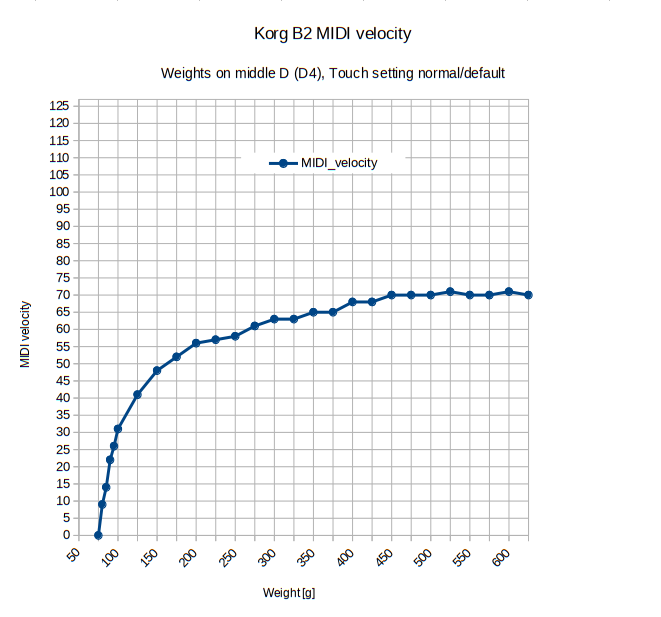
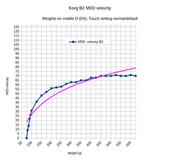
That reminds me of my midi-velocity vs. drop-weight diagram I made a while ago:
https://i.postimg.cc/L6wxp2nW/Korg-B2-middle-D-D4-25g-5g-steps.png
in thread https://forum.modartt.com/viewtopic.php...14#p986514

The variable weights were placed near the front edge of a middle white key. The potential energy is

Epot = m * g * h

The resulting curve of that example hammer-action (Korg B2) is not linear, so the midi-velocity is not proportional to an energy, I guess.

yeq30 wrote:

To get this right you have to know exactly what touch response curve the Keyboard is going to send to Pianoteq. To measure this, I built a home-made key-energy calibration gadget which allowed me to measure the MIDI values generated by dropping a known weight (metal rod) from various known heights onto a key.

Hello yeq30, do you have a photo of your metal rod construction? Eventually I will try something similar in the future. If you have spare time, it would be interesting for me to see the midi-velocity of the Kawai NV10 with a ~500 g weight somewhere placed in the middle range of the keyboard and factory defaults (background: with ~500 g the acceleration of the key is known in good approximation 9,81 m/s²).  -

It seems more hard facts exist about classical grand pianos than about simple digital piano actions We don't even know for sure, if the factory default "normal" midi-velocity output of some digital piano is linearly coupled with the time interval between two key contacts.

Last edited by groovy (Yesterday 13:43)

Re: Some results with Kawai NV10

I will dig out the measuring rig and send a photo. It's pretty crude.

I hope that one day, just the same as totally accurate colour-control is now built into all PC's (it didn't used to be), every preset will just have a button or check-box for "real" so we won't have to mess around setting up presets to sound / feel like a real piano.

One thing te measuring gadget showed me was how wide the error margin is on the MIDI values, especially below about 75. Down around 30'ish it is just hit and miss what you get. It was better but still a bit loose in the 120 - 180 region. I've spent 60 odd years as a classical pianist - professional for the first 6 years of them - so I'm used to what a good piano feels and responds like. That is mostly what confirms to me that the exponential curve is what is needed, even if I didn't know that for sure anyway from the years I spent working in electronic music and studio environments.

One major thing: I expect the full dynamic range from a preset - no swapping presets to play ppp or ff; that is a joke, but not a funny one.

Although the NV10 is supposed to have very accurate veclocity detection I suspect that even in the sweet range it is still quite variable. This is because I have several evenness / missing-notes "guage-pieces" I can play that I know I can perform without trouble on a good acoustic piano. These are Chopin Op 10 No. 2 and Liszt Feux Follets.On the NV10, I can only guarantee no missing notes with one or two of the presets, usually with a rather low Dynamic setting (30'ish). Any higher and the variability combines with the increased range of loudness to make notes go awol at speed. I take the attitude that if these two pieces are Ok them absolutely anything else probably is.

I have found that it takes quite a lot of playing a variety of classical stuff (where total dynamic control is central / essential) for about a week to tailor a preset. Even then, a few days later I usually decide that something needs tweaking. I have to say that since Pianoteq 9 came out, the presets are all better and some are excellent; prior to version 9, quite a few of them were obviously created by Stephen King - but I guess he's left the team now.


groovy wrote:
iternabe wrote:

Energy is velocity squared.  So, loudness of notes made by the string can either be linear to hammer velocity, or hammer energy, but not BOTH.  OP was creating a velocity curve based on drop height, which is energy, or equivalent of velocity squared.  My question is, why not based the velocity curve on key/hammer velocity, which would be square root of energy or drop height?

That reminds me of my midi-velocity vs. drop-weight diagram I made a while ago:
https://i.postimg.cc/L6wxp2nW/Korg-B2-middle-D-D4-25g-5g-steps.png
in thread https://forum.modartt.com/viewtopic.php...14#p986514

The variable weights were placed near the front edge of a middle white key. The potential energy is

Epot = m * g * h

The resulting curve of that example hammer-action (Korg B2) is not linear, so the midi-velocity is not proportional to an energy, I guess.

yeq30 wrote:

To get this right you have to know exactly what touch response curve the Keyboard is going to send to Pianoteq. To measure this, I built a home-made key-energy calibration gadget which allowed me to measure the MIDI values generated by dropping a known weight (metal rod) from various known heights onto a key.

Hello yeq30, do you have a photo of your metal rod construction? Eventually I will try something similar in the future. If you have spare time, it would be interesting for me to see the midi-velocity of the Kawai NV10 with a ~500 g weight somewhere placed in the middle range of the keyboard and factory defaults (background: with ~500 g the acceleration of the key is known in good approximation 9,81 m/s²).  -

It seems more hard facts exist about classical grand pianos than about simple digital piano actions We don't even know for sure, if the factory default "normal" midi-velocity output of some digital piano is linearly coupled with the time interval between two key contacts.