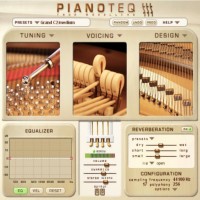
Listening through loudspeakers usually requires significantly less reverberation than through headphones. The reason is simple: when using loudspeakers, the sound is naturally reverberated by the room in which they sit. We thus recommend that you reduce the reverberation mix when using loudspeakers.
larrycalame wrote:Is there a way to add a high quality third party reverb to the sound output by PTQ in standalone mode?
Let me say, in a word; yes. Some forum members load impulse responses directly into PIANOTEQ. They mouse over to REVERB under EFFECTS, then click and scroll down to Use WAV impulse to Load WAV impulse.
My suggestion to you is; learn as much as you need to use impulse responses (IRs), used in convolution reverbs and PIANOTEQ both. Many have been freely distributed on the web that you can find through your search engine. They come in specific forms; single, serial, parallel, parallel mix, and true stereo for anybody to research thoroughly.
If right away you'd like to get just your feet wet and make your own, check out one the least expensive convolution reverbs —Fog Convoler 2— sold at just $39 (US).
I already posted about it now referenced in another thread Any third-party effects you'd recommend?. Which maybe or not you saw...
In any case at this one I'm making available a YouTube video which can show some of its ease of use:
Fog Convolver 2.2.0 Update
Pianoteq 8 Studio Bundle, Pearl malletSTATION EM1, Roland (DRUM SOUND MODULE TD-30, HandSonic 10, AX-1), Akai EWI USB, Yamaha DIGITAL PIANO P-95, M-Audio STUDIOPHILE BX5, Focusrite Saffire PRO 24 DSP.