Topic: Pianos you play back into native speakers

I would like to use a digital piano that I can use with Pianoteq on a Mac and then feed back into the native speakers of the digital piano.  Could anyone share a set-up that you are using?

I would like the experience to be with hardly noticeable latency and no noticeable buzz, yet with minimal muddiness. 

I would just be playing in a room, no stage performance.  I love the piano sound I hear from Pianoteq and would like to upgrade my instrument choices to that.

Re: Pianos you play back into native speakers

Hymnsinyourhome wrote:

I would like to use a digital piano that I can use with Pianoteq on a Mac and then feed back into the native speakers of the digital piano.  Could anyone share a set-up that you are using?

I would like the experience to be with hardly noticeable latency and no noticeable buzz, yet with minimal muddiness. 

I would just be playing in a room, no stage performance.  I love the piano sound I hear from Pianoteq and would like to upgrade my instrument choices to that.

I use a Roland FP90X in that way and I love it. The Roland has a built in usb audio interface that works with either a Mac or Windows computer. It also has a very pianistic key action, a three stage equalizer, and a full sounding stereo 4 speaker array. It also has stereo line outs, in case you ever wish to connect it to external speakers.

Re: Pianos you play back into native speakers

While I love the speakers in my Novus NV10S, its biggest drawback is that the audio input is analogue, with a meagre 96k ADC sitting behind a 3.5mm line jack. In your search, I'd be sure to check for digital inputs (usb etc) over analogue audio - such as larrycalame's suggestion. I managed to make it work for myself but it was quite a faff.

Re: Pianos you play back into native speakers

I'm using a Yamaha clp685, it has "USB audio" feature so the piano is recognized as a soundcard, which can do both input and output.

i started with directly using it with PC(windows/mac), and now switched to using a dedicated linux box attached to the piano. latency is minimal and no buzz or anything since it's all digital between pianoteq and the piano.

Re: Pianos you play back into native speakers

I used to play on a low-spec yamaha YDP-144
It was good enough back then, and the usb audio interface has okay delay

Re: Pianos you play back into native speakers

yang wrote:

I'm using a Yamaha clp685, it has "USB audio" feature so the piano is recognized as a soundcard, which can do both input and output.

i started with directly using it with PC(windows/mac), and now switched to using a dedicated linux box attached to the piano. latency is minimal and no buzz or anything since it's all digital between pianoteq and the piano.

Which Linux box are you using and what about the user interface? I am now using an iPad, but need that for daily use so a dedicated Linux box would be better.

I have a Yamaha CLP-885

Last edited by Oltmb (17-09-2026 10:49)

Re: Pianos you play back into native speakers

Oltmb wrote:
yang wrote:

I'm using a Yamaha clp685, it has "USB audio" feature so the piano is recognized as a soundcard, which can do both input and output.

i started with directly using it with PC(windows/mac), and now switched to using a dedicated linux box attached to the piano. latency is minimal and no buzz or anything since it's all digital between pianoteq and the piano.

Which Linux box are you using and what about the user interface? I am now using an iPad, but need that for daily use so a dedicated Linux box would be better.

I have a Yamaha CLP-885

I bought a used HP elitedesk 800 g4 ($100+ w/o hard drive) and put a old ssd in it. (the model i bought has wifi). cpu is more than enough for pianoteq. Any box should work.

for software, I just use a Debian server, installed pianoteq, and setup some service myself. main features are:
- when piano is turned on (usb device detected), check pianoteq's audio chain is fully healthy, if yes, send "local control off" signal to piano.  I intentionally do NOT remember the local control to OFF on piano, just in case the box is not working, my kids won't be stuck with a muted piano. it should always make sound when turned on. (piano always turns on with local control ON)

- when piano is turned on, enable performance mode and disable sleep, etc
- when piano is off, enable normal power management.


also has a program I made for my self that run on the linux box, serves a web page i can access from my phone (for remote control/change presets, etc).

If you're interested i can share more details.

if you're too tech savvy though, i know some people just use mac mini.  however, linux is much more customizable.

Last edited by yang (19-09-2026 08:08)

Re: Pianos you play back into native speakers

Hi yang,

yang wrote:

for software, I just use a Debian server, installed pianoteq, and setup some service myself. main features are:
- when piano is turned on (usb device detected), check pianoteq's audio chain is fully healthy, if yes, send "local control off" signal to piano.  I intentionally do NOT remember the local control to OFF on piano, just in case the box is not working, my kids won't be stuck with a muted piano. it should always make sound when turned on. (piano always turns on with local control ON)

- when piano is turned on, enable performance mode and disable sleep, etc
- when piano is off, enable normal power management.


also has a program I made for my self that run on the linux box, serves a web page i can access from my phone (for remote control/change presets, etc).

If you're interested i can share more details.

I think it is very interesting and would love more details if you're willing to share!

How do you send ,local off‘ to the piano? And how does the program look that you created?

Last edited by tswift66 (22-09-2026 17:03)

Re: Pianos you play back into native speakers

tswift66 wrote:

Hi yang,

yang wrote:

for software, I just use a Debian server, installed pianoteq, and setup some service myself. main features are:
- when piano is turned on (usb device detected), check pianoteq's audio chain is fully healthy, if yes, send "local control off" signal to piano.  I intentionally do NOT remember the local control to OFF on piano, just in case the box is not working, my kids won't be stuck with a muted piano. it should always make sound when turned on. (piano always turns on with local control ON)

- when piano is turned on, enable performance mode and disable sleep, etc
- when piano is off, enable normal power management.


also has a program I made for my self that run on the linux box, serves a web page i can access from my phone (for remote control/change presets, etc).

If you're interested i can share more details.

I think it is very interesting and would love more details if you're willing to share!

How do you send ,local off‘ to the piano? And how does the program look that you created?


Glad you're interested! Here are the details on how the Local Off handshake works, the software design, and what the UI looks like:


1. How to send "Local Off" (and the safety handshake)

Under the hood, it uses standard MIDI:
- MIDI CC 122 (Local Control): Sending [0xB0, 0x7A, 0x00] (channel 1, CC 122, value 0) turns off the piano's internal sound generator, and [0xB0, 0x7A, 0x7F] (value 127) turns it back on.
- Note: While CC 122 is standard on Yamaha CLPs and many modern digital pianos, implementation can vary by brand and model, so it's always worth double-checking your piano's MIDI implementation chart in the manual.

More importantly, the safety logic behind when it gets sent:
- The Linux daemon monitors the USB connection. When the piano is turned on, it performs a quick health check:
  1) Verifies the Pianoteq process is running.
  2) Verifies the PipeWire/ALSA low-latency audio stream is actively linked to the piano's USB audio interface.
- Only when the entire audio chain is 100% verified does it send CC 122 (value 0). If the audio connection ever drops, it automatically sends CC 122 (value 127) to restore the piano's native sound.
(it also changes the linux box's power saving mode, etc, triggered by the same event)

2. Software Architecture & Upstream Velocity Mapping

The box runs headless Debian with a lightweight daemon written in Rust:
- Centralized Velocity Mapping: I map the velocity curve right in the MIDI proxy layer before sending events to Pianoteq. In Pianoteq itself, the velocity curve is left completely flat/linear.
  The big advantage: If I ever switch to or layer another VST (like Garritan CFX or a DAW), I don't have to duplicate or calibrate the curve across different plugins. All sound engines receive the exact same touch response from the upstream proxy.
- Headless Pianoteq Control: Pianoteq runs without a desktop GUI. The daemon communicates with it via Pianoteq's native JSON-RPC API to switch presets, adjust reverb, and manage parameters.


3. How the Program & Web UI Look

The daemon serves a responsive Web app over the local network (e.g. http://<box-ip>:8770). You just open the URL in Chrome or Safari on your phone or tablet (and you can tap "Add to Home Screen" so it opens full-screen like a native app).

The phone interface focuses on quick, practical controls while sitting at the piano:
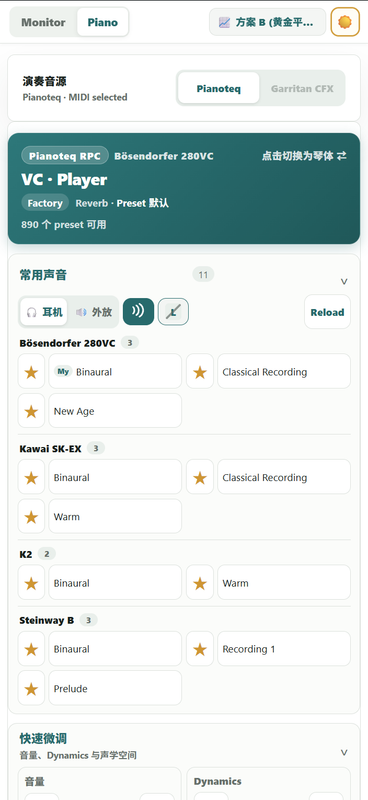
- Preset Switcher: Large touch buttons for favorite presets (e.g. Steinway D, Bösendorfer, Warm/Bright configurations) so you can switch sounds in two taps.
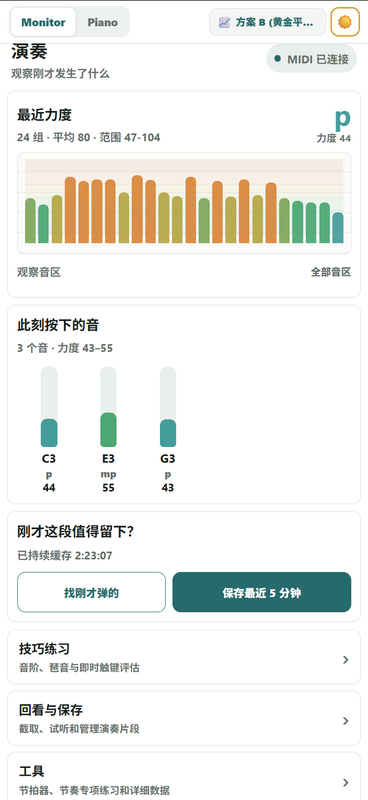
- 60-Minute Rolling Recorder: You don't have to remember to press "Record" before playing. The daemon continuously keeps the latest 60 minutes of mapped MIDI in a memory buffer. If you just played something you like, pull out your phone, view the detected takes on a timeline, audition the clip, and export a standard .mid file directly.
- Metronome & Practice tools.

It essentially turns Pianoteq into an invisible "built-in sound engine" for the piano, with your phone acting as the wireless remote. It looks like this on my phone.

change preset and switch between built-in audio vs pianoteq
https://i.postimg.cc/gJNWVk4y/chrome-XFOTVW5LB8.png

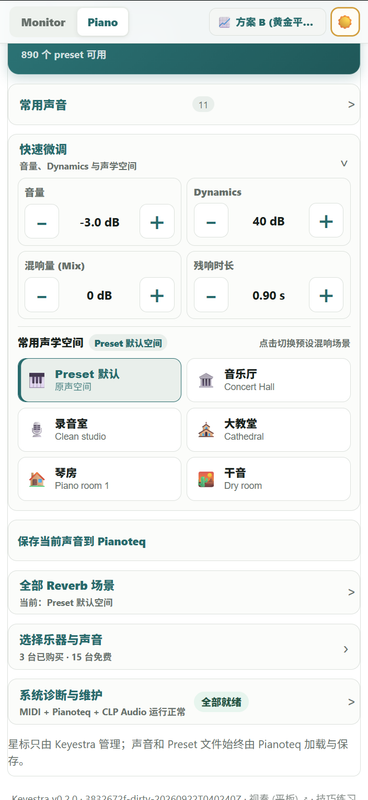
change volume, reverb, etc.
https://i.postimg.cc/BQ80F3FT/chrome-pp-EBw-XYKm9.png

see the midi input details, and also possible to see recent played midi.(can save or export).
https://i.postimg.cc/FH3XPxDd/chrome-v-Vzg-Ou-ZJ0k.png