<?xml version="1.0" encoding="utf-8"?>
<feed xmlns="http://www.w3.org/2005/Atom">
	<title type="html"><![CDATA[Modartt user forum - Insanely great performance on ARM-64bit (Pianoteq, Odroid N2+, Linux)]]></title>
	<link rel="self" href="https://forum.modartt.com/extern.php?action=feed&amp;tid=8265&amp;type=atom"/>
	<updated>2023-04-26T08:31:09Z</updated>
	<generator>PunBB</generator>
	<id>https://forum.modartt.com/viewtopic.php?id=8265</id>
		<entry>
			<title type="html"><![CDATA[Re: Insanely great performance on ARM-64bit (Pianoteq, Odroid N2+, Linux)]]></title>
			<link rel="alternate" href="https://forum.modartt.com/viewtopic.php?pid=989724#p989724"/>
			<content type="html"><![CDATA[<p>Thanks Groove On for your reply and update on the Odroid. Shame it has stalled a little.</p><p>Your suggestion on a lower-power Intel has got me thinking: I have an unused 15W TDP Intel Core i5-7400T 2.4GHz CPU on a mini-ITX Z270 motherboard and picoPSU. I specified and configured it to consume as little power as possible (some tweaks on the BIOS including under-volting), and can boot on power restore.</p><p>I&#039;m thinking this may be similar solution, and it looks like there are some Linux options to try. Should be interesting...</p>]]></content>
			<author>
				<name><![CDATA[TenorBrass]]></name>
				<uri>https://forum.modartt.com/profile.php?id=9027</uri>
			</author>
			<updated>2023-04-26T08:31:09Z</updated>
			<id>https://forum.modartt.com/viewtopic.php?pid=989724#p989724</id>
		</entry>
		<entry>
			<title type="html"><![CDATA[Re: Insanely great performance on ARM-64bit (Pianoteq, Odroid N2+, Linux)]]></title>
			<link rel="alternate" href="https://forum.modartt.com/viewtopic.php?pid=989651#p989651"/>
			<content type="html"><![CDATA[<div class="quotebox"><cite>TenorBrass wrote:</cite><blockquote><p>1) ... have you got to the point of having yours running in a reliable, hassle-free way?</p></blockquote></div><p>Yes, my headless Odroid N2+ directly boots Pianoteq in around 30+ seconds. I use RealVNC on an iPad to make changes to Pianoteq settings.</p><div class="quotebox"><cite>TenorBrass wrote:</cite><blockquote><p>2) is there a Pianoteq Odroid N2+ Linux download that a newbie can use as a starting point?</p></blockquote></div><p> I feel Odroid N2+ development has stalled/stagnated; so <em>today</em> I would use different hardware for a Pianoteq appliance. </p><p>Recommended low-cost SBCs (listed in order of CPU power):<br />1. Mini-PC with Celeron 5100/5105 *<br />2. Orange Pi 5 or 5B<br />3. Mini-PC with Celeron J4125<br />4. Odroid N2+ or Raspberry Pi 4</p><p>* the Orange Pi 5 is significantly cheaper than a Celeron 5100/5105 box, but the intel Celeron 5100/5105 will have a LOT of built-in goodies (sound, wifi, bluetooth, case and cooling!). The Orange Pi 5 will need a bit more attention and extra hardware to get it up and running. Performance between the Orange and Celeron SBCs are within spitting distance, but the Celeron does outperform the Orange hardware. Both the Celeron and Orange SBCs outperform all the other SBCs on the list..</p><p><strong>*** NOTES ***</strong>: (also worth checking out)<br />1. @Navindra &#039;s thread on the Raspberry Pi 400 - <a href="https://forum.modartt.com/viewtopic.php?id=7905">https://forum.modartt.com/viewtopic.php?id=7905</a><br />2. @shuhao &#039;s thread on Pianoteq&#039;s JSON/Web interface - <a href="https://forum.modartt.com/viewtopic.php?id=9073">https://forum.modartt.com/viewtopic.php?id=9073</a></p><p><strong>Re: Odroid N2+ starting point</strong><br />Unfortunately, I never got around to making a Pianoteq-friendly iso boot image. My setup uses the archdroid distro because I found the base image had decent performance and was easy to customize with decent Arch online documentation). <strong>archdroid</strong>: <a href="https://archdroid.org">https://archdroid.org</a></p><p>I also had good results with Armbian and Hard Kernel&#039;s Ubuntu MATE distro.<br /><strong>armbian</strong>: <a href="https://www.armbian.com">https://www.armbian.com</a><br /><strong>ubuntu mate</strong>: <a href="https://wiki.odroid.com/getting_started/os_installation_guide#operating_systems_we_re_providing">https://wiki.odroid.com/getting_started..._providing</a></p>]]></content>
			<author>
				<name><![CDATA[Groove On]]></name>
				<uri>https://forum.modartt.com/profile.php?id=5495</uri>
			</author>
			<updated>2023-04-23T17:39:27Z</updated>
			<id>https://forum.modartt.com/viewtopic.php?pid=989651#p989651</id>
		</entry>
		<entry>
			<title type="html"><![CDATA[Re: Insanely great performance on ARM-64bit (Pianoteq, Odroid N2+, Linux)]]></title>
			<link rel="alternate" href="https://forum.modartt.com/viewtopic.php?pid=989649#p989649"/>
			<content type="html"><![CDATA[<div class="quotebox"><cite>Vepece wrote:</cite><blockquote><p>But, while investigating my setup for optimizing/solving audio cracks, I noticed that no more than 4 assigned CPU cores will be used by PTQ. As mentioned in <a href="https://forum.modartt.com/viewtopic.php?pid=988976#p988976">https://forum.modartt.com/viewtopic.php...76#p988976</a> I have tried 6 cores, but PTQ never puts workload on more than 4!</p></blockquote></div><p>What are your CPU Governor settings?</p><p>On the Odroid N2+ running a default Archdroid, Armbian and Ubuntu MATE - it could use up to 6-cores, but it tried really hard to stick the Piantoeq threads on the 4-high-performance cores. Also there was a performance hit when it switched between the hight and low performance cores.</p>]]></content>
			<author>
				<name><![CDATA[Groove On]]></name>
				<uri>https://forum.modartt.com/profile.php?id=5495</uri>
			</author>
			<updated>2023-04-23T17:07:52Z</updated>
			<id>https://forum.modartt.com/viewtopic.php?pid=989649#p989649</id>
		</entry>
		<entry>
			<title type="html"><![CDATA[Re: Insanely great performance on ARM-64bit (Pianoteq, Odroid N2+, Linux)]]></title>
			<link rel="alternate" href="https://forum.modartt.com/viewtopic.php?pid=989617#p989617"/>
			<content type="html"><![CDATA[<p>I&#039;m currently going through the Pianoteq trial and so far very impressed.</p><p>I play a Kawai ES8 and love the action (far better than my piano playing at present). I would love to add some further acoustic and electric pianos without building any complex Mac/PC for live/practice.</p><p>My ideal device would boot with power on, and accept power off (compared with button to initiate close-down sequence) - essentially working as an appliance not a computer. Reading this Odroid N2+ thread reassures me that other people may be doing similar with &quot;fit for purpose&quot; results (no need for massive polyphony). </p><p>@Groove on - you have shared a lot of valuable information, and it&#039;s priceless for new/potential Pianoteq users such as myself. Thanks! Two quick questions 1) you shared a view about Intel Linux vs Odroid N2+. I&#039;ll confess I like the sound of the Odroid running a read-only distro. With your experience, have you got to the point of having yours running in a reliable, hassle-free way? and 2) is there a Pianoteq Odroid N2+ Linux download that a newbie can use as a starting point? </p><p>I&#039;m new to Linux, but have done some complex stuff before on Teensy, which I&#039;m thinking of deploying for a headless control-surface for presets, FX, etc</p><p>Thanks again to everyone for such a useful thread.</p>]]></content>
			<author>
				<name><![CDATA[TenorBrass]]></name>
				<uri>https://forum.modartt.com/profile.php?id=9027</uri>
			</author>
			<updated>2023-04-22T10:00:18Z</updated>
			<id>https://forum.modartt.com/viewtopic.php?pid=989617#p989617</id>
		</entry>
		<entry>
			<title type="html"><![CDATA[Re: Insanely great performance on ARM-64bit (Pianoteq, Odroid N2+, Linux)]]></title>
			<link rel="alternate" href="https://forum.modartt.com/viewtopic.php?pid=988977#p988977"/>
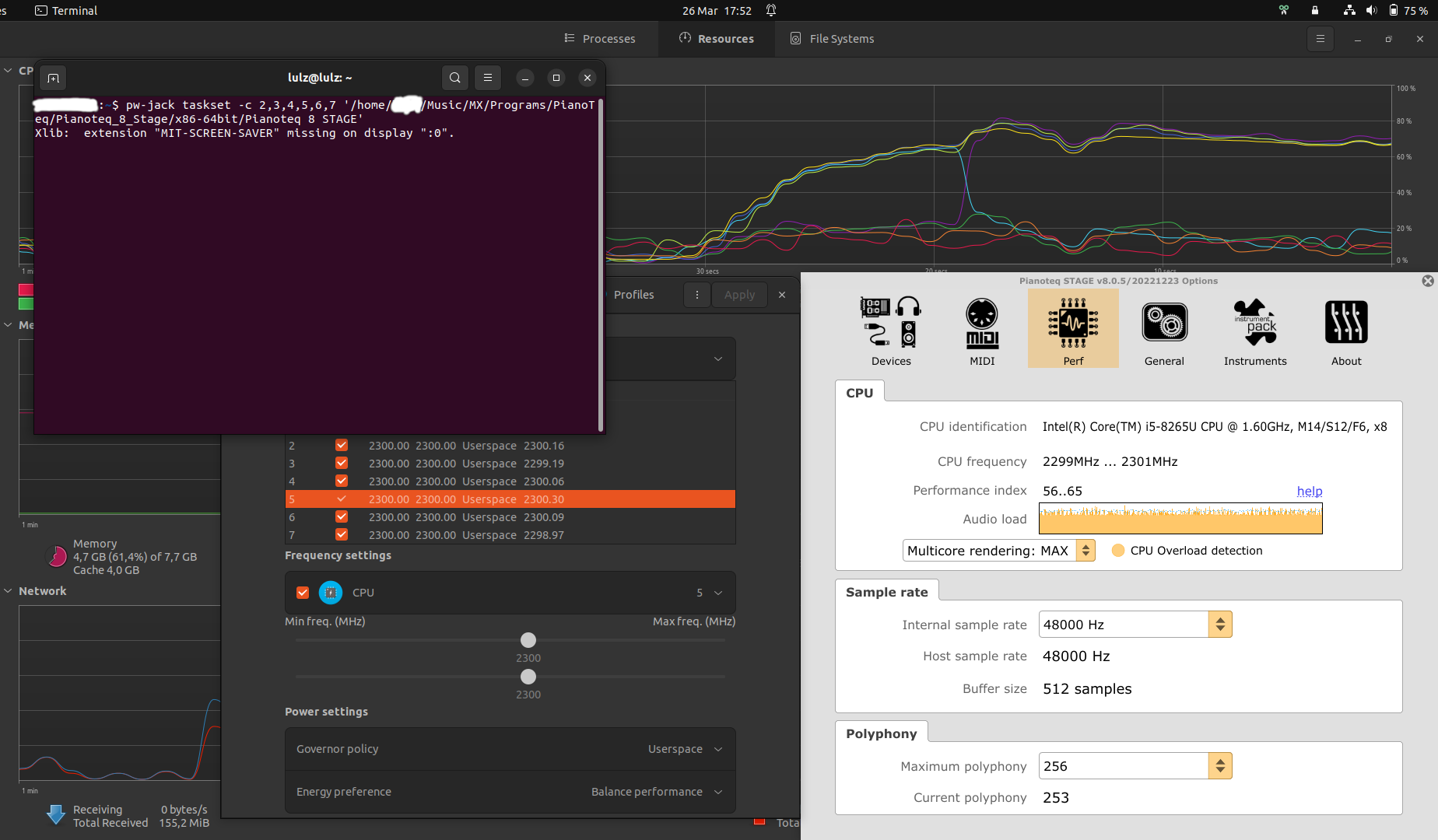
			<content type="html"><![CDATA[<p>Hey,</p><p>to not further hijack this topic for Intel CPU specific issues, I started another thread.</p><p>But, while investigating my setup for optimizing/solving audio cracks, I noticed that no more than 4 assigned CPU cores will be used by PTQ.<br />As mentioned in <a href="https://forum.modartt.com/viewtopic.php?pid=988976#p988976">https://forum.modartt.com/viewtopic.php...76#p988976</a> I have tried 6 cores, but PTQ never puts workload on more than 4!</p><p>Could some of you try to see if thats something specific to my setup (CPU, OS, Settings...) or if you experience the same on your system, like Groove On, do you encounter the same on your ARM CPU - or Groovy, your help is always appreciated, can you elaborate?</p><p>As you can see, Ive started with 6 cores by taskset, PTQ Multicore Rendering was set to MAX, and still there was only load on 4 cores - he even switches cores!</p><p><span class="postimg"><img src="https://abload.de/img/2023-03-27-ptq_taskseelezs.png" alt="https://abload.de/img/2023-03-27-ptq_taskseelezs.png" title="https://abload.de/img/2023-03-27-ptq_taskseelezs.png"/></span></p><br /><p>Thanks</p>]]></content>
			<author>
				<name><![CDATA[Vepece]]></name>
				<uri>https://forum.modartt.com/profile.php?id=8887</uri>
			</author>
			<updated>2023-03-26T16:13:12Z</updated>
			<id>https://forum.modartt.com/viewtopic.php?pid=988977#p988977</id>
		</entry>
		<entry>
			<title type="html"><![CDATA[Re: Insanely great performance on ARM-64bit (Pianoteq, Odroid N2+, Linux)]]></title>
			<link rel="alternate" href="https://forum.modartt.com/viewtopic.php?pid=988860#p988860"/>
			<content type="html"><![CDATA[<div class="quotebox"><cite>levinite wrote:</cite><blockquote><p>Have you checked for an Intel specific power manager or freq utility? Thank for the pipewire tip!</p></blockquote></div><p>Yes,<br />Intel uses its own P_State Driver and uses its own governors (Powersave or Performance) - which does not allow to set a specific freq but only a lower and upper limit.<br />Anyways: Its still not following its own commands within its own governors:<br />If, for example, I set as lower limit 2150 and upper limit the same 2150 the Cores still never run at 2150 but around 2000, with drops to 1800 or even way lower.</p><p>This means that the Kernel or the CPU/Hardware itself still can overwrite values.<br />Makes sense: We leave the job to the governors, with all its Ondemand features and Thermal protection features.</p><p>Ive read solutions how to set P-State to &quot;passive&quot;, to gain the userspace governor and set specific frequency with that.<br />Other solutions even suggest to disable P-State entirely, forcing the ACPI driver, as well as deactivating the ondemand service so there is no interference by the Kernel any longer at all.</p><p>Here some ChatGPT reply:<br /></p><div class="quotebox"><blockquote><p>The benefit of using &quot;intel_pstate=disable acpi=force intel_pstate=no_hwp&quot; and &quot;sudo systemctl disable ondemand&quot; instead of just &quot;intel_pstate=passive&quot; is that it provides more control over the CPU governor and power management settings.</p><p>By setting &quot;intel_pstate=disable&quot;, you are disabling the Intel PState driver and enabling the acpi-cpufreq driver which provides more control over the CPU governor. &quot;acpi=force&quot; is used to force the kernel to use the ACPI power management driver. &quot;intel_pstate=no_hwp&quot; disables the HWP (Hardware P-States) feature which can cause frequency scaling issues on some systems.</p><p>By disabling the ondemand service, you are preventing the system from automatically adjusting the CPU frequency based on usage. This allows you to manually set the CPU frequency using tools like cpufreq-set or other third-party tools.</p><p>The downside of using these additional settings is that they require more configuration and may not be necessary for all systems. Additionally, disabling certain power management features may impact the system&#039;s energy efficiency or performance. It is important to test and monitor the system&#039;s performance and power consumption after making these changes.</p></blockquote></div><p>My guess is this is causing the audio cracking I experience: PTQ Power Index claims the audio load is 100%, which makes sense due to the cracking - but my SysMonitor readout shows the CPU cores in question (Taskset to only specific cores) shows the load is not at maximum but only 50-70%.</p><p>This confuse me, as the hardware seems to not be on 100% load and therefore should not cause audio cracking - but PTQ claims so and I actually experience audio cracking.</p><p>My workaround for the moment is to set Polyphony in PTQ way lower than I like: 48 is the max. to never suffer audio cracking, but I would like to run at 256 for obvious reasons.</p><p>Im in doubt if I like to try the userspace governor, because I like the ondemand features for daily work.</p><br /><p>CPUPower-GUI 1.0 actually allows to set different profiles, so in theory I can change between different governors:<br />So Userspace with 2150MHz whenever I want to do audio work,<br />and Powersave for regular Day-to-Day work.<br />All this by a GUI and 1 simple change of a Profile - similar to some selfmade .sh with cpufreq commands which you can do as well if you prefer.</p><p>But to get the Userspace Governor I need to set P-State to at least passive, so there is no P-State Powersave/Performance governor any longer - or is there? Or is there some kind of ACPI Governor that is similar?</p><p>Before I &quot;try&amp;error&quot; I rather double check and ask in here if anyone with personal experience can share his opinion?</p><br /><p>Thanks</p>]]></content>
			<author>
				<name><![CDATA[Vepece]]></name>
				<uri>https://forum.modartt.com/profile.php?id=8887</uri>
			</author>
			<updated>2023-03-21T17:25:57Z</updated>
			<id>https://forum.modartt.com/viewtopic.php?pid=988860#p988860</id>
		</entry>
		<entry>
			<title type="html"><![CDATA[Re: Insanely great performance on ARM-64bit (Pianoteq, Odroid N2+, Linux)]]></title>
			<link rel="alternate" href="https://forum.modartt.com/viewtopic.php?pid=988129#p988129"/>
			<content type="html"><![CDATA[<div class="quotebox"><cite>Vepece wrote:</cite><blockquote><p>Hey,</p><p>thank you for this small hint!</p><p>My Ubuntu Low Latency Kernel running on an i5-8265U (4 Cores / 8 Threads),<br />checked with &quot;grep ^CONFIG_HZ /boot/config-`uname -r`&quot; resulting in<br />CONFIG_HZ_1000=y (generally activated)<br />CONFIG_HZ=1000 (actually set to desired value),</p><p>has some decent Performance Index in PTQ7/8Demo of ~56 when running on taskset -c 4,5,6,7 (only the 4 Hyperthreading Cores) @1.6GHz or up to 100-120 Index @&quot;3.9GHz&quot;.<br />I am playing around if I should use 2 physical Cores (Like 2 and 3) with their corresponding HT Cores (6,7), or only use the HT Cores... but I couldnt notice any difference yet.</p><p>The only thing bothering me is that Intel seems to not accept all kinds of instructions: I am trying to set for example<br />sudo cpufreq-set -c 4 -d 1600MHz -u 1610MHz -g performance<br />sudo cpufreq-set -c 5 -d 1600MHz -u 1610MHz -g performance<br />sudo cpufreq-set -c 6 -d 1600MHz -u 1610MHz -g performance<br />sudo cpufreq-set -c 7 -d 1600MHz -u 1610MHz -g performance</p><p>But he wont accept this and run maximal CPU clock in performance mode on ALL my Threads as soon as I specify -g performance governor,<br />but when Im leaving -g performance as governor and use the min/max specifications, he wont follow these and &quot;cpufreq-info&quot; command in a terminal and PTQs Pref Dialog show me some way different min/max values. Weird.</p><p>So some selfmade .sh to start PTQ doesnt work as expected at this moment, which is why I use &quot;cpupower-gui&quot; to set the freq., which kinda works.<br />But here again, even when applying the frequency/governor only to specific Threads in the GUI, it will still alter all threads.<br />At least the CPU freq. stays stable as specified as long as I keep it under round about ~3.2GHz and use the Performance governor: 1600MHz, 2000MHz, 2500Mhz, 3000MHz - they all seem to stay pretty straight when watching PTQ Perf Dialog, or when hitting &quot;cpufreq-info&quot; into a terminal again,<br />but as soon as I scratch 3.2 GHz or above (up to 3.9GHz with this CPU), there is a big fluctuation again over several hundred MHz.</p><p>Same quirk when setting the min/max freq. but using the Powersave Governor: Huge fluctuations that are outside the specified freq.</p><p>To me this concludes that this got something to do with Intel themself, and how strict they follow these commands.</p><p>Lets see if I atleast manage to use &quot;cpufreq-set&quot; commands by script for the future, rather than using the GUI program to set the CPU frequencys,<br />so I at least can have some less complex starting procedure.<br />The other quirks I kinda could live with and just use 1.6 - 2 GHz, as the power index seems high enaugh and my Laptop doesnt make any noises with that settings (CPU itself, or the Fan), as the CPU makes a ton of noise when clock rates are set in the 3.0 - 3.9GHz range.</p><p>But if anyone has some tip for how to get cpufreq-set to work as expected, I would appreciate it.</p><p>Thanks again for the info @Groove On - made me again love the decision to use Linux as daily OS and even for music production: Low Latency, setting Clock Rates, specifying CPU cores (and hopefully the USB-MIDI polling rates as mentioned in another thread...)</p><br /><p>Another note by me, because I never seen it mentioned in this thread yet, is a small hint I like to recommend:<br />Skip PulseAudio and JackD1/JackD2!<br />Use Pipewire!<br />On my Ubuntu 22.04 LTS it came pre-installed and only needed to be activated with certain steps (deactivating PulseAudio permanently for example), which worked flawlessly.</p><p>Because of my personal mess with JackD2 which I installed before using Pipewire, I even took a clean break and removed entire Jack and Pipewire a few times over and over again, which is why I used apt package install of Pipewire with Wireplumber as Session Manager a few times and got to say its super easy to install and doesnt need any in-depth setup (as the Pipewire documentaion mentions for a regular installation procedure, it actually does all this automatically. The docu of Pipewire even specifies the issue with user groups and RT prioritys, and has a cleaner solution for this - check it out.).</p><p>I have one small quirk, which is that I still need to start programs with the &quot;pw-jack&quot; prefix if I want them to run by &quot;Jack&quot; (Fake Jack by Pipewire) - which should not be necessary if Pipewire is set up properly and should do it automatically if any application wants to connect to a Jack Server.<br />Another tiny quirk is that I can not configure Jack Server settings in applications: So just changing the sampling rate or buffer size within PTQ aint possible, but thats a no brainer to me because I just set 48KHz/128 samples globally and could even set &quot;per App&quot; settings by some pipewire config file if I need to.</p><p>But both quirks are a small price to pay and more than acceptable to me, because PulseAudio and Jack, all work by PipeWire now and there is never any conflict or never any issue with the sound. ALSA also still works flawlessly, so I got a nice bridge connecting all drivers/servers/sessions together and can use any Patchbay I want to - be QJackCTL (the package is annoying and still wants to install JackD1/D2, which is why I dont use it any longer, but it worked back when I had it even with parallel installs of JackD1/D2 while still running in a pw-jack environment), Hevlum for Pipewire, Carla or what ever you like.</p><p>I became a small advocate for PipeWire and can only recommend it for good performance and ease of everything since ~6-12 months,<br />as it has grown out of the issues that have been reported at the beginning (18 months ago) with it.</p><br /><p>Cheers</p></blockquote></div><p>Have you checked for an Intel specific power manager or freq utility? Thank for the pipewire tip!</p>]]></content>
			<author>
				<name><![CDATA[levinite]]></name>
				<uri>https://forum.modartt.com/profile.php?id=7208</uri>
			</author>
			<updated>2023-02-05T01:13:10Z</updated>
			<id>https://forum.modartt.com/viewtopic.php?pid=988129#p988129</id>
		</entry>
		<entry>
			<title type="html"><![CDATA[Re: Insanely great performance on ARM-64bit (Pianoteq, Odroid N2+, Linux)]]></title>
			<link rel="alternate" href="https://forum.modartt.com/viewtopic.php?pid=988126#p988126"/>
			<content type="html"><![CDATA[<p>Hey,</p><p>thank you for this small hint!</p><p>My Ubuntu Low Latency Kernel running on an i5-8265U (4 Cores / 8 Threads),<br />checked with &quot;grep ^CONFIG_HZ /boot/config-`uname -r`&quot; resulting in<br />CONFIG_HZ_1000=y (generally activated)<br />CONFIG_HZ=1000 (actually set to desired value),</p><p>has some decent Performance Index in PTQ7/8Demo of ~56 when running on taskset -c 4,5,6,7 (only the 4 Hyperthreading Cores) @1.6GHz or up to 100-120 Index @&quot;3.9GHz&quot;.<br />I am playing around if I should use 2 physical Cores (Like 2 and 3) with their corresponding HT Cores (6,7), or only use the HT Cores... but I couldnt notice any difference yet.</p><p>The only thing bothering me is that Intel seems to not accept all kinds of instructions: I am trying to set for example<br />sudo cpufreq-set -c 4 -d 1600MHz -u 1610MHz -g performance<br />sudo cpufreq-set -c 5 -d 1600MHz -u 1610MHz -g performance<br />sudo cpufreq-set -c 6 -d 1600MHz -u 1610MHz -g performance<br />sudo cpufreq-set -c 7 -d 1600MHz -u 1610MHz -g performance</p><p>But he wont accept this and run maximal CPU clock in performance mode on ALL my Threads as soon as I specify -g performance governor,<br />but when Im leaving -g performance as governor and use the min/max specifications, he wont follow these and &quot;cpufreq-info&quot; command in a terminal and PTQs Pref Dialog show me some way different min/max values. Weird.</p><p>So some selfmade .sh to start PTQ doesnt work as expected at this moment, which is why I use &quot;cpupower-gui&quot; to set the freq., which kinda works.<br />But here again, even when applying the frequency/governor only to specific Threads in the GUI, it will still alter all threads.<br />At least the CPU freq. stays stable as specified as long as I keep it under round about ~3.2GHz and use the Performance governor: 1600MHz, 2000MHz, 2500Mhz, 3000MHz - they all seem to stay pretty straight when watching PTQ Perf Dialog, or when hitting &quot;cpufreq-info&quot; into a terminal again,<br />but as soon as I scratch 3.2 GHz or above (up to 3.9GHz with this CPU), there is a big fluctuation again over several hundred MHz.</p><p>Same quirk when setting the min/max freq. but using the Powersave Governor: Huge fluctuations that are outside the specified freq.</p><p>To me this concludes that this got something to do with Intel themself, and how strict they follow these commands.</p><p>Lets see if I atleast manage to use &quot;cpufreq-set&quot; commands by script for the future, rather than using the GUI program to set the CPU frequencys,<br />so I at least can have some less complex starting procedure.<br />The other quirks I kinda could live with and just use 1.6 - 2 GHz, as the power index seems high enaugh and my Laptop doesnt make any noises with that settings (CPU itself, or the Fan), as the CPU makes a ton of noise when clock rates are set in the 3.0 - 3.9GHz range.</p><p>But if anyone has some tip for how to get cpufreq-set to work as expected, I would appreciate it.</p><p>Thanks again for the info @Groove On - made me again love the decision to use Linux as daily OS and even for music production: Low Latency, setting Clock Rates, specifying CPU cores (and hopefully the USB-MIDI polling rates as mentioned in another thread...)</p><br /><p>Another note by me, because I never seen it mentioned in this thread yet, is a small hint I like to recommend:<br />Skip PulseAudio and JackD1/JackD2!<br />Use Pipewire!<br />On my Ubuntu 22.04 LTS it came pre-installed and only needed to be activated with certain steps (deactivating PulseAudio permanently for example), which worked flawlessly.</p><p>Because of my personal mess with JackD2 which I installed before using Pipewire, I even took a clean break and removed entire Jack and Pipewire a few times over and over again, which is why I used apt package install of Pipewire with Wireplumber as Session Manager a few times and got to say its super easy to install and doesnt need any in-depth setup (as the Pipewire documentaion mentions for a regular installation procedure, it actually does all this automatically. The docu of Pipewire even specifies the issue with user groups and RT prioritys, and has a cleaner solution for this - check it out.).</p><p>I have one small quirk, which is that I still need to start programs with the &quot;pw-jack&quot; prefix if I want them to run by &quot;Jack&quot; (Fake Jack by Pipewire) - which should not be necessary if Pipewire is set up properly and should do it automatically if any application wants to connect to a Jack Server.<br />Another tiny quirk is that I can not configure Jack Server settings in applications: So just changing the sampling rate or buffer size within PTQ aint possible, but thats a no brainer to me because I just set 48KHz/128 samples globally and could even set &quot;per App&quot; settings by some pipewire config file if I need to.</p><p>But both quirks are a small price to pay and more than acceptable to me, because PulseAudio and Jack, all work by PipeWire now and there is never any conflict or never any issue with the sound. ALSA also still works flawlessly, so I got a nice bridge connecting all drivers/servers/sessions together and can use any Patchbay I want to - be QJackCTL (the package is annoying and still wants to install JackD1/D2, which is why I dont use it any longer, but it worked back when I had it even with parallel installs of JackD1/D2 while still running in a pw-jack environment), Hevlum for Pipewire, Carla or what ever you like.</p><p>I became a small advocate for PipeWire and can only recommend it for good performance and ease of everything since ~6-12 months,<br />as it has grown out of the issues that have been reported at the beginning (18 months ago) with it.</p><br /><p>Cheers</p>]]></content>
			<author>
				<name><![CDATA[Vepece]]></name>
				<uri>https://forum.modartt.com/profile.php?id=8887</uri>
			</author>
			<updated>2023-02-04T19:18:29Z</updated>
			<id>https://forum.modartt.com/viewtopic.php?pid=988126#p988126</id>
		</entry>
		<entry>
			<title type="html"><![CDATA[Re: Insanely great performance on ARM-64bit (Pianoteq, Odroid N2+, Linux)]]></title>
			<link rel="alternate" href="https://forum.modartt.com/viewtopic.php?pid=987951#p987951"/>
			<content type="html"><![CDATA[<p>Great post Groove On, thank you very much for sharing.</p><p>Best regards</p>]]></content>
			<author>
				<name><![CDATA[Beco]]></name>
				<uri>https://forum.modartt.com/profile.php?id=4699</uri>
			</author>
			<updated>2023-01-28T19:19:52Z</updated>
			<id>https://forum.modartt.com/viewtopic.php?pid=987951#p987951</id>
		</entry>
		<entry>
			<title type="html"><![CDATA[Re: Insanely great performance on ARM-64bit (Pianoteq, Odroid N2+, Linux)]]></title>
			<link rel="alternate" href="https://forum.modartt.com/viewtopic.php?pid=987833#p987833"/>
			<content type="html"><![CDATA[<div class="quotebox"><cite>Groove On wrote:</cite><blockquote><p>You could save a little money if you went with a mini-PC based on the Celeron J4125. Less performance than the N5100/5105, but still easily beats most ARM based SBCs.</p></blockquote></div><p>I totaly agree, good solution. Personally I like the challenge and 3.14159. I got mine for approximately 100$ without ssd.</p>]]></content>
			<author>
				<name><![CDATA[Deconditioning]]></name>
				<uri>https://forum.modartt.com/profile.php?id=8869</uri>
			</author>
			<updated>2023-01-19T18:37:53Z</updated>
			<id>https://forum.modartt.com/viewtopic.php?pid=987833#p987833</id>
		</entry>
		<entry>
			<title type="html"><![CDATA[Re: Insanely great performance on ARM-64bit (Pianoteq, Odroid N2+, Linux)]]></title>
			<link rel="alternate" href="https://forum.modartt.com/viewtopic.php?pid=987831#p987831"/>
			<content type="html"><![CDATA[<div class="quotebox"><cite>navindra wrote:</cite><blockquote><div class="quotebox"><cite>Deconditioning wrote:</cite><blockquote><p>&quot;Would you recommend the Odroid N2+ or do you think there&#039;s a better value board out there? &quot;.</p><p>Yes, I have an orange Pi 5 with 1To sata. The index perf is 69 (with PTQ on the 4 performant cores at startup). Take a sata, it&#039;s half the price of nvme.</p></blockquote></div><p>Interesting -- the big question for me -- do you use passive cooling or require a fan?</p></blockquote></div><p>There is a little fan on the box, really quiet.</p>]]></content>
			<author>
				<name><![CDATA[Deconditioning]]></name>
				<uri>https://forum.modartt.com/profile.php?id=8869</uri>
			</author>
			<updated>2023-01-19T17:32:06Z</updated>
			<id>https://forum.modartt.com/viewtopic.php?pid=987831#p987831</id>
		</entry>
		<entry>
			<title type="html"><![CDATA[Re: Insanely great performance on ARM-64bit (Pianoteq, Odroid N2+, Linux)]]></title>
			<link rel="alternate" href="https://forum.modartt.com/viewtopic.php?pid=987826#p987826"/>
			<content type="html"><![CDATA[<div class="quotebox"><cite>fran.e wrote:</cite><blockquote><p>Hey Groove On, do you have any new advice regarding building a little Pianoteq specific SBC ...</p></blockquote></div><p>I&#039;m on the fence with the iPad version coming (ahem) &quot;soon&quot; ... BUT ...</p><p><strong>If I were building a dedicated Pianoteq box today (JAN 2023)</strong><br />I&#039;d go with a mini-PC using a Celeron N5100 / N5105 for around ~US$200 (for example the Beelink U59).</p><p><strong>Reasons</strong>:<br />1. Very good out-of-the-box performance (CPU price/performance easily beats low-cost ARM SBCs).<br />2. Basic goodies are standard and well-supported: Audio, Wifi, NVME, M.2, Bluetooth etc.<br />3. All-in-one designs (no more hacking the case/cooler and other hardware).<br />4. Intel support in Linux is mature. Compared to an ARM SBC, Linux on Intel has more stability, robustness and a much wider choice of distros.<br />5. Wider choice of hardware.</p><p><strong>Notes</strong>:<br />You could save a little money if you went with a mini-PC based on the Celeron J4125. Less performance than the N5100/5105, but still easily beats most ARM based SBCs.</p>]]></content>
			<author>
				<name><![CDATA[Groove On]]></name>
				<uri>https://forum.modartt.com/profile.php?id=5495</uri>
			</author>
			<updated>2023-01-19T05:16:06Z</updated>
			<id>https://forum.modartt.com/viewtopic.php?pid=987826#p987826</id>
		</entry>
		<entry>
			<title type="html"><![CDATA[Re: Insanely great performance on ARM-64bit (Pianoteq, Odroid N2+, Linux)]]></title>
			<link rel="alternate" href="https://forum.modartt.com/viewtopic.php?pid=987825#p987825"/>
			<content type="html"><![CDATA[<div class="quotebox"><cite>Deconditioning wrote:</cite><blockquote><p>&quot;Would you recommend the Odroid N2+ or do you think there&#039;s a better value board out there? &quot;.</p><p>Yes, I have an orange Pi 5 with 1To sata. The index perf is 69 (with PTQ on the 4 performant cores at startup). Take a sata, it&#039;s half the price of nvme.</p></blockquote></div><p>Interesting -- the big question for me -- do you use passive cooling or require a fan?</p>]]></content>
			<author>
				<name><![CDATA[navindra]]></name>
				<uri>https://forum.modartt.com/profile.php?id=7205</uri>
			</author>
			<updated>2023-01-19T00:26:33Z</updated>
			<id>https://forum.modartt.com/viewtopic.php?pid=987825#p987825</id>
		</entry>
		<entry>
			<title type="html"><![CDATA[Re: Insanely great performance on ARM-64bit (Pianoteq, Odroid N2+, Linux)]]></title>
			<link rel="alternate" href="https://forum.modartt.com/viewtopic.php?pid=987823#p987823"/>
			<content type="html"><![CDATA[<p>&quot;Would you recommend the Odroid N2+ or do you think there&#039;s a better value board out there? &quot;.</p><p>Yes, I have an orange Pi 5 with 1To sata. The index perf is 69 (with PTQ on the 4 performant cores at startup). Take a sata, it&#039;s half the price of nvme.<br />Best. O.</p>]]></content>
			<author>
				<name><![CDATA[Deconditioning]]></name>
				<uri>https://forum.modartt.com/profile.php?id=8869</uri>
			</author>
			<updated>2023-01-18T22:28:46Z</updated>
			<id>https://forum.modartt.com/viewtopic.php?pid=987823#p987823</id>
		</entry>
		<entry>
			<title type="html"><![CDATA[Re: Insanely great performance on ARM-64bit (Pianoteq, Odroid N2+, Linux)]]></title>
			<link rel="alternate" href="https://forum.modartt.com/viewtopic.php?pid=987812#p987812"/>
			<content type="html"><![CDATA[<p>Hey Groove On, do you have any new advice regarding building a little Pianoteq specific SBC for use on gigs with a midi keyboard? I&#039;ve read all of the posts on here regarding this subject and I&#039;m wondering after all this time if you have any news, maybe a breakthrough or something. <br />I&#039;m thinking of buying an SBC and attaching a DAC hat on it to have it all in one and with the minimum latency possible that would serve me long term with future iterations of Pianoteq. Would you recommend the Odroid N2+ or do you think there&#039;s a better value board out there? I&#039;m thinking of spending around 150 ~200€ max on the board/power supply/DAC hat. <br />Thanks so much! I&#039;m sure your posts will be very helpful along the way! <i class="far fa-smile smiley"></i></p>]]></content>
			<author>
				<name><![CDATA[fran.e]]></name>
				<uri>https://forum.modartt.com/profile.php?id=8865</uri>
			</author>
			<updated>2023-01-17T15:12:08Z</updated>
			<id>https://forum.modartt.com/viewtopic.php?pid=987812#p987812</id>
		</entry>
</feed>