<?xml version="1.0" encoding="utf-8"?>
<feed xmlns="http://www.w3.org/2005/Atom">
	<title type="html"><![CDATA[Modartt user forum - PianoTeq on Zoom Calls]]></title>
	<link rel="self" href="https://forum.modartt.com/extern.php?action=feed&amp;tid=8089&amp;type=atom"/>
	<updated>2021-01-10T06:59:54Z</updated>
	<generator>PunBB</generator>
	<id>https://forum.modartt.com/viewtopic.php?id=8089</id>
		<entry>
			<title type="html"><![CDATA[Re: PianoTeq on Zoom Calls]]></title>
			<link rel="alternate" href="https://forum.modartt.com/viewtopic.php?pid=973040#p973040"/>
			<content type="html"><![CDATA[<div class="quotebox"><cite>aWc wrote:</cite><blockquote><p>Of course, the sound is mono, but the quality seems decent enough.</p></blockquote></div><p>It might be that Zoom still sticks to mono for sharing computer audio. Though they do have an option for enabling stereo (used to be under Settings &gt; Audio &gt; Advanced) under Audio settings in the Music and Professional Audio section, it seems to be attached to the Enable Original Sound setting tied to the mic. It might be worth testing in case it also changes the computer audio sharing to stereo. (It might also require that in the Zoom website settings that you allow Enable Stereo in a meeting.)</p><p>Another method to consider if that won&#039;t work for the Share Music or Computer Audio Only option: use Loopback or something like it to mix your mic and Pianoteq together and use that input instead of your mic in Zoom with the Enable Original Sound and related stereo and high fidelity options.</p><p>Glad it&#039;s working well in mono, already.</p>]]></content>
			<author>
				<name><![CDATA[composerjk]]></name>
				<uri>https://forum.modartt.com/profile.php?id=5180</uri>
			</author>
			<updated>2021-01-10T06:59:54Z</updated>
			<id>https://forum.modartt.com/viewtopic.php?pid=973040#p973040</id>
		</entry>
		<entry>
			<title type="html"><![CDATA[Re: PianoTeq on Zoom Calls]]></title>
			<link rel="alternate" href="https://forum.modartt.com/viewtopic.php?pid=972994#p972994"/>
			<content type="html"><![CDATA[<p>composerjk, thank you! I tried your suggestion, and it works really well, plus the microphone from the webcam can still be mixed in, wonderful!&nbsp; Of course, the sound is mono, but the quality seems decent enough. </p><div class="quotebox"><cite>composerjk wrote:</cite><blockquote><div class="quotebox"><cite>nicholaspeters wrote:</cite><blockquote><p>I am a piano teacher who uses Zoom to deliver lessons to students. I would like to use PianoTeq to stream my keyboard audio. While I can hear the piano in my headphones, my students cannot. I have tried every setting available, but no luck so far. Does anyone have suggestions on how I might get past this technical issue?</p></blockquote></div><p>Have you tried sharing only computer sound? In Zoom, when one selects the <em>Share Screen</em>, there should be a set of tabs at the top: <em>Basic&nbsp; &nbsp;|&nbsp; &nbsp;Advanced&nbsp; &nbsp;|&nbsp; &nbsp;Files</em>. Select <em>Advanced</em>. There should be a box labeled <em>Music or Computer Sound Only</em>. That option will share only the computer audio without sharing the screen.</p><p>Assuming Pianoteq is on the same computer as Zoom, then the Pianoteq (and other sounds on your computer) should go through the Zoom session.</p><p>For more complex situations on a Mac, as mentioned in this thread, Rogue Amoeba&#039;s <a href="https://rogueamoeba.com/loopback/">Loopback</a> can be useful in redirecting and mixing audio sources to make them available within Zoom.</p></blockquote></div>]]></content>
			<author>
				<name><![CDATA[aWc]]></name>
				<uri>https://forum.modartt.com/profile.php?id=6082</uri>
			</author>
			<updated>2021-01-07T23:22:12Z</updated>
			<id>https://forum.modartt.com/viewtopic.php?pid=972994#p972994</id>
		</entry>
		<entry>
			<title type="html"><![CDATA[Re: PianoTeq on Zoom Calls]]></title>
			<link rel="alternate" href="https://forum.modartt.com/viewtopic.php?pid=972983#p972983"/>
			<content type="html"><![CDATA[<div class="quotebox"><cite>nicholaspeters wrote:</cite><blockquote><p>I am a piano teacher who uses Zoom to deliver lessons to students. I would like to use PianoTeq to stream my keyboard audio. While I can hear the piano in my headphones, my students cannot. I have tried every setting available, but no luck so far. Does anyone have suggestions on how I might get past this technical issue?</p></blockquote></div><p>Have you tried sharing only computer sound? In Zoom, when one selects the <em>Share Screen</em>, there should be a set of tabs at the top: <em>Basic&nbsp; &nbsp;|&nbsp; &nbsp;Advanced&nbsp; &nbsp;|&nbsp; &nbsp;Files</em>. Select <em>Advanced</em>. There should be a box labeled <em>Music or Computer Sound Only</em>. That option will share only the computer audio without sharing the screen.</p><p>Assuming Pianoteq is on the same computer as Zoom, then the Pianoteq (and other sounds on your computer) should go through the Zoom session.</p><p>For more complex situations on a Mac, as mentioned in this thread, Rogue Amoeba&#039;s <a href="https://rogueamoeba.com/loopback/">Loopback</a> can be useful in redirecting and mixing audio sources to make them available within Zoom.</p>]]></content>
			<author>
				<name><![CDATA[composerjk]]></name>
				<uri>https://forum.modartt.com/profile.php?id=5180</uri>
			</author>
			<updated>2021-01-07T05:13:30Z</updated>
			<id>https://forum.modartt.com/viewtopic.php?pid=972983#p972983</id>
		</entry>
		<entry>
			<title type="html"><![CDATA[Re: PianoTeq on Zoom Calls]]></title>
			<link rel="alternate" href="https://forum.modartt.com/viewtopic.php?pid=972964#p972964"/>
			<content type="html"><![CDATA[<p>great, but it does not seem to handle audio (except for microphone), which was the OP&#039;s query.</p><br /><div class="quotebox"><cite>dklein wrote:</cite><blockquote><p>There is a company called &quot;TimeWarpTechnologies&quot; that specializes in such piano-to-piano connections over the internet.&nbsp; One of their programs is called InternetMIDI.</p><p><a href="https://timewarptech.com/shop/music-software-apps/software/internet-midi/?v=7516fd43adaa">https://timewarptech.com/shop/music-sof...16fd43adaa</a></p></blockquote></div>]]></content>
			<author>
				<name><![CDATA[aWc]]></name>
				<uri>https://forum.modartt.com/profile.php?id=6082</uri>
			</author>
			<updated>2021-01-06T17:21:17Z</updated>
			<id>https://forum.modartt.com/viewtopic.php?pid=972964#p972964</id>
		</entry>
		<entry>
			<title type="html"><![CDATA[Re: PianoTeq on Zoom Calls]]></title>
			<link rel="alternate" href="https://forum.modartt.com/viewtopic.php?pid=972951#p972951"/>
			<content type="html"><![CDATA[<div class="quotebox"><cite>dklein wrote:</cite><blockquote><p>There is a company called &quot;TimeWarpTechnologies&quot; that specializes in such piano-to-piano connections over the internet.&nbsp; One of their programs is called InternetMIDI.</p><p><a href="https://timewarptech.com/shop/music-software-apps/software/internet-midi/?v=7516fd43adaa">https://timewarptech.com/shop/music-sof...16fd43adaa</a></p></blockquote></div><p>I&#039;ve been trying to find something which will display keyboard and pedals in a more conventional fashion than Pianoteq. InternetMIDI will work with pre-recorded midi files as well as direct input, so it&#039;s just what I want! Thanks! <i class="far fa-smile smiley"></i> <br />The keyboard-over-internet feature is potentially very useful, but it does require the other party to have a midi-capable piano and purchase a copy of InternetMIDI, so that&#039;s something to be aware of.<br />Trying out the demo of InternetMIDI just now, I was able to connect it to Pianoteq using Springbeats Virtual Midi Cable: <a href="https://springbeats.com/2016/12/10/springbeats-free-virtual-midi-cable/">https://springbeats.com/2016/12/10/spri...idi-cable/</a></p>]]></content>
			<author>
				<name><![CDATA[dazric]]></name>
				<uri>https://forum.modartt.com/profile.php?id=5077</uri>
			</author>
			<updated>2021-01-06T12:08:17Z</updated>
			<id>https://forum.modartt.com/viewtopic.php?pid=972951#p972951</id>
		</entry>
		<entry>
			<title type="html"><![CDATA[Re: PianoTeq on Zoom Calls]]></title>
			<link rel="alternate" href="https://forum.modartt.com/viewtopic.php?pid=972942#p972942"/>
			<content type="html"><![CDATA[<p>There is a company called &quot;TimeWarpTechnologies&quot; that specializes in such piano-to-piano connections over the internet.&nbsp; One of their programs is called InternetMIDI.</p><p><a href="https://timewarptech.com/shop/music-software-apps/software/internet-midi/?v=7516fd43adaa">https://timewarptech.com/shop/music-sof...16fd43adaa</a></p>]]></content>
			<author>
				<name><![CDATA[dklein]]></name>
				<uri>https://forum.modartt.com/profile.php?id=4749</uri>
			</author>
			<updated>2021-01-06T01:41:21Z</updated>
			<id>https://forum.modartt.com/viewtopic.php?pid=972942#p972942</id>
		</entry>
		<entry>
			<title type="html"><![CDATA[Re: PianoTeq on Zoom Calls]]></title>
			<link rel="alternate" href="https://forum.modartt.com/viewtopic.php?pid=972935#p972935"/>
			<content type="html"><![CDATA[<p>Excellent! Thank you so much.</p>]]></content>
			<author>
				<name><![CDATA[nicholaspeters]]></name>
				<uri>https://forum.modartt.com/profile.php?id=7570</uri>
			</author>
			<updated>2021-01-05T21:17:42Z</updated>
			<id>https://forum.modartt.com/viewtopic.php?pid=972935#p972935</id>
		</entry>
		<entry>
			<title type="html"><![CDATA[Re: PianoTeq on Zoom Calls]]></title>
			<link rel="alternate" href="https://forum.modartt.com/viewtopic.php?pid=972933#p972933"/>
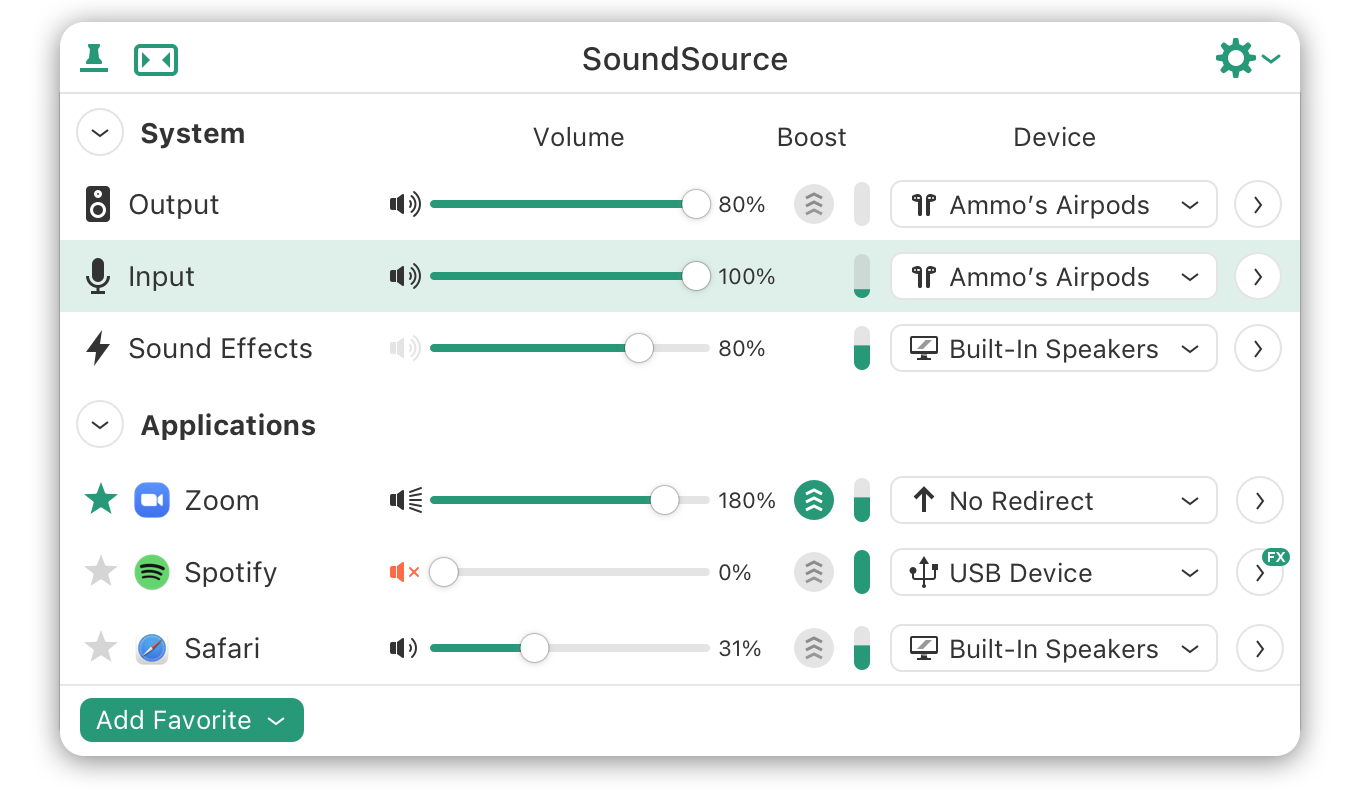
			<content type="html"><![CDATA[<p>As indicated, previously, Rogue Amoeba the maker of Audio Hijack, Loopback, and SoundSource might have the solution you seek.&nbsp; Any one of those applications permits audio rerouting.&nbsp; </p><p>I see Zoom in one of its screenshots:</p><p><span class="postimg"><img src="https://www.rogueamoeba.com/soundsource/images/hero@2x.png" alt="https://www.rogueamoeba.com/soundsource/images/hero@2x.png" title="https://www.rogueamoeba.com/soundsource/images/hero@2x.png"/></span></p><p><a href="https://www.rogueamoeba.com/">https://www.rogueamoeba.com/</a></p>]]></content>
			<author>
				<name><![CDATA[Amen Ptah Ra]]></name>
				<uri>https://forum.modartt.com/profile.php?id=5334</uri>
			</author>
			<updated>2021-01-05T21:15:28Z</updated>
			<id>https://forum.modartt.com/viewtopic.php?pid=972933#p972933</id>
		</entry>
		<entry>
			<title type="html"><![CDATA[Re: PianoTeq on Zoom Calls]]></title>
			<link rel="alternate" href="https://forum.modartt.com/viewtopic.php?pid=972931#p972931"/>
			<content type="html"><![CDATA[<p>Thank you all for your responses. I am using a MacBook Pro and a Scarlett Solo with the Mic 1 input (XLR) for a microhone and the piano going&nbsp; as MIDI into the Mac as a USB input. This digital interface does not permit swapping the two channels, but I have a Komplete Audio 2 interface that does, so I will try that. I should also explain that the audio out from the keyboard does work through the Scarlett. The keyboard is a Yamaha P-110, so I can use RCA connectors out from the keyboard. Students can hear that audio fine, but cannot hear the PianoTeq output, although I can.</p><p>The PianoTeq samples are wonderful, so I will keep trying to get those sounds out to students.</p><p>Thanks again.<br />Nick Peters</p>]]></content>
			<author>
				<name><![CDATA[nicholaspeters]]></name>
				<uri>https://forum.modartt.com/profile.php?id=7570</uri>
			</author>
			<updated>2021-01-05T20:47:00Z</updated>
			<id>https://forum.modartt.com/viewtopic.php?pid=972931#p972931</id>
		</entry>
		<entry>
			<title type="html"><![CDATA[Re: PianoTeq on Zoom Calls]]></title>
			<link rel="alternate" href="https://forum.modartt.com/viewtopic.php?pid=972926#p972926"/>
			<content type="html"><![CDATA[<p>Just to add, I&#039;m taking piano lessons over zoom. My setup is a condenser mic (appx 2&#039; from the speakers), plugged into a Scarlett 8i6 usb interface, to a PC running Win10.The mic is handy to pick up one&#039;s speech as well as the piano. Honestly not much idea how it sounds on the teacher&#039;s end, as they&#039;re only using an iPad. But at least their feedback to the playing on our side always seems accurate.</p><p>The bugaboo was, initially I plugged into the 2nd mic input, and could not get it to work, for no apparent reason. Finally I saw it has to be plugged into Input 1, and suddenly it worked fine. The issue seems to be that Zoom can&#039;t accept a stereo input, but rather only the &quot;first&quot; signal (which I believe is Left by default).</p><p>Would need to look into further, but I&#039;d expect one could utilize multiple inputs, as long as they can all be routed to the &quot;#1 / left&quot; side of the interface. Or at least, I think I&#039;d be able to use all the mic and line inputs on the interface, with the proper routing.</p><p>But now I realize this may not be particularly relevant, as it&#039;s a different computer running zoom from the one running the piano. So in my case the piano is a standalone instrument (which I am then mic&#039;ing acoustically, rather than running a line input). If the goal is to be running PTQ and Zoom in the same box (as well as a mic for voice, presumably), this may not be much help.</p><p>But at least do keep in mind you can&#039;t transmit as stereo!</p><p>Edit to add:</p><p>Sorry, my lessons are not using Zoom, they are on Skype.</p><p>Also, one of my kids just started voice lessons, and those are using FaceTime. The instructor said they found it provides the best sound quality. And from personal experience with family/social gatherings, this seems to bear out.</p><p>If anything, Zoom seems to have the worst quality. And (at least in default) it&#039;s cumbersome by not allowing duplex. So in a way, kudos to them for making an inferior product so popular. But perhaps you might at least look at other platforms?</p>]]></content>
			<author>
				<name><![CDATA[houston]]></name>
				<uri>https://forum.modartt.com/profile.php?id=4483</uri>
			</author>
			<updated>2021-01-05T20:03:37Z</updated>
			<id>https://forum.modartt.com/viewtopic.php?pid=972926#p972926</id>
		</entry>
		<entry>
			<title type="html"><![CDATA[Re: PianoTeq on Zoom Calls]]></title>
			<link rel="alternate" href="https://forum.modartt.com/viewtopic.php?pid=972924#p972924"/>
			<content type="html"><![CDATA[<p>I haven&#039;t tried this specifically, and your OS may be a factor as well, but I know you can share computer audio with Zoom using <a href="https://support.zoom.us/hc/en-us/articles/201362643-Sharing-computer-sound-during-screen-sharing">https://support.zoom.us/hc/en-us/articl...en-sharing</a> and then you need PTQ to route through the OS instead of directly to hardware (e.g. WDM or Direct Audio instead of ASIO--depending on your microphone and audio interfaces).&nbsp; If that doesn&#039;t work, some sound card drivers offer a secondary internal sound route (e.g. Creative has &quot;What U Hear&quot; as an audio interface that you can set as a microphone/input), and there is the option of a second computer like Twitch streams use that will do the audio processing but pass it to the video chat computer--though I don&#039;t think you&#039;ll need that.</p>]]></content>
			<author>
				<name><![CDATA[tmyoung]]></name>
				<uri>https://forum.modartt.com/profile.php?id=3155</uri>
			</author>
			<updated>2021-01-05T18:53:42Z</updated>
			<id>https://forum.modartt.com/viewtopic.php?pid=972924#p972924</id>
		</entry>
		<entry>
			<title type="html"><![CDATA[Re: PianoTeq on Zoom Calls]]></title>
			<link rel="alternate" href="https://forum.modartt.com/viewtopic.php?pid=972922#p972922"/>
			<content type="html"><![CDATA[<p>Have a look at this thread, especially the suggestion (including a video) Groove On gave somewhere halfway. Your set-up doesn&#039;t use an external audio interface (as far as I can tell from your post), so it might work.</p><p><a href="https://forum.modartt.com/viewtopic.php?id=7577">https://forum.modartt.com/viewtopic.php?id=7577</a></p>]]></content>
			<author>
				<name><![CDATA[thiesdewaard]]></name>
				<uri>https://forum.modartt.com/profile.php?id=6660</uri>
			</author>
			<updated>2021-01-05T18:28:17Z</updated>
			<id>https://forum.modartt.com/viewtopic.php?pid=972922#p972922</id>
		</entry>
		<entry>
			<title type="html"><![CDATA[Re: PianoTeq on Zoom Calls]]></title>
			<link rel="alternate" href="https://forum.modartt.com/viewtopic.php?pid=972921#p972921"/>
			<content type="html"><![CDATA[<p>Like others have suggested, you can probably use an application like Audio Hijack to connect the audio internally from Pianoteq to Zoom.<br /> However, I have not tried that myself.&nbsp; </p><p>If you have more than one computer, you can use this strategy: I recently did a little concert for my family through Zoom. I used one Mac mini with Pianoteq and connected the audio out to the audio in of a second mini running the Zoom software. Within Zoom&#039;s audio preferences, you can select the audio source and switch between the microphone from your webcam to the line in of the computer running Zoom. Not ideal, but it worked pretty good!</p><div class="quotebox"><cite>nicholaspeters wrote:</cite><blockquote><p>I am a piano teacher who uses Zoom to deliver lessons to students. I would like to use PianoTeq to stream my keyboard audio. While I can hear the piano in my headphones, my students cannot. I have tried every setting available, but no luck so far. Does anyone have suggestions on how I might get past this technical issue?</p></blockquote></div>]]></content>
			<author>
				<name><![CDATA[aWc]]></name>
				<uri>https://forum.modartt.com/profile.php?id=6082</uri>
			</author>
			<updated>2021-01-05T18:02:05Z</updated>
			<id>https://forum.modartt.com/viewtopic.php?pid=972921#p972921</id>
		</entry>
		<entry>
			<title type="html"><![CDATA[PianoTeq on Zoom Calls]]></title>
			<link rel="alternate" href="https://forum.modartt.com/viewtopic.php?pid=972918#p972918"/>
			<content type="html"><![CDATA[<p>I am a piano teacher who uses Zoom to deliver lessons to students. I would like to use PianoTeq to stream my keyboard audio. While I can hear the piano in my headphones, my students cannot. I have tried every setting available, but no luck so far. Does anyone have suggestions on how I might get past this technical issue?</p>]]></content>
			<author>
				<name><![CDATA[nicholaspeters]]></name>
				<uri>https://forum.modartt.com/profile.php?id=7570</uri>
			</author>
			<updated>2021-01-05T15:54:52Z</updated>
			<id>https://forum.modartt.com/viewtopic.php?pid=972918#p972918</id>
		</entry>
</feed>