<?xml version="1.0" encoding="utf-8"?>
<feed xmlns="http://www.w3.org/2005/Atom">
	<title type="html"><![CDATA[Modartt user forum - Kawai K-300 Aures and Pianoteq 7 assistance appreciated.]]></title>
	<link rel="self" href="https://forum.modartt.com/extern.php?action=feed&amp;tid=7965&amp;type=atom"/>
	<updated>2021-03-09T15:32:24Z</updated>
	<generator>PunBB</generator>
	<id>https://forum.modartt.com/viewtopic.php?id=7965</id>
		<entry>
			<title type="html"><![CDATA[Re: Kawai K-300 Aures and Pianoteq 7 assistance appreciated.]]></title>
			<link rel="alternate" href="https://forum.modartt.com/viewtopic.php?pid=974480#p974480"/>
			<content type="html"><![CDATA[<div class="quotebox"><cite>Maciek1965 wrote:</cite><blockquote><p>Thanks a lot Robinlb !</p><p>I will try a connection with audio-interface /Focusrite Scarlett Solo 3rd Gen should do the job !/</p><p>By the way, Do You think that&nbsp; the Pianoteq Stage 7 is good enough for me as the beginner in pianosound-experiments ?</p><p>Best regards<br />Maciej</p></blockquote></div><p>Yes, it&#039;s definitely good enough, and certainly better than built-in audio source in most DPs.<br />The CA99&#039;s soundboard will works nice with it, deep bass and great vibration sensation to fingers and pedal.<br />but&nbsp; of course, it will require you to be patient with some tweaks. I prefer Bluthner and YC5 of PTQ7 on my CA98&amp;Auido system. For your reference.</p>]]></content>
			<author>
				<name><![CDATA[robinlb]]></name>
				<uri>https://forum.modartt.com/profile.php?id=7435</uri>
			</author>
			<updated>2021-03-09T15:32:24Z</updated>
			<id>https://forum.modartt.com/viewtopic.php?pid=974480#p974480</id>
		</entry>
		<entry>
			<title type="html"><![CDATA[Re: Kawai K-300 Aures and Pianoteq 7 assistance appreciated.]]></title>
			<link rel="alternate" href="https://forum.modartt.com/viewtopic.php?pid=974477#p974477"/>
			<content type="html"><![CDATA[<p>Thanks a lot Robinlb !</p><p>I will try a connection with audio-interface /Focusrite Scarlett Solo 3rd Gen should do the job !/</p><p>By the way, Do You think that&nbsp; the Pianoteq Stage 7 is good enough for me as the beginner in pianosound-experiments ?</p><p>Best regards<br />Maciej</p><br /><br /><br /><div class="quotebox"><cite>robinlb wrote:</cite><blockquote><div class="quotebox"><cite>Maciek1965 wrote:</cite><blockquote><p>Hello Petr !</p><p>Did You manage to solve Your problems with connetion to K 300 ?<br />I have Kawai CA 99 and desperately try to connect it to my laptop with PTQ, so far without eny good result ?</p><p>Let me hnow please if You have done eny progress with Your connectionproblem !</p><p>Best regards<br />Maciej</p></blockquote></div><p>My CA98 is connected to my desktop with RME DAC, and I added another two pairs of speakers working together with CA98. PtqV7 sounds nice and Im satisfied for this system.<br />CA98(USB-MIDI)-&gt;Desktop(USB) -&gt;ADI2 DAC(2Line Out RCA/XLR) -&gt;1 Tube pre-AMP -&gt;CA98 (mainly use its soundboard)<br />&nbsp; &nbsp; &nbsp; &nbsp; &nbsp; &nbsp; &nbsp; &nbsp; &nbsp; &nbsp; &nbsp; &nbsp; &nbsp; &nbsp; &nbsp; &nbsp; &nbsp; &nbsp; &nbsp; &nbsp; &nbsp; &nbsp; &nbsp; &nbsp; -&gt;2 Tube AMP+Tannoy CPA5 -&gt;ART RM5 monitors<br />Of course, if you want to simplify, just connect a qualified auido interface or DAC (eg. RME Babyface pro for win7/10 or Apogee Duet3 for Mac.....) to your laptop and CA99 line in port, turn off Local control on CA99. Ptq will be well running, and enjoy it :-)</p></blockquote></div>]]></content>
			<author>
				<name><![CDATA[Maciek1965]]></name>
				<uri>https://forum.modartt.com/profile.php?id=7691</uri>
			</author>
			<updated>2021-03-09T14:03:06Z</updated>
			<id>https://forum.modartt.com/viewtopic.php?pid=974477#p974477</id>
		</entry>
		<entry>
			<title type="html"><![CDATA[Re: Kawai K-300 Aures and Pianoteq 7 assistance appreciated.]]></title>
			<link rel="alternate" href="https://forum.modartt.com/viewtopic.php?pid=974469#p974469"/>
			<content type="html"><![CDATA[<div class="quotebox"><cite>Maciek1965 wrote:</cite><blockquote><p>Hello Petr !</p><p>Did You manage to solve Your problems with connetion to K 300 ?<br />I have Kawai CA 99 and desperately try to connect it to my laptop with PTQ, so far without eny good result ?</p><p>Let me hnow please if You have done eny progress with Your connectionproblem !</p><p>Best regards<br />Maciej</p></blockquote></div><p>My CA98 is connected to my desktop with RME DAC, and I added another two pairs of speakers working together with CA98. PtqV7 sounds nice and Im satisfied for this system.<br />CA98(USB-MIDI)-&gt;Desktop(USB) -&gt;ADI2 DAC(2Line Out RCA/XLR) -&gt;1 Tube pre-AMP -&gt;CA98 (mainly use its soundboard)<br />&nbsp; &nbsp; &nbsp; &nbsp; &nbsp; &nbsp; &nbsp; &nbsp; &nbsp; &nbsp; &nbsp; &nbsp; &nbsp; &nbsp; &nbsp; &nbsp; &nbsp; &nbsp; &nbsp; &nbsp; &nbsp; &nbsp; &nbsp; &nbsp; -&gt;2 Tube AMP+Tannoy CPA5 -&gt;ART RM5 monitors<br />Of course, if you want to simplify, just connect a qualified auido interface or DAC (eg. RME Babyface pro for win7/10 or Apogee Duet3 for Mac.....) to your laptop and CA99 line in port, turn off Local control on CA99. Ptq will be well running, and enjoy it :-)</p>]]></content>
			<author>
				<name><![CDATA[robinlb]]></name>
				<uri>https://forum.modartt.com/profile.php?id=7435</uri>
			</author>
			<updated>2021-03-09T01:27:30Z</updated>
			<id>https://forum.modartt.com/viewtopic.php?pid=974469#p974469</id>
		</entry>
		<entry>
			<title type="html"><![CDATA[Re: Kawai K-300 Aures and Pianoteq 7 assistance appreciated.]]></title>
			<link rel="alternate" href="https://forum.modartt.com/viewtopic.php?pid=974430#p974430"/>
			<content type="html"><![CDATA[<p>Hello Petr !</p><p>Did You manage to solve Your problems with connetion to K 300 ?<br />I have Kawai CA 99 and desperately try to connect it to my laptop with PTQ, so far without eny good result ?</p><p>Let me hnow please if You have done eny progress with Your connectionproblem !</p><p>Best regards<br />Maciej</p>]]></content>
			<author>
				<name><![CDATA[Maciek1965]]></name>
				<uri>https://forum.modartt.com/profile.php?id=7691</uri>
			</author>
			<updated>2021-03-07T11:32:25Z</updated>
			<id>https://forum.modartt.com/viewtopic.php?pid=974430#p974430</id>
		</entry>
		<entry>
			<title type="html"><![CDATA[Re: Kawai K-300 Aures and Pianoteq 7 assistance appreciated.]]></title>
			<link rel="alternate" href="https://forum.modartt.com/viewtopic.php?pid=971944#p971944"/>
			<content type="html"><![CDATA[<p>Thanks Nick.</p><p>But it&#039;s strange.&nbsp; I remamber years ago I had a slow computer, with onboard sound cart, and didn&#039;t felt any latency problems. After upgrade to a whole new &amp; faster computer and add a simple a 5.1 offboard soundcard, I started to feel latency issues. Both PCs in this case was when I still used a MIDI cable with joystick connection.</p>]]></content>
			<author>
				<name><![CDATA[Beto-Music]]></name>
				<uri>https://forum.modartt.com/profile.php?id=8</uri>
			</author>
			<updated>2020-12-06T23:21:27Z</updated>
			<id>https://forum.modartt.com/viewtopic.php?pid=971944#p971944</id>
		</entry>
		<entry>
			<title type="html"><![CDATA[Re: Kawai K-300 Aures and Pianoteq 7 assistance appreciated.]]></title>
			<link rel="alternate" href="https://forum.modartt.com/viewtopic.php?pid=971931#p971931"/>
			<content type="html"><![CDATA[<p>Hi Beto-Music. The last audio interface I had was a Zoom UAC2, this was a USB3 device with low latency. After some time I tried Asio4All and noticed a &#039;slight&#039; improvement on both the performance index in Pianoteq, and less noticeable jitter.</p><p>Latency is not an issue these days with Pianoteq on my HP Omen PC. I think an upgrade to ones PC is the best way to go, not a new audio interface. My performance index improved and jitter was gone completely (at least I could not detect it during playing) compared to my previous, and less powerful PC. I have only used Asio4All on this PC.</p><p>There are some advantages with an audio interface, multi-channel balanced outputs for example, to use Pianoteq with five outputs and five powered monitors. Also to have Phantom Power microphone preamps/inputs for live recording, but these would probably not benefit Petr with the Kawai and Pianoteq setup.</p><p>Nick</p>]]></content>
			<author>
				<name><![CDATA[MeDorian]]></name>
				<uri>https://forum.modartt.com/profile.php?id=4550</uri>
			</author>
			<updated>2020-12-06T15:53:33Z</updated>
			<id>https://forum.modartt.com/viewtopic.php?pid=971931#p971931</id>
		</entry>
		<entry>
			<title type="html"><![CDATA[Re: Kawai K-300 Aures and Pianoteq 7 assistance appreciated.]]></title>
			<link rel="alternate" href="https://forum.modartt.com/viewtopic.php?pid=971928#p971928"/>
			<content type="html"><![CDATA[<p>The cheapest soundcard with ASIO???</p><p><a href="https://www.amazon.com/Mr-Dj-AD-IO-Channel-SoundCard/dp/B00BCA4D46/ref=sr_1_4?dchild=1&amp;keywords=asio+sound+card&amp;qid=1607263279&amp;sr=8-4">https://www.amazon.com/Mr-Dj-AD-IO-Chan...amp;sr=8-4</a></p><p>Is native ASIO, in a soundcard, a sure indicator of acceptable latency by using pianoteq???</p><p>And I don&#039;t refer just about the latency number on screen, but the latency of the soundboard circuit itself, not presented on screen.</p><p>I think we really need to creat a list of affordable soundcards that works with fine latency on pianoteq, or even soundcards that works fine once we install ASIO4ALL.</p><p>On web there are some latency checkers for systems. Is it realiable?</p>]]></content>
			<author>
				<name><![CDATA[Beto-Music]]></name>
				<uri>https://forum.modartt.com/profile.php?id=8</uri>
			</author>
			<updated>2020-12-06T14:49:36Z</updated>
			<id>https://forum.modartt.com/viewtopic.php?pid=971928#p971928</id>
		</entry>
		<entry>
			<title type="html"><![CDATA[Re: Kawai K-300 Aures and Pianoteq 7 assistance appreciated.]]></title>
			<link rel="alternate" href="https://forum.modartt.com/viewtopic.php?pid=971922#p971922"/>
			<content type="html"><![CDATA[<p>Dear Obiwan,</p><p>Thank you very much for your valuable information. I appreciate it very much.</p><p>I will collect money and within a short time will purchase the PTQ 7.</p><p>Then, after installation I will be happy to inform you how it works.</p><p>I wish you and the other guys a nice weekend.</p><p>Thanks&amp;cheers,</p><p>Petr</p>]]></content>
			<author>
				<name><![CDATA[Petr Planý]]></name>
				<uri>https://forum.modartt.com/profile.php?id=7492</uri>
			</author>
			<updated>2020-12-06T08:29:32Z</updated>
			<id>https://forum.modartt.com/viewtopic.php?pid=971922#p971922</id>
		</entry>
		<entry>
			<title type="html"><![CDATA[Re: Kawai K-300 Aures and Pianoteq 7 assistance appreciated.]]></title>
			<link rel="alternate" href="https://forum.modartt.com/viewtopic.php?pid=971916#p971916"/>
			<content type="html"><![CDATA[<div class="quotebox"><cite>Petr Planý wrote:</cite><blockquote><p>Hello folks,</p><p>In that case, even if it is a pretty preliminary, I’d like to ask for a kind response of dear Obiwan please:</p><p>I’ve found the FOCUSRITE Scarlett Solo 3rd Gen. It’s cheaper and twice smaller than the Scarlett 2i2. It seems, at least for me, it offers the same or similar properties as its bigger brother. It’s here:</p><p><a href="https://kytary.cz/focusrite-scarlett-solo-3rd-gen/HN206300/">https://kytary.cz/focusrite-scarlett-so.../HN206300/</a></p><p>The question is: Is this Scarlett Solo 3rd Gen capable to replace the Scarlett 2i2 for my needs please?</p><p>And my naive cable connection scheme: </p><p>From the Kawai USB-B to USB-A of the Acer Spin laptop, the USB-C from the laptop to the Scarlett (Solo 3rd Gen.) USB-C, from the Scarlett Line-Out to the Kawai Line-In.</p><p>If it is a bad scheme describe in shortness the working one please.</p><p>I believe it will work either by the first or the second way. Then, I will certainly not fiddle with the settings since I need to work, pracise and enjoy music. As Phil Best, the splendid pianist I’ve watched him in the PTQ videos, says. He doesn‘t change too many parametres of the PTQ but only plays the music. And certainly on the Best level.</p><p>Thank you very much.</p><p>I look forward to hearing from you.</p><p>Cheers,</p><p>Petr</p></blockquote></div><p>The Scarlett Solo 3rd Gen, should work equally well for your use case. It only has a single mic pre-amp, but as you are only interested in playing audio out of it rather than recording audio in to it, this should fulfil your needs. As it does not have MIDI/IN out ports on the back you will need to connect up your Kawai via USB like you have described to carry the MIDI information between your piano and laptop.</p><p>For now though, as others have suggested I would attempt to resolve the technical problems you have experienced when connecting direct to your laptop with the full version of PianoTeq, before shedding out extra for an audio interface. You can always do this at a later date if you wish to upgrade, or are not satisfied with the sound/latency when connected direct to your laptop.&nbsp; I used PianoTeq very satisfactorily direct to my laptop for many years before I eventually decided to upgrade to using an audio interface.&nbsp; I use both the Focusrite Clarett 8Pre and the Scarlett 2i4 with PianoTeq and can testify they both work very well.</p>]]></content>
			<author>
				<name><![CDATA[obiwan]]></name>
				<uri>https://forum.modartt.com/profile.php?id=631</uri>
			</author>
			<updated>2020-12-05T22:24:27Z</updated>
			<id>https://forum.modartt.com/viewtopic.php?pid=971916#p971916</id>
		</entry>
		<entry>
			<title type="html"><![CDATA[Re: Kawai K-300 Aures and Pianoteq 7 assistance appreciated.]]></title>
			<link rel="alternate" href="https://forum.modartt.com/viewtopic.php?pid=971910#p971910"/>
			<content type="html"><![CDATA[<p>Hello folks,</p><p>I’d like to thank to all the people who are kindly involved in my PTQ challenge please.</p><p>The plan is as follows:</p><p>Within a week or two I will purchase the PTQ 7.</p><p>If it’ll work with my Kawai Aures there is no need to consider any external sound card/audio interface like the Scarlett’s ones.</p><p>If it doesn’t, I’ll be forced to proceed the latter solution.</p><p>In that case, even if it is a pretty preliminary, I’d like to ask for a kind response of dear Obiwan please:</p><p>I’ve found the FOCUSRITE Scarlett Solo 3rd Gen. It’s cheaper and twice smaller than the Scarlett 2i2. It seems, at least for me, it offers the same or similar properties as its bigger brother. It’s here:</p><p><a href="https://kytary.cz/focusrite-scarlett-solo-3rd-gen/HN206300/">https://kytary.cz/focusrite-scarlett-so.../HN206300/</a></p><p>The question is: Is this Scarlett Solo 3rd Gen capable to replace the Scarlett 2i2 for my needs please?</p><p>And my naive cable connection scheme: </p><p>From the Kawai USB-B to USB-A of the Acer Spin laptop, the USB-C from the laptop to the Scarlett (Solo 3rd Gen.) USB-C, from the Scarlett Line-Out to the Kawai Line-In.</p><p>If it is a bad scheme describe in shortness the working one please.</p><p>I believe it will work either by the first or the second way. Then, I will certainly not fiddle with the settings since I need to work, pracise and enjoy music. As Phil Best, the splendid pianist I’ve watched him in the PTQ videos, says. He doesn‘t change too many parametres of the PTQ but only plays the music. And certainly on the Best level.</p><p>Thank you very much.</p><p>I look forward to hearing from you.</p><p>Cheers,</p><p>Petr</p>]]></content>
			<author>
				<name><![CDATA[Petr Planý]]></name>
				<uri>https://forum.modartt.com/profile.php?id=7492</uri>
			</author>
			<updated>2020-12-05T18:14:36Z</updated>
			<id>https://forum.modartt.com/viewtopic.php?pid=971910#p971910</id>
		</entry>
		<entry>
			<title type="html"><![CDATA[Re: Kawai K-300 Aures and Pianoteq 7 assistance appreciated.]]></title>
			<link rel="alternate" href="https://forum.modartt.com/viewtopic.php?pid=971889#p971889"/>
			<content type="html"><![CDATA[<p>Petr, it&#039;s probably a bug. Quite normal since V7 was released recently. Don&#039;t worry, Modartt fixes bugs quite fast, and you just will need to download the fixed trial version. <br />You will need to give details about your system, to help then fix it, if it&#039;s really a bug.</p><p>I noticed that in Windows-8 the function of MIDI record from Recently Played on The Keyboard, it&#039;s not working for things I played last days. My digital piano it&#039;s not connected, as it&#039;s on cleaning &amp; repair process, but thing&nbsp; Iplayed with mouse last days, testing functions, are not appearing in the Recently Played on Keyboard. Maybe it&#039;s a bug...</p><p>About latency, it&#039;s a mess sometimes. I had a PC with onboard soundcard that worked with better latency than some cheap offboard soundcard in a faster PC, both running Asio4all. And Asio4all not always works well too.<br />I bet many people with a digital piano and a laptop or even desktop, download pianoteq, to test, but quit to buy due latency issues. Or some even change the on board for a offboard soundcard, and still have some issues about latency.</p><p>Sometimes the latency number on pianoteq window can be ok, loike 6ms, but the latency of the soundcard, the latency that do not appears as a number on any screen, but latency of the soundboard circuits itself, it&#039;s somewhat high, despite the software latency be low. And some people are more sensitive to latency than others.</p><p> Not everyone are dispose to pay for a costy soundcard or costy exterior sondcard or a even more pricy audio interface. <strong>I suggest that we (Forum people and Modartt) should have a list of affordable soundcards that works fine with pianoteq for latency issues, if we want more people to buy pianoteq.</strong>We could start with a list of low cost soundcards with native ASIO drivers, or perhaps even a list of low cost souncards, even without native ASIO, but that works fine once Asio4all it&#039;s installed.</p>]]></content>
			<author>
				<name><![CDATA[Beto-Music]]></name>
				<uri>https://forum.modartt.com/profile.php?id=8</uri>
			</author>
			<updated>2020-12-05T01:09:47Z</updated>
			<id>https://forum.modartt.com/viewtopic.php?pid=971889#p971889</id>
		</entry>
		<entry>
			<title type="html"><![CDATA[Re: Kawai K-300 Aures and Pianoteq 7 assistance appreciated.]]></title>
			<link rel="alternate" href="https://forum.modartt.com/viewtopic.php?pid=971888#p971888"/>
			<content type="html"><![CDATA[<p>A few things might be causing a problem, possibly your line out might be sending a &#039;headphone&#039; level signal, this can be changed to line-out in audio settings on your laptop.</p><p>Regarding an external audio interface, I don&#039;t think it will make a difference here, I use Asio4All with no problems at 128 samples, 48 Khz, 256 polyphony. It might be better to have Pianoteq running without issues first, listening to headphones and solving the transpose problem. Then check if hiss is present through headphones, if not then the hiss might be the cable or the output not set to line level. Also I would have the laptop volume set to 50, or lower to start off with until you find the optimum level to go to the Kawai.</p><p>Nick</p>]]></content>
			<author>
				<name><![CDATA[MeDorian]]></name>
				<uri>https://forum.modartt.com/profile.php?id=4550</uri>
			</author>
			<updated>2020-12-05T00:54:16Z</updated>
			<id>https://forum.modartt.com/viewtopic.php?pid=971888#p971888</id>
		</entry>
		<entry>
			<title type="html"><![CDATA[Re: Kawai K-300 Aures and Pianoteq 7 assistance appreciated.]]></title>
			<link rel="alternate" href="https://forum.modartt.com/viewtopic.php?pid=971882#p971882"/>
			<content type="html"><![CDATA[<p>Hello Beto-Music,</p><p>Thank you for your information.</p><p>I have changed the PTQ transposition value to 5 and the C key matches with the C note. Anyhow, after turn off/on the PTQ the value goes again to 0 and a horrible hiss appears. After change of the value to 5 the hiss disappears.</p><p>BTW the Kawai transposer is still in the 0 position and while playing on Kawai the C matches the C.</p><p>It is also interesting the PTQ screen shows the 8000 kHz sampling rate only. When changed to higher values the hiss appears again.</p><p>The latency is still too much high for a real playing the piano. Any attempt to change its value to smaller ones doesn’t function</p><p>So thus, if the PTQ transposer is in the value 5, it matches the tune and doesn’t hiss. If the sampling rate is (automatically) set to the 8000 kHz it doesn’t hiss and play the PTQ instruments. Anyhow, the sound quality isn’t too much high since the sampling rate is so small.</p><p>The question is if it is a matter of the Trial version of the PTQ I have and if it would be OK with the full PTQ Pro version.</p><p>In the mean time I have been contemplating the external sound card – the Scarlett 2i2 (see the today’s Obiwan’s thread please). Who knows, it might work better and much safely. But I wouldn’t like to have a bulky staff on the piano top).</p><p>I would appreciate very much your opinion please.</p><p>Cheers,</p><p>Petr</p>]]></content>
			<author>
				<name><![CDATA[Petr Planý]]></name>
				<uri>https://forum.modartt.com/profile.php?id=7492</uri>
			</author>
			<updated>2020-12-04T21:45:18Z</updated>
			<id>https://forum.modartt.com/viewtopic.php?pid=971882#p971882</id>
		</entry>
		<entry>
			<title type="html"><![CDATA[Re: Kawai K-300 Aures and Pianoteq 7 assistance appreciated.]]></title>
			<link rel="alternate" href="https://forum.modartt.com/viewtopic.php?pid=971881#p971881"/>
			<content type="html"><![CDATA[<p>Hello Obiwan,</p><p>Thank you very much for encouraging me to continue. Thanks also for the recommended Scarlett 2i2 interface. I‘ve founded it in Prague, no problem to get it.</p><p>The Scarlett 2i2 looks great. Although I’d like to avoid too much staff on the piano desk maybe there is an additional benefit to use the external sound card.</p><p>First of all maybe it’s more safe for the Kawai/laptop HW/SW. Yesterday, as I’ve proceed by try/error method horrible hisses appeared. But being a musician not a technician I am probably too much paranoic.</p><p>Maybe the Scarlett 2i2 offers better results. The use of the PTQ on my Kawai-300 Aures has the only purpose to practise a classical piano literature, to improvise and enjoy the music on it. Although the Shigeru-Kawai sounds used by the Aures are splendid it seems (in fact, it’s audible) the PTQ physical modelling promises even better results.</p><p>But as written above I will not use this music combo for anything else than a piano proctising tool.</p><p>Maybe the Scarlett 2i2 brings more comfort and stability than the direct PTQ/asio/piano connection please?<br />If yes, it’ll be great to upgrate to it. BTW the Scarlett 2i2 doesn&#039;s use the MIDI channels. I hope its operating is pretty easy.</p><p>Let me kindly know please.</p><p>Thank you very much.</p><p>P.S. Kindly read my today’s response to Beto-Music. The troubles with the PDQ transposer, sampling rate, hissing, impossibility to change the latency (at least at the Trial version) warn me currently against the purchase of the PTQ.</p><p>Do you guess if these troubles sustain even with the full PTQ version there is chance to easily resolve it by the external sound card as the Scarlett 2i2 interface please?</p><p>The PTQ costs a pretty much of money and I wouldn’t like to spend my funds for the product which is certainly great on the one side. But on the other side the weakness is its implementation to existing sound cards and keyboards.</p><p>I will appreciate very much your opinion please.</p><p>Thank you very much.</p><p>Cheers,</p><p>Petr</p>]]></content>
			<author>
				<name><![CDATA[Petr Planý]]></name>
				<uri>https://forum.modartt.com/profile.php?id=7492</uri>
			</author>
			<updated>2020-12-04T21:43:21Z</updated>
			<id>https://forum.modartt.com/viewtopic.php?pid=971881#p971881</id>
		</entry>
		<entry>
			<title type="html"><![CDATA[Re: Kawai K-300 Aures and Pianoteq 7 assistance appreciated.]]></title>
			<link rel="alternate" href="https://forum.modartt.com/viewtopic.php?pid=971866#p971866"/>
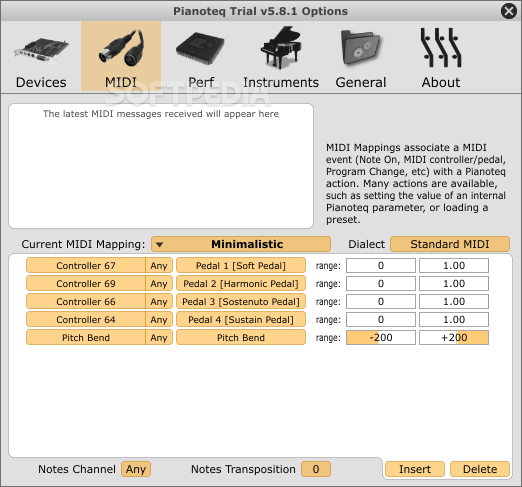
			<content type="html"><![CDATA[<p>Petr, look this:</p><p><a href="https://www.modartt.com/faq?category=pianoteq_working">https://www.modartt.com/faq?category=pianoteq_working</a></p><p><strong>&quot;How can I transpose in Pianoteq?<br />In Options-Midi there is a notes transposition value. You can set this value to anything between -36 and +36.&quot;</strong></p><br /><p>In the botton of the window, see there: </p><p>Note Channel&nbsp; Notes Transposition MIDI tunning.</p><p><span class="postimg"><img src="https://windows-cdn.softpedia.com/screenshots/pianoteq_15.png" alt="PunBB bbcode test" title="PunBB bbcode test"/></span></p><p>Look if Notes Transposition it&#039;s on zero or if it&#039;s set with other number.</p><p>If it&#039;s not zero and you never set anything there before, it may be a bug. What Windows version are you using?</p><p>If it&#039;s on zero, it may be a problem of Kawai K-300 transposition for controller function be set to 5 notes and you didn&#039;t noticed. This if Kawai-300 allows trasposition separated for MIDI controller function, and separated for internal K-300 soundbanks.</p>]]></content>
			<author>
				<name><![CDATA[Beto-Music]]></name>
				<uri>https://forum.modartt.com/profile.php?id=8</uri>
			</author>
			<updated>2020-12-04T14:48:58Z</updated>
			<id>https://forum.modartt.com/viewtopic.php?pid=971866#p971866</id>
		</entry>
</feed>