<?xml version="1.0" encoding="utf-8"?>
<feed xmlns="http://www.w3.org/2005/Atom">
	<title type="html"><![CDATA[Modartt user forum - Tuning: only change small part of the keyboard]]></title>
	<link rel="self" href="https://forum.modartt.com/extern.php?action=feed&amp;tid=5994&amp;type=atom"/>
	<updated>2018-10-10T09:32:33Z</updated>
	<generator>PunBB</generator>
	<id>https://forum.modartt.com/viewtopic.php?id=5994</id>
		<entry>
			<title type="html"><![CDATA[Re: Tuning: only change small part of the keyboard]]></title>
			<link rel="alternate" href="https://forum.modartt.com/viewtopic.php?pid=956746#p956746"/>
			<content type="html"><![CDATA[<p>Hi!<br />Thanks for your ideas.</p><p>At the moment, I&#039;ll continue to use the VST2 version, since I don&#039;t know what the VST3 has to offer more?</p><p>In regard to MTS: I&#039;ve been able to assign whatever value in cents for whatever MIDI-Note I wanted, so it doesn&#039;t seem to me to be limited to 12 notes intonation systems. If you&#039;re interested, I could send you the Max/MSP patch I used to send the messages <i class="far fa-smile-wink smiley"></i></p><p>Cheers</p>]]></content>
			<author>
				<name><![CDATA[milux]]></name>
				<uri>https://forum.modartt.com/profile.php?id=6106</uri>
			</author>
			<updated>2018-10-10T09:32:33Z</updated>
			<id>https://forum.modartt.com/viewtopic.php?pid=956746#p956746</id>
		</entry>
		<entry>
			<title type="html"><![CDATA[Re: Tuning: only change small part of the keyboard]]></title>
			<link rel="alternate" href="https://forum.modartt.com/viewtopic.php?pid=956590#p956590"/>
			<content type="html"><![CDATA[<p>Hi Milux,</p><p>That&#039;s a good question about MTS with the VST3 version of Pianoteq, one which I will defer to the developers, although from what I understand, it is the transmission of MIDI data (such as MTS) from plugins, rather than the reception of it, that&#039;s changed with the new VST3 standards.</p><p>Having made a few Windows VST3i plugins, I can confirm that all of them have been able to faithfully receive MTS transmissions, for example when the MTS data is placed on the timeline of a DAW track (usually with REAPER here for this scenario), routed/transmitted to the virtual instrument.</p><p>One word of caution though, from what I gathered from a previous thread on this forum some weeks past, the type of MTS that Pianoteq uses is strictly limited to 12 note intonation systems, and therefore, it would likely do nothing with a full keyboard microtuning that was transmitted to the plugin, where every note across the MIDI range would be retuned. </p><p>To be honest, I&#039;ve done nothing with MTS in Pianoteq, because (a) I&#039;m typically using its elegant SCL/KBM functionality, and (b) often work with intonation systems having less or greater than 12 notes, as well as some that may repeat at intervals other than a 2/1, such as for example Bohlen-Pierce which divides harmonic 3 into 13 equal parts (one of a vast continuum of such possibilities and divisions of other harmonics).</p>]]></content>
			<author>
				<name><![CDATA[Microtuning-VI]]></name>
				<uri>https://forum.modartt.com/profile.php?id=5444</uri>
			</author>
			<updated>2018-09-28T18:14:11Z</updated>
			<id>https://forum.modartt.com/viewtopic.php?pid=956590#p956590</id>
		</entry>
		<entry>
			<title type="html"><![CDATA[Re: Tuning: only change small part of the keyboard]]></title>
			<link rel="alternate" href="https://forum.modartt.com/viewtopic.php?pid=956573#p956573"/>
			<content type="html"><![CDATA[<p>Thanks Microtuning-VI. I&#039;ll check it out.</p><p>It also seems to me that only the VST2 version supports the MIDI Tuning Standard. Is it so? Somehow it doesn&#039;t work in the VST3 version.</p>]]></content>
			<author>
				<name><![CDATA[milux]]></name>
				<uri>https://forum.modartt.com/profile.php?id=6106</uri>
			</author>
			<updated>2018-09-28T10:02:07Z</updated>
			<id>https://forum.modartt.com/viewtopic.php?pid=956573#p956573</id>
		</entry>
		<entry>
			<title type="html"><![CDATA[Re: Tuning: only change small part of the keyboard]]></title>
			<link rel="alternate" href="https://forum.modartt.com/viewtopic.php?pid=956562#p956562"/>
			<content type="html"><![CDATA[<p>Hi Milux,</p><p>Apologies. Missed that detail.</p><p>Of potential interest is a series of articles I&#039;ve written over the years: Microtuning Virtual Instruments, which can be accessed here:</p><p><a href="http://xen-arts.net/xen-articles/">http://xen-arts.net/xen-articles/</a></p><p>Almost all of them deal with using Scala for creating various kinds of popular microtuning formats, data files and tuning tables used in virtual instruments that feature full keyboard microtuning, including the SCL and KBM files used by Pianoteq. </p><p>At the beginning of the below article there is a section that demonstrates how to create and save Scala SCL and KBM files:</p><p>Microtuning Virtual Instruments – Part 5 | Scala Workflow<br /><a href="http://xen-arts.net/microtuning-virtual-instruments-part-5/">http://xen-arts.net/microtuning-virtual...ts-part-5/</a></p><p>It&#039;s fairly straight forward as you will see. It&#039;s worth having Scala installed just for that one feature, as it makes it easy to create the SCL/KBM tuning tables.</p>]]></content>
			<author>
				<name><![CDATA[Microtuning-VI]]></name>
				<uri>https://forum.modartt.com/profile.php?id=5444</uri>
			</author>
			<updated>2018-09-27T18:31:04Z</updated>
			<id>https://forum.modartt.com/viewtopic.php?pid=956562#p956562</id>
		</entry>
		<entry>
			<title type="html"><![CDATA[Re: Tuning: only change small part of the keyboard]]></title>
			<link rel="alternate" href="https://forum.modartt.com/viewtopic.php?pid=956561#p956561"/>
			<content type="html"><![CDATA[<p>Hey!<br />I actually meant directly pasting it into Pianoteq... And I didn&#039;t have the 1/1 line in what I had... I am not that familiar with Scala <i class="far fa-smile smiley"></i></p>]]></content>
			<author>
				<name><![CDATA[milux]]></name>
				<uri>https://forum.modartt.com/profile.php?id=6106</uri>
			</author>
			<updated>2018-09-27T17:03:44Z</updated>
			<id>https://forum.modartt.com/viewtopic.php?pid=956561#p956561</id>
		</entry>
		<entry>
			<title type="html"><![CDATA[Re: Tuning: only change small part of the keyboard]]></title>
			<link rel="alternate" href="https://forum.modartt.com/viewtopic.php?pid=956557#p956557"/>
			<content type="html"><![CDATA[<p>Hi Milux,</p><p>If you are pasting your tuning into Scala&#039;s File/New/Scale dialog, leave off the 1/1, as it will create that for you.</p><p>That&#039;s the likely reason for the offset of one note.</p>]]></content>
			<author>
				<name><![CDATA[Microtuning-VI]]></name>
				<uri>https://forum.modartt.com/profile.php?id=5444</uri>
			</author>
			<updated>2018-09-27T16:10:28Z</updated>
			<id>https://forum.modartt.com/viewtopic.php?pid=956557#p956557</id>
		</entry>
		<entry>
			<title type="html"><![CDATA[Re: Tuning: only change small part of the keyboard]]></title>
			<link rel="alternate" href="https://forum.modartt.com/viewtopic.php?pid=956555#p956555"/>
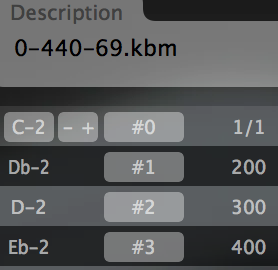
			<content type="html"><![CDATA[<p>Thanks Microtuning-VI for your reply.<br />I&#039;ve managed to get it working with MTS, but I would like to implement your solution too. <br />I&#039;m not sure how to create the SCL file you&#039;re referring to. I&#039;ve copy/pasted your settings in to the temperament and keyboard mapping sections, but it seems like there is an offset of one note... Do you know why?</p><p><span class="postimg"><img src="https://i.postimg.cc/jjtVVKRv/Screen_Shot_2018-09-27_at_17.46.18.png" alt="https://i.postimg.cc/jjtVVKRv/Screen_Shot_2018-09-27_at_17.46.18.png" title="https://i.postimg.cc/jjtVVKRv/Screen_Shot_2018-09-27_at_17.46.18.png"/></span></p>]]></content>
			<author>
				<name><![CDATA[milux]]></name>
				<uri>https://forum.modartt.com/profile.php?id=6106</uri>
			</author>
			<updated>2018-09-27T15:32:19Z</updated>
			<id>https://forum.modartt.com/viewtopic.php?pid=956555#p956555</id>
		</entry>
		<entry>
			<title type="html"><![CDATA[Re: Tuning: only change small part of the keyboard]]></title>
			<link rel="alternate" href="https://forum.modartt.com/viewtopic.php?pid=956554#p956554"/>
			<content type="html"><![CDATA[<p>It would be possible to make a full keyboard range SCL microtuning file that leaves most of the keyboard in 12 equal, then features a zone with non-12 intervals. </p><p>Facing such a task, I would be inclined to create the full range tuning in a spreadsheet using cents values, and just create the offsets needed in the unique zone(s) as a part of the whole tuning. </p><p>Knowing that 12 equal is 100 cents steps, create a SCL file that modifies the pitches you wish to offset in that region. MIDI Note 0, would be the 1/1 and have a value of 0 cents, then proceed to create the scale all the way through MIDI Note 127...</p><p>It might necessitate creating and using a special KBM file as well, where the 1/1 of the tuning would be mapped to MIDI Note 0, with what ever reference is needed, and I&#039;m assuming standard concert 69.A @ 440 Hz for this.</p><p>As we know, usually, 12 equal will be this in cents:</p><p>0<br />100<br />200<br />300<br />400<br />500<br />600<br />700<br />800<br />900<br />1000<br />1100<br />1200</p><p>But as a framework for doing what you are suggesting, a full range mapping would look like this:</p><p>MIDI&nbsp; &nbsp; Cents<br />00&nbsp; &nbsp; 0<br />01&nbsp; &nbsp; 100<br />02&nbsp; &nbsp; 200<br />03&nbsp; &nbsp; 300<br />04&nbsp; &nbsp; 400<br />05&nbsp; &nbsp; 500<br />06&nbsp; &nbsp; 600<br />07&nbsp; &nbsp; 700<br />08&nbsp; &nbsp; 800<br />09&nbsp; &nbsp; 900<br />10&nbsp; &nbsp; 1000<br />11&nbsp; &nbsp; 1100<br />12&nbsp; &nbsp; 1200<br />13&nbsp; &nbsp; 1300<br />14&nbsp; &nbsp; 1400<br />15&nbsp; &nbsp; 1500<br />16&nbsp; &nbsp; 1600<br />17&nbsp; &nbsp; 1700<br />18&nbsp; &nbsp; 1800<br />19&nbsp; &nbsp; 1900<br />20&nbsp; &nbsp; 2000<br />21&nbsp; &nbsp; 2100<br />22&nbsp; &nbsp; 2200<br />23&nbsp; &nbsp; 2300<br />24&nbsp; &nbsp; 2400<br />25&nbsp; &nbsp; 2500<br />26&nbsp; &nbsp; 2600<br />27&nbsp; &nbsp; 2700<br />28&nbsp; &nbsp; 2800<br />29&nbsp; &nbsp; 2900<br />30&nbsp; &nbsp; 3000<br />31&nbsp; &nbsp; 3100<br />32&nbsp; &nbsp; 3200<br />33&nbsp; &nbsp; 3300<br />34&nbsp; &nbsp; 3400<br />35&nbsp; &nbsp; 3500<br />36&nbsp; &nbsp; 3600<br />37&nbsp; &nbsp; 3700<br />38&nbsp; &nbsp; 3800<br />39&nbsp; &nbsp; 3900<br />40&nbsp; &nbsp; 4000<br />41&nbsp; &nbsp; 4100<br />42&nbsp; &nbsp; 4200<br />43&nbsp; &nbsp; 4300<br />44&nbsp; &nbsp; 4400<br />45&nbsp; &nbsp; 4500<br />46&nbsp; &nbsp; 4600<br />47&nbsp; &nbsp; 4700<br />48&nbsp; &nbsp; 4800<br />49&nbsp; &nbsp; 4900<br />50&nbsp; &nbsp; 5000<br />51&nbsp; &nbsp; 5100<br />52&nbsp; &nbsp; 5200<br />53&nbsp; &nbsp; 5300<br />54&nbsp; &nbsp; 5400<br />55&nbsp; &nbsp; 5500<br />56&nbsp; &nbsp; 5600<br />57&nbsp; &nbsp; 5700<br />58&nbsp; &nbsp; 5800<br />59&nbsp; &nbsp; 5900<br />60&nbsp; &nbsp; 6000<br />61&nbsp; &nbsp; 6100<br />62&nbsp; &nbsp; 6200<br />63&nbsp; &nbsp; 6300<br />64&nbsp; &nbsp; 6400<br />65&nbsp; &nbsp; 6500<br />66&nbsp; &nbsp; 6600<br />67&nbsp; &nbsp; 6700<br />68&nbsp; &nbsp; 6800<br />69&nbsp; &nbsp; 6900<br />70&nbsp; &nbsp; 7000<br />71&nbsp; &nbsp; 7100<br />72&nbsp; &nbsp; 7200<br />73&nbsp; &nbsp; 7300<br />74&nbsp; &nbsp; 7400<br />75&nbsp; &nbsp; 7500<br />76&nbsp; &nbsp; 7600<br />77&nbsp; &nbsp; 7700<br />78&nbsp; &nbsp; 7800<br />79&nbsp; &nbsp; 7900<br />80&nbsp; &nbsp; 8000<br />81&nbsp; &nbsp; 8100<br />82&nbsp; &nbsp; 8200<br />83&nbsp; &nbsp; 8300<br />84&nbsp; &nbsp; 8400<br />85&nbsp; &nbsp; 8500<br />86&nbsp; &nbsp; 8600<br />87&nbsp; &nbsp; 8700<br />88&nbsp; &nbsp; 8800<br />89&nbsp; &nbsp; 8900<br />90&nbsp; &nbsp; 9000<br />91&nbsp; &nbsp; 9100<br />92&nbsp; &nbsp; 9200<br />93&nbsp; &nbsp; 9300<br />94&nbsp; &nbsp; 9400<br />95&nbsp; &nbsp; 9500<br />96&nbsp; &nbsp; 9600<br />97&nbsp; &nbsp; 9700<br />98&nbsp; &nbsp; 9800<br />99&nbsp; &nbsp; 9900<br />100&nbsp; &nbsp; 10000<br />101&nbsp; &nbsp; 10100<br />102&nbsp; &nbsp; 10200<br />103&nbsp; &nbsp; 10300<br />104&nbsp; &nbsp; 10400<br />105&nbsp; &nbsp; 10500<br />106&nbsp; &nbsp; 10600<br />107&nbsp; &nbsp; 10700<br />108&nbsp; &nbsp; 10800<br />109&nbsp; &nbsp; 10900<br />110&nbsp; &nbsp; 11000<br />111&nbsp; &nbsp; 11100<br />112&nbsp; &nbsp; 11200<br />113&nbsp; &nbsp; 11300<br />114&nbsp; &nbsp; 11400<br />115&nbsp; &nbsp; 11500<br />116&nbsp; &nbsp; 11600<br />117&nbsp; &nbsp; 11700<br />118&nbsp; &nbsp; 11800<br />119&nbsp; &nbsp; 11900<br />120&nbsp; &nbsp; 12000<br />121&nbsp; &nbsp; 12100<br />122&nbsp; &nbsp; 12200<br />123&nbsp; &nbsp; 12300<br />124&nbsp; &nbsp; 12400<br />125&nbsp; &nbsp; 12500<br />126&nbsp; &nbsp; 12600<br />127&nbsp; &nbsp; 12700</p><p>Should theoretically work in Pianoteq with an appropriate KBM file, such as something like this:</p><p>! 0-440-69.kbm<br />! <br />! Size of map:<br />0<br />! First MIDI note number to retune:<br />0<br />! Last MIDI note number to retune:<br />127<br />! Middle note where the first entry in the mapping is mapped to:<br />0<br />! Reference note for which frequency is given:<br />69<br />! Frequency to tune the above note to (floating point e.g. 440.0):<br />440.000000<br />! Scale degree to consider as formal octave:<br />0<br />! Mapping.</p>]]></content>
			<author>
				<name><![CDATA[Microtuning-VI]]></name>
				<uri>https://forum.modartt.com/profile.php?id=5444</uri>
			</author>
			<updated>2018-09-27T13:49:01Z</updated>
			<id>https://forum.modartt.com/viewtopic.php?pid=956554#p956554</id>
		</entry>
		<entry>
			<title type="html"><![CDATA[Re: Tuning: only change small part of the keyboard]]></title>
			<link rel="alternate" href="https://forum.modartt.com/viewtopic.php?pid=956553#p956553"/>
			<content type="html"><![CDATA[<p>Hey hazenut,<br />Thanks for pointing me to this! I found this thread after your answer...<br /><a href="https://www.forum-pianoteq.com/viewtopic.php?id=5754">https://www.forum-pianoteq.com/viewtopic.php?id=5754</a><br />It also contains a useful midi file to test it!</p><p>Thanks!</p>]]></content>
			<author>
				<name><![CDATA[milux]]></name>
				<uri>https://forum.modartt.com/profile.php?id=6106</uri>
			</author>
			<updated>2018-09-27T13:41:56Z</updated>
			<id>https://forum.modartt.com/viewtopic.php?pid=956553#p956553</id>
		</entry>
		<entry>
			<title type="html"><![CDATA[Re: Tuning: only change small part of the keyboard]]></title>
			<link rel="alternate" href="https://forum.modartt.com/viewtopic.php?pid=956550#p956550"/>
			<content type="html"><![CDATA[<p>I remember they have said pianoteq supports real-time midi tuning standard, that you may use a sequencer to send the following message to pianoteq to tune note by note:</p><p>F0 7F id 08 02 tt ll [kk xx yy zz]x(ll) F7<br />where</p><p>F0 7F = universal realtime SysEx header<br />id&nbsp; &nbsp; = target device ID<br />08&nbsp; &nbsp; = sub-id #1 (MIDI tuning standard)<br />02&nbsp; &nbsp; = sub-id #2 (note change)<br />tt&nbsp; &nbsp; = tuning program number from 0 to 127<br />ll&nbsp; &nbsp; = number of notes to be changed (sets of [kk xx yy zz])<br />[kk xx yy zz] = MIDI note number, followed by frequency data for note<br />F7&nbsp; &nbsp; = end of SysEx message</p><p>(<a href="http://www.microtonal-synthesis.com/MIDItuning.html">http://www.microtonal-synthesis.com/MIDItuning.html</a>)</p>]]></content>
			<author>
				<name><![CDATA[hazenut]]></name>
				<uri>https://forum.modartt.com/profile.php?id=4251</uri>
			</author>
			<updated>2018-09-27T13:17:28Z</updated>
			<id>https://forum.modartt.com/viewtopic.php?pid=956550#p956550</id>
		</entry>
		<entry>
			<title type="html"><![CDATA[Tuning: only change small part of the keyboard]]></title>
			<link rel="alternate" href="https://forum.modartt.com/viewtopic.php?pid=956539#p956539"/>
			<content type="html"><![CDATA[<p>Hi there!<br />I&#039;m trying to only change the tuning of a small part of the keyboard dynamically with Max. The easiest way would probably be using the &quot;Detune&quot; dialog box (with its limitations). But I can&#039;t figure out if this can be changed with some MIDI commands or so?</p><p>An other way would be to change the scl/kbm files. But I can&#039;t figure out how to map the whole keyboard differently. All the files I see are just for 1 octave or so... </p><p>Do somebody know of a way to doing this?</p><p>Thanks in advance!</p><p>MiluX</p>]]></content>
			<author>
				<name><![CDATA[milux]]></name>
				<uri>https://forum.modartt.com/profile.php?id=6106</uri>
			</author>
			<updated>2018-09-27T08:24:05Z</updated>
			<id>https://forum.modartt.com/viewtopic.php?pid=956539#p956539</id>
		</entry>
</feed>