<?xml version="1.0" encoding="utf-8"?>
<feed xmlns="http://www.w3.org/2005/Atom">
	<title type="html"><![CDATA[Modartt user forum - length USB cable to pc]]></title>
	<link rel="self" href="https://forum.modartt.com/extern.php?action=feed&amp;tid=4008&amp;type=atom"/>
	<updated>2015-09-19T16:15:49Z</updated>
	<generator>PunBB</generator>
	<id>https://forum.modartt.com/viewtopic.php?id=4008</id>
		<entry>
			<title type="html"><![CDATA[Re: length USB cable to pc]]></title>
			<link rel="alternate" href="https://forum.modartt.com/viewtopic.php?pid=939649#p939649"/>
			<content type="html"><![CDATA[<p>Oke THX for the reply&#039;s </p><p>(sorry for my late reaction)</p>]]></content>
			<author>
				<name><![CDATA[Plurkis]]></name>
				<uri>https://forum.modartt.com/profile.php?id=4147</uri>
			</author>
			<updated>2015-09-19T16:15:49Z</updated>
			<id>https://forum.modartt.com/viewtopic.php?pid=939649#p939649</id>
		</entry>
		<entry>
			<title type="html"><![CDATA[Re: length USB cable to pc]]></title>
			<link rel="alternate" href="https://forum.modartt.com/viewtopic.php?pid=939531#p939531"/>
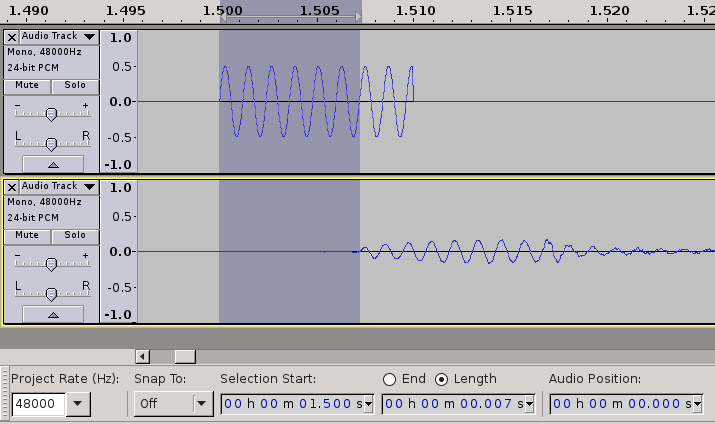
			<content type="html"><![CDATA[<div class="quotebox"><cite>AKM wrote:</cite><blockquote><p>But what is the delay for the internal soundcard?</p></blockquote></div><p>A vague estimation could be the <strong>roundtrip-time of 7 ms</strong> between the internal speaker and the internal mic of my netbook:</p><p><span class="postimg"><img src="http://fs1.directupload.net/images/150906/zhxovfjo.png" alt="http://fs1.directupload.net/images/150906/zhxovfjo.png" title="http://fs1.directupload.net/images/150906/zhxovfjo.png"/></span></p><p>The minimum &quot;Audio-to-buffer&quot; setting, that I could choose in audacity, was 3 ms (with 2 ms or 1 ms I got no output, took me some time to debug). This option has a help text &quot;higher = more latency&quot;.</p><p>cheers</p>]]></content>
			<author>
				<name><![CDATA[groovy]]></name>
				<uri>https://forum.modartt.com/profile.php?id=1021</uri>
			</author>
			<updated>2015-09-06T15:22:05Z</updated>
			<id>https://forum.modartt.com/viewtopic.php?pid=939531#p939531</id>
		</entry>
		<entry>
			<title type="html"><![CDATA[Re: length USB cable to pc]]></title>
			<link rel="alternate" href="https://forum.modartt.com/viewtopic.php?pid=939523#p939523"/>
			<content type="html"><![CDATA[<p>Thank you very much, I was very interested to check it. 9 ms. roundtrip is absolutely within the usable limits for live monitoring/playing. Lets not forget that the &quot;play&quot; latency will be in this case 5 ms. or lower.</p>]]></content>
			<author>
				<name><![CDATA[AKM]]></name>
				<uri>https://forum.modartt.com/profile.php?id=4253</uri>
			</author>
			<updated>2015-09-05T23:05:52Z</updated>
			<id>https://forum.modartt.com/viewtopic.php?pid=939523#p939523</id>
		</entry>
		<entry>
			<title type="html"><![CDATA[Re: length USB cable to pc]]></title>
			<link rel="alternate" href="https://forum.modartt.com/viewtopic.php?pid=939519#p939519"/>
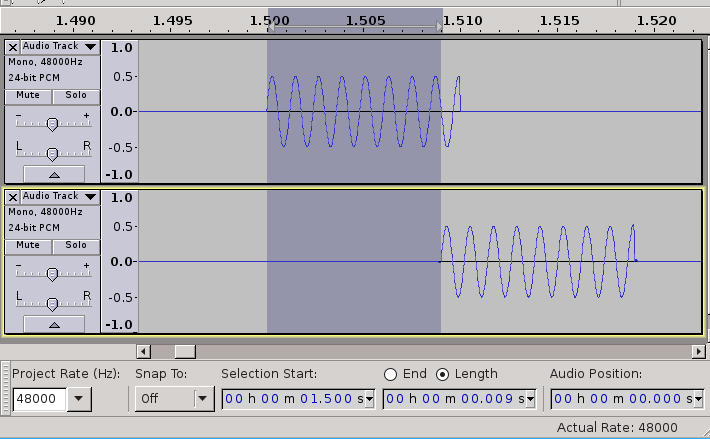
			<content type="html"><![CDATA[<p>Yes, I did that &quot;overdubbing&quot; in the meantime already :-). I generated a click-track in 24bit/48kHz, played it back on one channel of the Scarlett 2i2 and looped it back with a cable for recording at the same time.</p><p>With the smallest Audio Buffering, that I could set in audacity (1 ms) I got latencies between playback-track and recording of ~9 ms:</p><p><span class="postimg"><img src="http://fs1.directupload.net/images/150905/e83nes8g.png" alt="http://fs1.directupload.net/images/150905/e83nes8g.png" title="http://fs1.directupload.net/images/150905/e83nes8g.png"/></span></p><p>In other words&nbsp; ~9 ms are a&nbsp; roundtrip-time. Around 2x the time for output alone (input costs time too).</p><p>With a double sample-rate of 96 kHz the latency is shorter, I can show it later.</p>]]></content>
			<author>
				<name><![CDATA[groovy]]></name>
				<uri>https://forum.modartt.com/profile.php?id=1021</uri>
			</author>
			<updated>2015-09-05T20:05:52Z</updated>
			<id>https://forum.modartt.com/viewtopic.php?pid=939519#p939519</id>
		</entry>
		<entry>
			<title type="html"><![CDATA[Re: length USB cable to pc]]></title>
			<link rel="alternate" href="https://forum.modartt.com/viewtopic.php?pid=939517#p939517"/>
			<content type="html"><![CDATA[<div class="quotebox"><cite>groovy wrote:</cite><blockquote><div class="quotebox"><cite>AKM wrote:</cite><blockquote><p>Are you interested to check your Scarlett 2i2 RTL (Round Trip Latency) with a test utility?</p></blockquote></div><p>Yes, but it is &quot;Windows only&quot;. And I would be more interested in unidirectional output latency than a roundtrip-time (=playing and recording in a loop).</p></blockquote></div><p>Interesting. From your tests one could see that Scarlett and Behringer is 5 ms. behind the internal audio. But what is the delay for the internal soundcard?</p><p>If you are still interested you may still test RTL manually. You should have some sound sample, some kind of a click sound. Then put it to some audio channel for the playback, interconnect the output with the input on yours Scarlett directly with a cables (or one for mono) then set another audio channel for the recording from the hardware input. Hit rec/play. Check how far behind this new recorded audio is. This is Round Trip Latency time for your card.</p>]]></content>
			<author>
				<name><![CDATA[AKM]]></name>
				<uri>https://forum.modartt.com/profile.php?id=4253</uri>
			</author>
			<updated>2015-09-05T19:08:36Z</updated>
			<id>https://forum.modartt.com/viewtopic.php?pid=939517#p939517</id>
		</entry>
		<entry>
			<title type="html"><![CDATA[Re: length USB cable to pc]]></title>
			<link rel="alternate" href="https://forum.modartt.com/viewtopic.php?pid=939514#p939514"/>
			<content type="html"><![CDATA[<div class="quotebox"><cite>AKM wrote:</cite><blockquote><p>Are you interested to check your Scarlett 2i2 RTL (Round Trip Latency) with a test utility?</p></blockquote></div><p>Yes, but it is &quot;Windows only&quot;. And I would be more interested in unidirectional output latency than a roundtrip-time (=playing and recording in a loop).</p><p>So I tried something with bord-tools:</p><p>I started <strong>two</strong> instances of Pianoteq on the netbook, each with a different audio-hardware for output. Both instances are triggered by the same MIDI-keyboard at the same time. The idea is: should one audio-hardware have a bigger latency than the other, its sound arrives later and the time-difference can be measured in a dual-channel recording.</p><p>The upper track is the PCI onboard-codec ALC283 and the lower the USB Scarlett 2i2 (note c, two octaves above &quot;middle-c&quot;):</p><p><span class="postimg"><img src="http://fs1.directupload.net/images/150905/jh7f45rp.png" alt="http://fs1.directupload.net/images/150905/jh7f45rp.png" title="http://fs1.directupload.net/images/150905/jh7f45rp.png"/></span></p><p>To see:<br /><strong>On my system the USB path has ~5 ms more latency than the PCI path.</strong></p><p>But is the reason the Focusrite hardware or the USB-Bus in general? Or both?</p><p>So I compared the USB Focusrite with another USB audiocard, the popular Behringer UCA222. Both USB-cards show exactly the same latency, as you can see in the next picture (Behringer upper, Focusrite lower track):</p><p><span class="postimg"><img src="http://fs1.directupload.net/images/150905/lcuwv8pi.png" alt="http://fs1.directupload.net/images/150905/lcuwv8pi.png" title="http://fs1.directupload.net/images/150905/lcuwv8pi.png"/></span></p><p>This exact synchronicity could be an indication, that the ~5 ms latency are a general lag of USB- vs. PCI-hardware. Anyway the Focusrite is not worse than a Behringer <strong>latency-wise</strong> in that experiment.</p><p>Btw, as the picture shows, the output-signal of the UCA222 is inverted compared to the Focusrite and the ALC283 codec.</p><p>It would be interesting, whether the ~5 ms USB-latency could be tuned by some USB-parameters. In old kernel-generations (2.6x?) I remember the option &quot;nrpacks&quot;, but today this&nbsp; does not exist anymore.</p><p>cheers</p><p>PS: Your PCI M-Audio seems to be a very good buy!</p>]]></content>
			<author>
				<name><![CDATA[groovy]]></name>
				<uri>https://forum.modartt.com/profile.php?id=1021</uri>
			</author>
			<updated>2015-09-05T15:33:31Z</updated>
			<id>https://forum.modartt.com/viewtopic.php?pid=939514#p939514</id>
		</entry>
		<entry>
			<title type="html"><![CDATA[Re: length USB cable to pc]]></title>
			<link rel="alternate" href="https://forum.modartt.com/viewtopic.php?pid=939513#p939513"/>
			<content type="html"><![CDATA[<div class="quotebox"><cite>groovy wrote:</cite><blockquote><div class="quotebox"><cite>AKM wrote:</cite><blockquote><p>Also, sorry to say that and hope being wrong, the Focusrite USB audio interfaces have quite bad reputation around in terms of latency.</p></blockquote></div><p>From my personal experience I would say that&#039;s wrong (source?). I compared my Focusrite Scarlett 2i2 with the onboard ALC283 on my linux-netbook, no difference for me in latency under the same conditions (48000 Hz, 64 samples (1.3 ms), Direct hardware device without any conversions, Pianoteq 5.3.0).</p></blockquote></div><p>I can&#039;t tell the source, just some time ago I was looking for a new audio interface to buy and was thinking about entry level Focusrite USB interfaces, but from some research I could see quite many reports about issues with latency. Glad to hear that it is not a problem in your case. I tried to google the&nbsp; same topic now but almost could not find anything. Are you interested to check your Scarlett 2i2 RTL (Round Trip Latency) with a test utility? If you don&#039;t mind here is a link: <a href="http://www.oblique-audio.com/free/rtlutility">http://www.oblique-audio.com/free/rtlutility</a> Note that you need to connect the output of the interface directly to its input with a cable to perform this test. The reason to use this method is because the interface latency shown in, say, a DAW audio preferences is a so called &quot;reported by a driver&quot; and sometimes manufactures fake this data.</p><p>I&#039;m using antique M-Audio Audiophile 2496 internal card with Windows 8.1 with quite impressively low latency timings. Here are my results for some most useable settings:</p><p>buffer size (samples), sample rate, measured RTL<br />64 44100 4.467<br />64 48000 4.124<br />64 88200 2.248<br />64 96000 2.045</p>]]></content>
			<author>
				<name><![CDATA[AKM]]></name>
				<uri>https://forum.modartt.com/profile.php?id=4253</uri>
			</author>
			<updated>2015-09-05T09:42:29Z</updated>
			<id>https://forum.modartt.com/viewtopic.php?pid=939513#p939513</id>
		</entry>
		<entry>
			<title type="html"><![CDATA[Re: length USB cable to pc]]></title>
			<link rel="alternate" href="https://forum.modartt.com/viewtopic.php?pid=939512#p939512"/>
			<content type="html"><![CDATA[<div class="quotebox"><cite>AKM wrote:</cite><blockquote><p>Also, sorry to say that and hope being wrong, the Focusrite USB audio interfaces have quite bad reputation around in terms of latency.</p></blockquote></div><p>From my personal experience I would say that&#039;s wrong (source?). I compared my Focusrite Scarlett 2i2 with the onboard ALC283 on my linux-netbook, no difference for me in latency under the same conditions (48000 Hz, 64 samples (1.3 ms), Direct hardware device without any conversions, Pianoteq 5.3.0).</p>]]></content>
			<author>
				<name><![CDATA[groovy]]></name>
				<uri>https://forum.modartt.com/profile.php?id=1021</uri>
			</author>
			<updated>2015-09-05T07:58:50Z</updated>
			<id>https://forum.modartt.com/viewtopic.php?pid=939512#p939512</id>
		</entry>
		<entry>
			<title type="html"><![CDATA[Re: length USB cable to pc]]></title>
			<link rel="alternate" href="https://forum.modartt.com/viewtopic.php?pid=939491#p939491"/>
			<content type="html"><![CDATA[<div class="quotebox"><cite>Plurkis wrote:</cite><blockquote><div class="quotebox"><cite>AKM wrote:</cite><blockquote><p>2) By the picture from your first post I assume that you may use a very short (or any length) MIDI cable to connect the piano to the audio interface and then to connect the audio interface to the computer with a 5-m USB cable with no problems.</p></blockquote></div><p>Hi Andrei, <br />In my picture I haven&#039;t got a midi cable between the piano and the USB audio interface.</p><p>The picture was:<br />Piano -&gt; USB Cable -&gt; PC -&gt; USB Cable -&gt; Audio interface -&gt; Monitor/Headset.</p><p>Is it better to do it like this ??<br />Piano -&gt; midi Cable -&gt; Audio interface -&gt; USB Cable -&gt; PC<br />(And from the audio interface to the monitor/Headset)</p></blockquote></div><p>I cant say that super confidently that MIDI cabling is that much &#039;better&#039; than USB - it is not such kind of a scalable project to grade it you know :) It will flawlessly work in both cases, just go and connect it and start playing :) Both ways of connection will do the same. ...Ok, go for MIDI cable, you will have the one more free USB port on your computer then :)</p>]]></content>
			<author>
				<name><![CDATA[AKM]]></name>
				<uri>https://forum.modartt.com/profile.php?id=4253</uri>
			</author>
			<updated>2015-09-02T21:18:22Z</updated>
			<id>https://forum.modartt.com/viewtopic.php?pid=939491#p939491</id>
		</entry>
		<entry>
			<title type="html"><![CDATA[Re: length USB cable to pc]]></title>
			<link rel="alternate" href="https://forum.modartt.com/viewtopic.php?pid=939490#p939490"/>
			<content type="html"><![CDATA[<div class="quotebox"><cite>AKM wrote:</cite><blockquote><p>2) By the picture from your first post I assume that you may use a very short (or any length) MIDI cable to connect the piano to the audio interface and then to connect the audio interface to the computer with a 5-m USB cable with no problems.</p></blockquote></div><p>Hi Andrei, <br />In my picture I haven&#039;t got a midi cable between the piano and the USB audio interface.</p><p>The picture was:<br />Piano -&gt; USB Cable -&gt; PC -&gt; USB Cable -&gt; Audio interface -&gt; Monitor/Headset.</p><p>Is it better to do it like this ??<br />Piano -&gt; midi Cable -&gt; Audio interface -&gt; USB Cable -&gt; PC<br />(And from the audio interface to the monitor/Headset)</p>]]></content>
			<author>
				<name><![CDATA[Plurkis]]></name>
				<uri>https://forum.modartt.com/profile.php?id=4147</uri>
			</author>
			<updated>2015-09-02T20:33:57Z</updated>
			<id>https://forum.modartt.com/viewtopic.php?pid=939490#p939490</id>
		</entry>
		<entry>
			<title type="html"><![CDATA[Re: length USB cable to pc]]></title>
			<link rel="alternate" href="https://forum.modartt.com/viewtopic.php?pid=939487#p939487"/>
			<content type="html"><![CDATA[<div class="quotebox"><cite>Plurkis wrote:</cite><blockquote><p>THX for the reply&#039;s !!</p><p>So If I understand correctly: </p><p>1)&nbsp; It should not be a problem, but it&#039;s pushing the limit of the USB cables. <br />The reason is the length of the usb cables. Errors can occur in the data.<br />(So I&#039;ll have to try this and see how it goes)</p><p>2)&nbsp; It is a better solution, to connect with a midi cable to the USB audio interface.<br />And from the Interface with a shorter USB cable to the computer.</p><p>The problem with this is, that I will have to use a longer audio cable to my monitors/headphones.<br />And I can&#039;t make adjustments on the volume of the audio interface.</p><br /><p>Is this correct ?? Or am I missing something </p><br /><p>Another question: <br />What is a better USB audio Interface ?? ( Maybe with an interface on the computer. )</p></blockquote></div><p>1) No, you are not pushing any limits, you are absolutely in the safe area, just better try not to buy the cheapest one 5-m USB cable in the store.</p><p>2) By the picture from your first post I assume that you may use a very short (or any length) MIDI cable to connect the piano to the audio interface and then to connect the audio interface to the computer with a 5-m USB cable with no problems. That will keep all your stuff perfectly organized as far as I can see it.</p><p>Speaking about the audio interfaces the RME stuff are very popular and considered pretty Hi-End class if you can afford it, the Prism Audio interfaces seems to be even more top level though (Lynx Audio or Apogee devices sure can be called &#039;good&#039; also). I honestly don&#039;t think that you &#039;need&#039; to go that far, try your setup connected and working, it should do the job right for you (and for most people), just if you desperately want to upgrade there are sure options to choose from.</p>]]></content>
			<author>
				<name><![CDATA[AKM]]></name>
				<uri>https://forum.modartt.com/profile.php?id=4253</uri>
			</author>
			<updated>2015-09-02T19:12:31Z</updated>
			<id>https://forum.modartt.com/viewtopic.php?pid=939487#p939487</id>
		</entry>
		<entry>
			<title type="html"><![CDATA[Re: length USB cable to pc]]></title>
			<link rel="alternate" href="https://forum.modartt.com/viewtopic.php?pid=939486#p939486"/>
			<content type="html"><![CDATA[<p>THX for the reply&#039;s !!</p><p>So If I understand correctly: </p><p>1)&nbsp; It should not be a problem, but it&#039;s pushing the limit of the USB cables. <br />The reason is the length of the usb cables. Errors can occur in the data.<br />(So I&#039;ll have to try this and see how it goes)</p><p>2)&nbsp; It is a better solution, to connect with a midi cable to the USB audio interface.<br />And from the Interface with a shorter USB cable to the computer.</p><p>The problem with this is, that I will have to use a longer audio cable to my monitors/headphones.<br />And I can&#039;t make adjustments on the volume of the audio interface.</p><br /><p>Is this correct ?? Or am I missing something </p><br /><p>Another question: <br />What is a better USB audio Interface ?? ( Maybe with an interface on the computer. )</p>]]></content>
			<author>
				<name><![CDATA[Plurkis]]></name>
				<uri>https://forum.modartt.com/profile.php?id=4147</uri>
			</author>
			<updated>2015-09-02T12:37:46Z</updated>
			<id>https://forum.modartt.com/viewtopic.php?pid=939486#p939486</id>
		</entry>
		<entry>
			<title type="html"><![CDATA[Re: length USB cable to pc]]></title>
			<link rel="alternate" href="https://forum.modartt.com/viewtopic.php?pid=939483#p939483"/>
			<content type="html"><![CDATA[<p>MIDI max length is 15 meters in theory. Much more than USB. In fact it is even much more. So yes, using a MIDI cable from the kb to the interface is a good solution. This being said, I&#039;m using a 8 m USB cable here without any problem... Latency will not change with cable length: it works fine or not.</p>]]></content>
			<author>
				<name><![CDATA[Luc Henrion]]></name>
				<uri>https://forum.modartt.com/profile.php?id=6</uri>
			</author>
			<updated>2015-09-01T18:51:16Z</updated>
			<id>https://forum.modartt.com/viewtopic.php?pid=939483#p939483</id>
		</entry>
		<entry>
			<title type="html"><![CDATA[Re: length USB cable to pc]]></title>
			<link rel="alternate" href="https://forum.modartt.com/viewtopic.php?pid=939482#p939482"/>
			<content type="html"><![CDATA[<div class="quotebox"><cite>AKM wrote:</cite><blockquote><p>Also, sorry to say that and hope being wrong, the Focusrite USB audio interfaces have quite bad reputation around in terms of latency. Though no complains about other parameters reported about them.</p></blockquote></div><p>Not sure at all.<br />I use a Focusrite Scarlett 6i6 and it works fine at 64 samples. No latency problem</p>]]></content>
			<author>
				<name><![CDATA[stamkorg]]></name>
				<uri>https://forum.modartt.com/profile.php?id=3941</uri>
			</author>
			<updated>2015-09-01T16:08:02Z</updated>
			<id>https://forum.modartt.com/viewtopic.php?pid=939482#p939482</id>
		</entry>
		<entry>
			<title type="html"><![CDATA[Re: length USB cable to pc]]></title>
			<link rel="alternate" href="https://forum.modartt.com/viewtopic.php?pid=939481#p939481"/>
			<content type="html"><![CDATA[<p>I did this research a while ago so I&#039;ll try to clarify this. The specs of the USB interface imply that the maximum cable length should be 5 meters. That means one single cable or two, say, 2 and 3 meters common USB cables connected to each other. If the length is more than 5 meters there &#039;may&#039; be some errors in the data. Also you are able to avoid this 5 meters limitation by using so called &#039;active&#039; USB cables, you should look for them in a dedicated computer supermarkets. There are quite many ways for doing such task, from USB cables that, again, may or not require even an additional power supply or the ones that use the LAN technology to deliver the USB connection through tens or even hundreds of meters. The price is somewhat higher than a conventional USB cable though not so extremely unrealistically high.</p><p>Your setup will perform perfectly right. There is nothing about the delay of the signal in all cases, there will be just zero loss in timing realistically speaking. My advice is just to go for more expensive 5 meter conventional USB cables, the more thicker ones, you know. I have quite experience with them and the cheaper ones may lead to disconnects from time to time or even introduce some buggy behaviour.</p><p>Or, as stamkorg says, you may consider using the actual MIDI cable from your DP to the audio interface if you have the MIDI sockets on your keyboard. I know nothing about the MIDI cable length limitations. Also I can&#039;t predict what will be more superior in terms of latency, direct MIDI connection or the MIDI over USB to your computer.</p><p>Also, sorry to say that and hope being wrong, the Focusrite USB audio interfaces have quite bad reputation around in terms of latency. Though no complains about other parameters reported about them.</p>]]></content>
			<author>
				<name><![CDATA[AKM]]></name>
				<uri>https://forum.modartt.com/profile.php?id=4253</uri>
			</author>
			<updated>2015-09-01T15:19:54Z</updated>
			<id>https://forum.modartt.com/viewtopic.php?pid=939481#p939481</id>
		</entry>
</feed>