<?xml version="1.0" encoding="utf-8"?>
<feed xmlns="http://www.w3.org/2005/Atom">
	<title type="html"><![CDATA[Modartt user forum - Kawai MP11]]></title>
	<link rel="self" href="https://forum.modartt.com/extern.php?action=feed&amp;tid=3611&amp;type=atom"/>
	<updated>2023-07-16T21:39:25Z</updated>
	<generator>PunBB</generator>
	<id>https://forum.modartt.com/viewtopic.php?id=3611</id>
		<entry>
			<title type="html"><![CDATA[Re: Kawai MP11]]></title>
			<link rel="alternate" href="https://forum.modartt.com/viewtopic.php?pid=991379#p991379"/>
			<content type="html"><![CDATA[<p>I don&#039;t know if I&#039;m doing this correctly, as my curves (for the MP11SE) look very different from the ones available for the MP11, but here are a couple:</p><p>Global Velocity = [0, 16, 34, 64, 93, 94, 119, 127; 0, 0, 24, 59, 97, 97, 127, 127]</p><p>Global Velocity = [0, 17, 40, 66, 91, 119, 127; 0, 0, 29, 63, 96, 127, 127]</p><p>cheers,<br />Miguel.</p>]]></content>
			<author>
				<name><![CDATA[mqbernardo]]></name>
				<uri>https://forum.modartt.com/profile.php?id=7930</uri>
			</author>
			<updated>2023-07-16T21:39:25Z</updated>
			<id>https://forum.modartt.com/viewtopic.php?pid=991379#p991379</id>
		</entry>
		<entry>
			<title type="html"><![CDATA[Re: Kawai MP11]]></title>
			<link rel="alternate" href="https://forum.modartt.com/viewtopic.php?pid=988945#p988945"/>
			<content type="html"><![CDATA[<p>I&#039;m a new MP11SE user too.<br />Is it possible to share the velocity curve for it? thanks.</p><div class="quotebox"><cite>Stilli wrote:</cite><blockquote><div class="quotebox"><cite>NothanUmber wrote:</cite><blockquote><div class="quotebox"><cite>Stilli wrote:</cite><blockquote><p>Me too, are there no other MP11SE users here?</p></blockquote></div><p>Not an MP 11 user (MP 8 here), but you can easily create your own curve with the Calibration wizard. First make sure that you chose the &quot;normal&quot; velocity curve on the MP11 (on MP8 this is &quot;System&quot;+&quot;Menu up/down&quot;+&quot;Value up/down&quot;)<br />Then click on calibrate and follow the instructions. One thing that might help: Switch off the sound as it might be counter intuitive. Reason: E.g. when calibrating &quot;normal&quot; velocity and the note sounds too harsh for the force applied, one tends to play even more tender. Which has exactly the opposite effect than what is desired - the wizard thinks that the average force for &quot;normal&quot; velocity is actually very small for this keyboard and assigns an even higher harshness and volume to this velocity.<br />Thus it is best to play silent, not to look at the generated curve (so one isn&#039;t counterintuitively influenced) and just consistently play pianissimo, piano, normal, forte, fortissimo as mentioned in the instructions for a longer time, so the wizard can average well). This worked quite nicely for my MP8.</p></blockquote></div><p>Thank you for the useful response.</p></blockquote></div>]]></content>
			<author>
				<name><![CDATA[stanleykho]]></name>
				<uri>https://forum.modartt.com/profile.php?id=8653</uri>
			</author>
			<updated>2023-03-25T06:15:42Z</updated>
			<id>https://forum.modartt.com/viewtopic.php?pid=988945#p988945</id>
		</entry>
		<entry>
			<title type="html"><![CDATA[Re: Kawai MP11]]></title>
			<link rel="alternate" href="https://forum.modartt.com/viewtopic.php?pid=975783#p975783"/>
			<content type="html"><![CDATA[<div class="quotebox"><cite>NothanUmber wrote:</cite><blockquote><div class="quotebox"><cite>Stilli wrote:</cite><blockquote><div class="quotebox"><cite>muevc wrote:</cite><blockquote><p>Hi everyone,<br />has anyone made curves specifically for MP11SE instead of MP11? <br />I still struggle a lot with these curves on my MP11SE.</p></blockquote></div><p>Me too, are there no other MP11SE users here?</p></blockquote></div><p>Not an MP 11 user (MP 8 here), but you can easily create your own curve with the Calibration wizard. First make sure that you chose the &quot;normal&quot; velocity curve on the MP11 (on MP8 this is &quot;System&quot;+&quot;Menu up/down&quot;+&quot;Value up/down&quot;)<br />Then click on calibrate and follow the instructions. One thing that might help: Switch off the sound as it might be counter intuitive. Reason: E.g. when calibrating &quot;normal&quot; velocity and the note sounds too harsh for the force applied, one tends to play even more tender. Which has exactly the opposite effect than what is desired - the wizard thinks that the average force for &quot;normal&quot; velocity is actually very small for this keyboard and assigns an even higher harshness and volume to this velocity.<br />Thus it is best to play silent, not to look at the generated curve (so one isn&#039;t counterintuitively influenced) and just consistently play pianissimo, piano, normal, forte, fortissimo as mentioned in the instructions for a longer time, so the wizard can average well). This worked quite nicely for my MP8.</p></blockquote></div><p>Thank you for the useful response.</p>]]></content>
			<author>
				<name><![CDATA[Stilli]]></name>
				<uri>https://forum.modartt.com/profile.php?id=5890</uri>
			</author>
			<updated>2021-05-12T16:35:06Z</updated>
			<id>https://forum.modartt.com/viewtopic.php?pid=975783#p975783</id>
		</entry>
		<entry>
			<title type="html"><![CDATA[Re: Kawai MP11]]></title>
			<link rel="alternate" href="https://forum.modartt.com/viewtopic.php?pid=975781#p975781"/>
			<content type="html"><![CDATA[<div class="quotebox"><cite>Stilli wrote:</cite><blockquote><div class="quotebox"><cite>muevc wrote:</cite><blockquote><p>Hi everyone,<br />has anyone made curves specifically for MP11SE instead of MP11? <br />I still struggle a lot with these curves on my MP11SE.</p></blockquote></div><p>Me too, are there no other MP11SE users here?</p></blockquote></div><p>Not an MP 11 user (MP 8 here), but you can easily create your own curve with the Calibration wizard. First make sure that you chose the &quot;normal&quot; velocity curve on the MP11 (on MP8 this is &quot;System&quot;+&quot;Menu up/down&quot;+&quot;Value up/down&quot;)<br />Then click on calibrate and follow the instructions. One thing that might help: Switch off the sound as it might be counter intuitive. Reason: E.g. when calibrating &quot;normal&quot; velocity and the note sounds too harsh for the force applied, one tends to play even more tender. Which has exactly the opposite effect than what is desired - the wizard thinks that the average force for &quot;normal&quot; velocity is actually very small for this keyboard and assigns an even higher harshness and volume to this velocity.<br />Thus it is best to play silent, not to look at the generated curve (so one isn&#039;t counterintuitively influenced) and just consistently play pianissimo, piano, normal, forte, fortissimo as mentioned in the instructions for a longer time, so the wizard can average well). This worked quite nicely for my MP8.</p>]]></content>
			<author>
				<name><![CDATA[NothanUmber]]></name>
				<uri>https://forum.modartt.com/profile.php?id=6093</uri>
			</author>
			<updated>2021-05-12T16:06:58Z</updated>
			<id>https://forum.modartt.com/viewtopic.php?pid=975781#p975781</id>
		</entry>
		<entry>
			<title type="html"><![CDATA[Re: Kawai MP11]]></title>
			<link rel="alternate" href="https://forum.modartt.com/viewtopic.php?pid=974025#p974025"/>
			<content type="html"><![CDATA[<div class="quotebox"><cite>muevc wrote:</cite><blockquote><p>Hi everyone,<br />has anyone made curves specifically for MP11SE instead of MP11? <br />I still struggle a lot with these curves on my MP11SE.</p></blockquote></div><p>Me too, are there no other MP11SE users here?</p>]]></content>
			<author>
				<name><![CDATA[Stilli]]></name>
				<uri>https://forum.modartt.com/profile.php?id=5890</uri>
			</author>
			<updated>2021-02-14T14:07:31Z</updated>
			<id>https://forum.modartt.com/viewtopic.php?pid=974025#p974025</id>
		</entry>
		<entry>
			<title type="html"><![CDATA[Re: Kawai MP11]]></title>
			<link rel="alternate" href="https://forum.modartt.com/viewtopic.php?pid=970517#p970517"/>
			<content type="html"><![CDATA[<p>Hi everyone,<br />has anyone made curves specifically for MP11SE instead of MP11? <br />I still struggle a lot with these curves on my MP11SE.</p>]]></content>
			<author>
				<name><![CDATA[muevc]]></name>
				<uri>https://forum.modartt.com/profile.php?id=6962</uri>
			</author>
			<updated>2020-10-31T21:45:44Z</updated>
			<id>https://forum.modartt.com/viewtopic.php?pid=970517#p970517</id>
		</entry>
		<entry>
			<title type="html"><![CDATA[Re: Kawai MP11]]></title>
			<link rel="alternate" href="https://forum.modartt.com/viewtopic.php?pid=959595#p959595"/>
			<content type="html"><![CDATA[<p>Thank you Nor, that&#039;s a great shape. It&#039;s definitely my preferred curve after a lot of testing. The numbers can be changed up for a brightness if wanted - the shape itself really does &#039;consolidate&#039; a lot of curve tweaking for me - feels very much at home now.</p>]]></content>
			<author>
				<name><![CDATA[Qexl]]></name>
				<uri>https://forum.modartt.com/profile.php?id=4633</uri>
			</author>
			<updated>2019-03-29T03:16:09Z</updated>
			<id>https://forum.modartt.com/viewtopic.php?pid=959595#p959595</id>
		</entry>
		<entry>
			<title type="html"><![CDATA[Re: Kawai MP11]]></title>
			<link rel="alternate" href="https://forum.modartt.com/viewtopic.php?pid=959051#p959051"/>
			<content type="html"><![CDATA[<p>In the VPC curve presets there was one for MP11. Here it is, supposedly from the VPC editor for the MP11:<br />Velocity = [0, 3, 7, 12, 17, 23, 30, 36, 43, 49, 56, 63, 72, 79, 85, 93, 99, 104, 108, 112, 116, 120, 123, 127; 0, 6, 10, 13, 17, 21, 25, 30, 36, 41, 47, 54, 62, 69, 75, 82, 90, 96, 102, 107, 110, 112, 113, 114]</p>]]></content>
			<author>
				<name><![CDATA[Nor]]></name>
				<uri>https://forum.modartt.com/profile.php?id=5335</uri>
			</author>
			<updated>2019-02-23T11:27:07Z</updated>
			<id>https://forum.modartt.com/viewtopic.php?pid=959051#p959051</id>
		</entry>
		<entry>
			<title type="html"><![CDATA[Re: Kawai MP11]]></title>
			<link rel="alternate" href="https://forum.modartt.com/viewtopic.php?pid=958566#p958566"/>
			<content type="html"><![CDATA[<p><span class="postimg"><img src="https://66.media.tumblr.com/07ebe371c881508a09cbb27ca9e1b7d8/tumblr_plspw6cwsY1rlmo8co1_500.jpg" alt="PunBB bbcode test" title="PunBB bbcode test"/></span></p><p>Thanks for the settings, guys. </p><p>I am wondering if anyone has a setting for the MP11SE optical sustain pedal and does it differ from the MP11&#039;s electro-mechanical pedal unit?</p>]]></content>
			<author>
				<name><![CDATA[psterrett]]></name>
				<uri>https://forum.modartt.com/profile.php?id=6253</uri>
			</author>
			<updated>2019-01-23T18:01:30Z</updated>
			<id>https://forum.modartt.com/viewtopic.php?pid=958566#p958566</id>
		</entry>
		<entry>
			<title type="html"><![CDATA[Re: Kawai MP11]]></title>
			<link rel="alternate" href="https://forum.modartt.com/viewtopic.php?pid=954148#p954148"/>
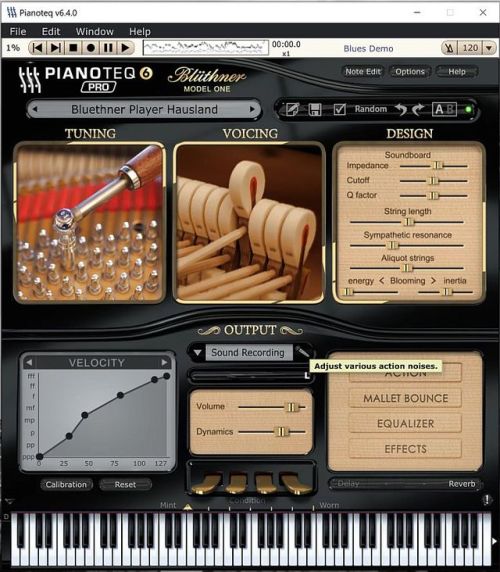
			<content type="html"><![CDATA[<p>Hausland&#039;s curve for MP11 is as good as I&#039;ve been able to achieve in Pianoteq 6+ - this is perfect here, thank you!</p>]]></content>
			<author>
				<name><![CDATA[Qexl]]></name>
				<uri>https://forum.modartt.com/profile.php?id=4633</uri>
			</author>
			<updated>2018-05-04T06:23:05Z</updated>
			<id>https://forum.modartt.com/viewtopic.php?pid=954148#p954148</id>
		</entry>
		<entry>
			<title type="html"><![CDATA[Re: Kawai MP11]]></title>
			<link rel="alternate" href="https://forum.modartt.com/viewtopic.php?pid=949998#p949998"/>
			<content type="html"><![CDATA[<p>Has anyone calibrated their MP11 with Version 6?&nbsp; My curves different.&nbsp; Curious if anyone experienced something similar.</p><br /><p>EDIT: After reviewing my data, my &quot;new&quot; curves are more like hausland&#039;s now.&nbsp; So maybe my data is a little outdated.<br />hausland, thank you for posting your calibration curves.</p>]]></content>
			<author>
				<name><![CDATA[scorpio]]></name>
				<uri>https://forum.modartt.com/profile.php?id=3817</uri>
			</author>
			<updated>2017-09-11T13:27:03Z</updated>
			<id>https://forum.modartt.com/viewtopic.php?pid=949998#p949998</id>
		</entry>
		<entry>
			<title type="html"><![CDATA[Re: Kawai MP11]]></title>
			<link rel="alternate" href="https://forum.modartt.com/viewtopic.php?pid=948935#p948935"/>
			<content type="html"><![CDATA[<p>Here are my current favourite settings:</p><p>Velocity = [0, 1, 30, 46, 81, 115, 127; 0, 0, 32, 65, 96, 121, 127]<br />Note-Off Velocity = [0, 1, 54, 92, 127; 0, 32, 96, 127, 127]<br />Sustain Velocity = [0, 10, 70, 117, 127; 0, 0, 61, 127, 127]<br />Aftertouch Velocity = [0, 127; 0, 0]</p><br /><p>I also have scorpio&#039;s settings as an alternative preset to the above - also very nice.</p>]]></content>
			<author>
				<name><![CDATA[hausland]]></name>
				<uri>https://forum.modartt.com/profile.php?id=5406</uri>
			</author>
			<updated>2017-07-27T03:12:25Z</updated>
			<id>https://forum.modartt.com/viewtopic.php?pid=948935#p948935</id>
		</entry>
		<entry>
			<title type="html"><![CDATA[Re: Kawai MP11]]></title>
			<link rel="alternate" href="https://forum.modartt.com/viewtopic.php?pid=942679#p942679"/>
			<content type="html"><![CDATA[<p>Anyone else with an MP11 that has a velocity curve they would like to share?</p>]]></content>
			<author>
				<name><![CDATA[scorpio]]></name>
				<uri>https://forum.modartt.com/profile.php?id=3817</uri>
			</author>
			<updated>2016-04-02T21:57:18Z</updated>
			<id>https://forum.modartt.com/viewtopic.php?pid=942679#p942679</id>
		</entry>
		<entry>
			<title type="html"><![CDATA[Re: Kawai MP11]]></title>
			<link rel="alternate" href="https://forum.modartt.com/viewtopic.php?pid=935360#p935360"/>
			<content type="html"><![CDATA[<p>Here are my settings that I am currently using:</p><p>Velocity = [0, 34, 68, 96, 127; 0, 32, 64, 96, 127]&nbsp; &nbsp;OR&nbsp; &nbsp; &nbsp;Velocity = [0, 127; 0, 127]<br />Note-Off Velocity = [0, 1, 39, 90, 127; 0, 32, 96, 127, 127]<br />Sustain Velocity = [0, 10, 117, 127; 0, 0, 127, 127]<br />Aftertouch Velocity = [0, 127; 0, 0]</p><p>I was very happy to see that we had nearly identical Note-Off curves.&nbsp; &nbsp;I expect that my Velocity curve will be tweaked going forward.</p>]]></content>
			<author>
				<name><![CDATA[scorpio]]></name>
				<uri>https://forum.modartt.com/profile.php?id=3817</uri>
			</author>
			<updated>2014-11-02T16:44:03Z</updated>
			<id>https://forum.modartt.com/viewtopic.php?pid=935360#p935360</id>
		</entry>
		<entry>
			<title type="html"><![CDATA[Kawai MP11]]></title>
			<link rel="alternate" href="https://forum.modartt.com/viewtopic.php?pid=935357#p935357"/>
			<content type="html"><![CDATA[<p>Here are my settings for Kawai MP11 without touchcurve changes into the instrument:</p><p>Velocity = [0, 1, 24, 53, 100, 127; 0, 0, 32, 64, 96, 127]<br />Note-Off Velocity = [0, 1, 29, 93, 127; 0, 32, 96, 127, 127]<br />Sustain Velocity = [0, 10, 105, 117, 127; 0, 0, 64, 127, 127]<br />Aftertouch Velocity = [0, 127; 0, 0]</p>]]></content>
			<author>
				<name><![CDATA[Dr. Flieger]]></name>
				<uri>https://forum.modartt.com/profile.php?id=4249</uri>
			</author>
			<updated>2014-11-02T14:04:00Z</updated>
			<id>https://forum.modartt.com/viewtopic.php?pid=935357#p935357</id>
		</entry>
</feed>
