<?xml version="1.0" encoding="utf-8"?>
<feed xmlns="http://www.w3.org/2005/Atom">
	<title type="html"><![CDATA[Modartt user forum - Raspberry Pi with controls and screen as Pianoteq Box]]></title>
	<link rel="self" href="https://forum.modartt.com/extern.php?action=feed&amp;tid=13180&amp;type=atom"/>
	<updated>2026-05-01T17:00:00Z</updated>
	<generator>PunBB</generator>
	<id>https://forum.modartt.com/viewtopic.php?id=13180</id>
		<entry>
			<title type="html"><![CDATA[Re: Raspberry Pi with controls and screen as Pianoteq Box]]></title>
			<link rel="alternate" href="https://forum.modartt.com/viewtopic.php?pid=1007820#p1007820"/>
			<content type="html"><![CDATA[<div class="quotebox"><cite>cpolymeris wrote:</cite><blockquote><div class="quotebox"><blockquote><p>1) What OS are you running? Is it the standard Raspberry PI 64-bit? Any optimisations?</p></blockquote></div><p>I think it&#039;s standard. It&#039;s been ~2(?) years since I setup pianoteq on the raspi, so I don&#039;t remember the details on how I configured the OS.</p><p>I do remember I tried an IQAudio extension board &quot;hat&quot; first for audio output -- I couldn&#039;t get it to work reliabily, I had latency issues.<br />Then, I first tried building the GUI with egui (an inmediate-mode rendering GUI toolkit), but that would eat too much CPU.</p><br /><div class="quotebox"><blockquote><p>2) How do you manage power - in particular shutdown? I would love to know if you have managed true read-only operation for a simple power-down.</p></blockquote></div><p>That&#039;s a good idea. For now I basically never turn it off -- if I have to, I&#039;ll ssh into it and shutdown from the command line. Side effect of this is that the UI elements get burnt into the LCD, temporarily.</p><p>Thanks again for sharing more on your great setup.</p><div class="quotebox"><blockquote><p>I&#039;m building something that also uses the Adafruit 4x encoders.</p></blockquote></div><p>One thing I would change in this design is to look for encoders with a higher &quot;resolution&quot; (more clicks per rotation).</p></blockquote></div><p>Using SSH makes good sense and will incorporate your approach. Meantime, the idle power consumption is pretty low, so can see why this works for you.</p><p>I&#039;m not surprised you have tried different audio hats. I started with a Blokas PiSound (good choice and low latency), but now experimenting with a HiFiBerry DAC8x to build some realistic sound fields using multiple mics - I really want to hear the localised hammers etc on speakers connected to the keybed, but extend to some more ambient speakers.</p>]]></content>
			<author>
				<name><![CDATA[TenorBrass]]></name>
				<uri>https://forum.modartt.com/profile.php?id=9027</uri>
			</author>
			<updated>2026-05-01T17:00:00Z</updated>
			<id>https://forum.modartt.com/viewtopic.php?pid=1007820#p1007820</id>
		</entry>
		<entry>
			<title type="html"><![CDATA[Re: Raspberry Pi with controls and screen as Pianoteq Box]]></title>
			<link rel="alternate" href="https://forum.modartt.com/viewtopic.php?pid=1007798#p1007798"/>
			<content type="html"><![CDATA[<div class="quotebox"><blockquote><p>1) What OS are you running? Is it the standard Raspberry PI 64-bit? Any optimisations?</p></blockquote></div><p>I think it&#039;s standard. It&#039;s been ~2(?) years since I setup pianoteq on the raspi, so I don&#039;t remember the details on how I configured the OS.</p><p>I do remember I tried an IQAudio extension board &quot;hat&quot; first for audio output -- I couldn&#039;t get it to work reliabily, I had latency issues.<br />Then, I first tried building the GUI with egui (an inmediate-mode rendering GUI toolkit), but that would eat too much CPU.</p><br /><div class="quotebox"><blockquote><p>2) How do you manage power - in particular shutdown? I would love to know if you have managed true read-only operation for a simple power-down.</p></blockquote></div><p>That&#039;s a good idea. For now I basically never turn it off -- if I have to, I&#039;ll ssh into it and shutdown from the command line. Side effect of this is that the UI elements get burnt into the LCD, temporarily.</p><div class="quotebox"><blockquote><p>I&#039;m building something that also uses the Adafruit 4x encoders.</p></blockquote></div><p>One thing I would change in this design is to look for encoders with a higher &quot;resolution&quot; (more clicks per rotation).</p>]]></content>
			<author>
				<name><![CDATA[cpolymeris]]></name>
				<uri>https://forum.modartt.com/profile.php?id=10215</uri>
			</author>
			<updated>2026-04-30T17:48:30Z</updated>
			<id>https://forum.modartt.com/viewtopic.php?pid=1007798#p1007798</id>
		</entry>
		<entry>
			<title type="html"><![CDATA[Re: Raspberry Pi with controls and screen as Pianoteq Box]]></title>
			<link rel="alternate" href="https://forum.modartt.com/viewtopic.php?pid=1007765#p1007765"/>
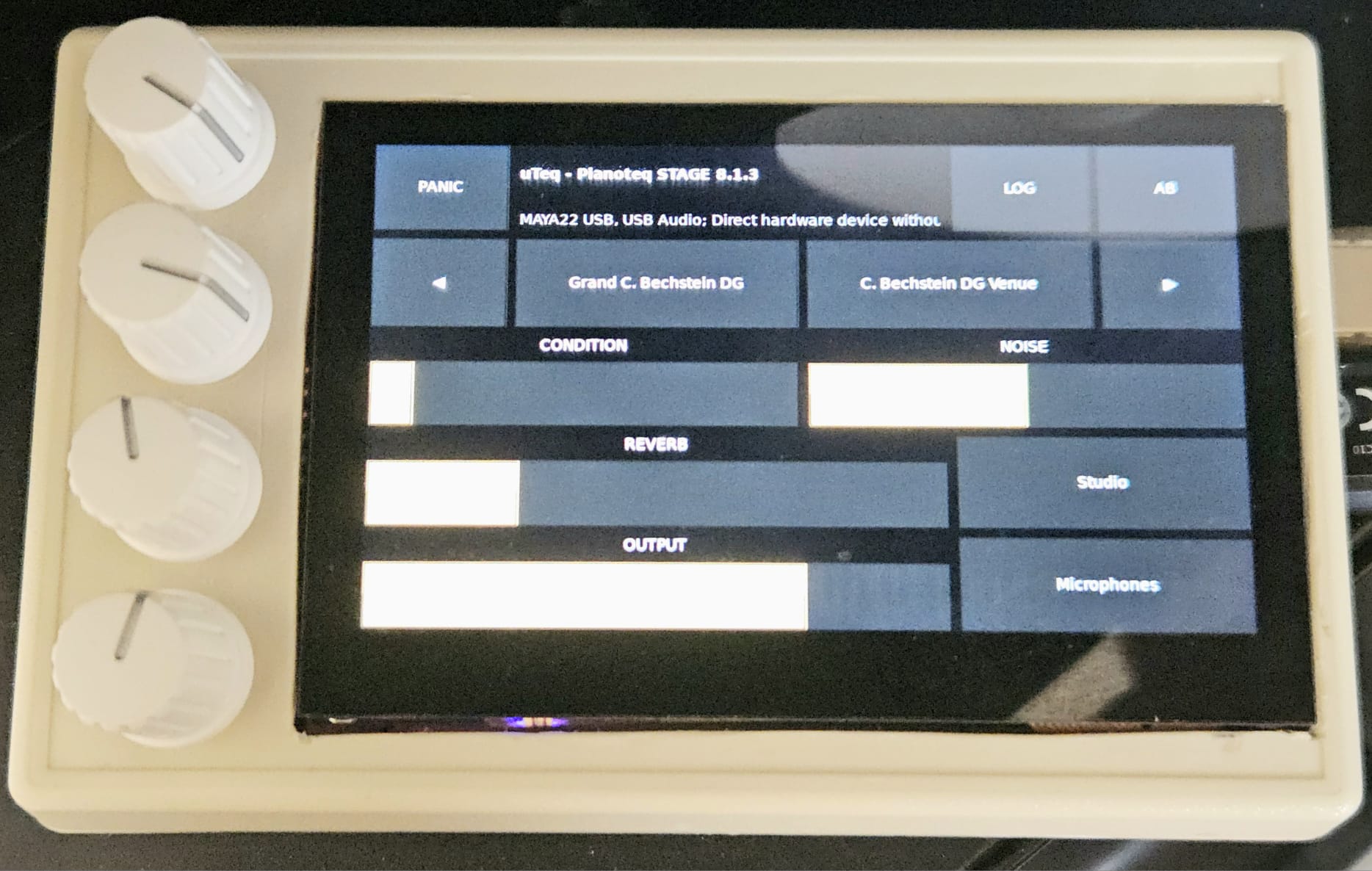
			<content type="html"><![CDATA[<div class="quotebox"><cite>cpolymeris wrote:</cite><blockquote><p>Hi,</p><p>I&#039;ve been running Pianoteq on a Raspi for a bit (still amazed that it&#039;s even possible!) -- but missed having some <strong>physical controls</strong>, as my piano, a Korg D1, has no MIDI sliders nor rotary encoders.</p><p>So I built myself this pianoteq-in-a-box-with-knobs:</p><p><span class="postimg"><img src="https://raw.githubusercontent.com/polymeris/uteq/refs/heads/main/doc/box.jpeg" alt="pianoteq in a box" title="pianoteq in a box"/></span></p><p>The interface you see has been working for a couple years for me, but it&#039;s only this week (and with LLM help) that I finally put the finishing touches on it.</p><p>It&#039;s written in Rust and FLTK for minimal CPU usage, talks to Pianoteq 8 (not tested with 9!) over JSONRPC and controls ALSA volume directly. The encoders are connected over the I2C bus.</p><p>I am <strong>not</strong> committing to maintaining the code, but thought maybe someone could still find it useful for their own setup, so here it is:</p><p><a href="https://github.com/polymeris/uteq">https://github.com/polymeris/uteq</a></p><p>Next goal: make a decent-looking enclosure <i class="far fa-smile-beam smiley"></i></p></blockquote></div><p>Great project! I very much like the choice of items being controlled and the form-factor.</p><p>I&#039;m interested in knowing a couple more things:</p><p>1) What OS are you running? Is it the standard Raspberry PI 64-bit? Any optimisations?<br />2) How do you manage power - in particular shutdown? I would love to know if you have managed true read-only operation for a simple power-down.</p><p>I&#039;m building something that also uses the Adafruit 4x encoders. It controls Pianoteq, plus a few more sound engines (bare-metal MiniDexed and a few Wav Trigger Pro&#039;s), so using a Teensy 4.1 for the midi IO, logic and 40x2 display. Some months away with the usual challenges of work...</p><p>Thanks for sharing your project, it looks very slick.</p>]]></content>
			<author>
				<name><![CDATA[TenorBrass]]></name>
				<uri>https://forum.modartt.com/profile.php?id=9027</uri>
			</author>
			<updated>2026-04-29T11:54:56Z</updated>
			<id>https://forum.modartt.com/viewtopic.php?pid=1007765#p1007765</id>
		</entry>
		<entry>
			<title type="html"><![CDATA[Re: Raspberry Pi with controls and screen as Pianoteq Box]]></title>
			<link rel="alternate" href="https://forum.modartt.com/viewtopic.php?pid=1007687#p1007687"/>
			<content type="html"><![CDATA[<p>This is fantastic, thanks for sharing! I&#039;m currently using the standalone GUI with the compact interface on a Pi, but it&#039;s a bit fiddly on such a small screen, having physical controls is so much nicer.</p>]]></content>
			<author>
				<name><![CDATA[jari_42]]></name>
				<uri>https://forum.modartt.com/profile.php?id=6992</uri>
			</author>
			<updated>2026-04-21T06:48:22Z</updated>
			<id>https://forum.modartt.com/viewtopic.php?pid=1007687#p1007687</id>
		</entry>
		<entry>
			<title type="html"><![CDATA[Raspberry Pi with controls and screen as Pianoteq Box]]></title>
			<link rel="alternate" href="https://forum.modartt.com/viewtopic.php?pid=1007629#p1007629"/>
			<content type="html"><![CDATA[<p>Hi,</p><p>I&#039;ve been running Pianoteq on a Raspi for a bit (still amazed that it&#039;s even possible!) -- but missed having some <strong>physical controls</strong>, as my piano, a Korg D1, has no MIDI sliders nor rotary encoders.</p><p>So I built myself this pianoteq-in-a-box-with-knobs:</p><p><span class="postimg"><img src="https://raw.githubusercontent.com/polymeris/uteq/refs/heads/main/doc/box.jpeg" alt="pianoteq in a box" title="pianoteq in a box"/></span></p><p>The interface you see has been working for a couple years for me, but it&#039;s only this week (and with LLM help) that I finally put the finishing touches on it.</p><p>It&#039;s written in Rust and FLTK for minimal CPU usage, talks to Pianoteq 8 (not tested with 9!) over JSONRPC and controls ALSA volume directly. The encoders are connected over the I2C bus.</p><p>I am <strong>not</strong> committing to maintaining the code, but thought maybe someone could still find it useful for their own setup, so here it is:</p><p><a href="https://github.com/polymeris/uteq">https://github.com/polymeris/uteq</a></p><p>Next goal: make a decent-looking enclosure <i class="far fa-smile-beam smiley"></i></p>]]></content>
			<author>
				<name><![CDATA[cpolymeris]]></name>
				<uri>https://forum.modartt.com/profile.php?id=10215</uri>
			</author>
			<updated>2026-04-16T10:10:07Z</updated>
			<id>https://forum.modartt.com/viewtopic.php?pid=1007629#p1007629</id>
		</entry>
</feed>
