<?xml version="1.0" encoding="utf-8"?>
<feed xmlns="http://www.w3.org/2005/Atom">
	<title type="html"><![CDATA[Modartt user forum - Pianoteq 8.2.0 update with muffled sound?]]></title>
	<link rel="self" href="https://forum.modartt.com/extern.php?action=feed&amp;tid=11187&amp;type=atom"/>
	<updated>2024-04-16T11:06:08Z</updated>
	<generator>PunBB</generator>
	<id>https://forum.modartt.com/viewtopic.php?id=11187</id>
		<entry>
			<title type="html"><![CDATA[Re: Pianoteq 8.2.0 update with muffled sound?]]></title>
			<link rel="alternate" href="https://forum.modartt.com/viewtopic.php?pid=996518#p996518"/>
			<content type="html"><![CDATA[<div class="quotebox"><cite>fulvia wrote:</cite><blockquote><p>I&#039;ve been using Pianoteq since v.3. I&#039;m glad I was not on my own thinking that the sound had become a little more &quot;muffled.&quot; This is no joke, but I was worrying that the top end of my hearing had gone; then, I thought maybe my monitors and audio interface may have had some issues. After checking lots of reference material it showed that both were ok. Then, checking the forum was pleased to see others had noted the missing treble. </p><p>Like others have noted, the realism around the attack has certainly improved. I&#039;m using Pianoteq much more these days as my standalone go-to piano. However, I&#039;ve always struggled getting Pianoteq in the mix whereby I want it to cut through with the treble, yet not be harsh or synthetic. It is interesting to listen to recordings of piano in rock and pop genres and to often here how very bright the piano will sound. I reference with good quality recordings of bands like Steely Dan where there is a consensus around the quality of the recordings / mixes. Usually, the mix engineers will boost the treble and this really allows the piano to cut through in the mix. For my own music, I&#039;m always looking for the piano to work well in the mix and not be masked and I will nearly always use another EQ when using Pianoteq. I&#039;d really like the higher frequencies to be further improved. I nearly always turn up the hammer hardness, yet, there becomes the risk of it sounding too synthetic. Same with the Equalizer (not the FX one). </p><p>I find that Pianoteq works brilliantly as a standalone instrument&nbsp; - there is something about the mics and the acoustic space which brings the piano &quot;into&quot; the room via the speakers. Nevertheless, for multitrack recordings, I often find that Pianoteq sounds way too big and expansive in the soundfield, and I&#039;ll ofen experiment with narrowing the width, using the &quot;stereo&quot; output rather than mics etc. etc.. All work in progress <i class="far fa-smile smiley"></i> </p><p>Does anyone else who uses Pianoteq in multitrack mixes find issues with getting the higher frequencies to cut through nicely, without sacrificing realism?</p></blockquote></div><p>I find that bright piano sound in a lot of rock and pop to be something of a fiction.<br />It gets even worse in dance genres, that horrendous house piano…</p><p>Coincidentally, the first time I listened to Steely Dan albums on studio monitors I was surprised (a little horrified) at the extreme carving away of frequencies, so much body taken out of instruments and vocals.</p><p>In modern recordings, we have a lot more body in the lows and low mids but that bright piano sound perseveres, along with, similarly, jangly acoustic guitars.</p><p>If you want to retain a natural piano sound I think you have to compose very thoughtfully.<br />Play up top as much as you can during busier parts and look for space to insert the notes further down the keyboard.</p><p>I found the Ant Petrof and Bluthner to have the brightness to be heard amongst a full arrangement. Just carve out what you absolutely have to.</p>]]></content>
			<author>
				<name><![CDATA[Topher]]></name>
				<uri>https://forum.modartt.com/profile.php?id=9582</uri>
			</author>
			<updated>2024-04-16T11:06:08Z</updated>
			<id>https://forum.modartt.com/viewtopic.php?pid=996518#p996518</id>
		</entry>
		<entry>
			<title type="html"><![CDATA[Re: Pianoteq 8.2.0 update with muffled sound?]]></title>
			<link rel="alternate" href="https://forum.modartt.com/viewtopic.php?pid=996492#p996492"/>
			<content type="html"><![CDATA[<p>I&#039;ve been using Pianoteq since v.3. I&#039;m glad I was not on my own thinking that the sound had become a little more &quot;muffled.&quot; This is no joke, but I was worrying that the top end of my hearing had gone; then, I thought maybe my monitors and audio interface may have had some issues. After checking lots of reference material it showed that both were ok. Then, checking the forum was pleased to see others had noted the missing treble. </p><p>Like others have noted, the realism around the attack has certainly improved. I&#039;m using Pianoteq much more these days as my standalone go-to piano. However, I&#039;ve always struggled getting Pianoteq in the mix whereby I want it to cut through with the treble, yet not be harsh or synthetic. It is interesting to listen to recordings of piano in rock and pop genres and to often here how very bright the piano will sound. I reference with good quality recordings of bands like Steely Dan where there is a consensus around the quality of the recordings / mixes. Usually, the mix engineers will boost the treble and this really allows the piano to cut through in the mix. For my own music, I&#039;m always looking for the piano to work well in the mix and not be masked and I will nearly always use another EQ when using Pianoteq. I&#039;d really like the higher frequencies to be further improved. I nearly always turn up the hammer hardness, yet, there becomes the risk of it sounding too synthetic. Same with the Equalizer (not the FX one). </p><p>I find that Pianoteq works brilliantly as a standalone instrument&nbsp; - there is something about the mics and the acoustic space which brings the piano &quot;into&quot; the room via the speakers. Nevertheless, for multitrack recordings, I often find that Pianoteq sounds way too big and expansive in the soundfield, and I&#039;ll ofen experiment with narrowing the width, using the &quot;stereo&quot; output rather than mics etc. etc.. All work in progress <i class="far fa-smile smiley"></i> </p><p>Does anyone else who uses Pianoteq in multitrack mixes find issues with getting the higher frequencies to cut through nicely, without sacrificing realism?</p>]]></content>
			<author>
				<name><![CDATA[fulvia]]></name>
				<uri>https://forum.modartt.com/profile.php?id=1574</uri>
			</author>
			<updated>2024-04-15T08:22:10Z</updated>
			<id>https://forum.modartt.com/viewtopic.php?pid=996492#p996492</id>
		</entry>
		<entry>
			<title type="html"><![CDATA[Re: Pianoteq 8.2.0 update with muffled sound?]]></title>
			<link rel="alternate" href="https://forum.modartt.com/viewtopic.php?pid=996136#p996136"/>
			<content type="html"><![CDATA[<div class="quotebox"><cite>tigran wrote:</cite><blockquote><p>Encountered this too, unfortunately. I almost exclusively use a Steinway D Player with slightly modified dynamics and volume. Upon updating it the &quot;muffledness&quot; was instantly apparent, underwater/closed lid sort of effect. Tried both reinstalling Pianoteq and making the preset from scratch, no luck. <br />Going to try using the iOS version to see if there&#039;s any difference.</p><p>Update:<br />Done some testing on iOS, and at this point I&#039;m almost convinced this is not a 8.2 specific issue, but some sort of a lower level issue with Pianoteq desktop (Mac in my case).<br />I&#039;ve compared few presets both on iPhone and Mac, same settings, same volume, same headphone setup (same DAC), and Steinway D is clearly muffled on Mac.<br />However there&#039;s a twist to this, after downgrading back to 8.1.3 the issue remained on the Mac, which is the reason I came to the conclusion above.<br />I almost started doubting my own ears, but after several back and forths between the laptop and the phone, I&#039;m 100% sure at this point that the phone sounds perfectly crisp and normal, while the Mac version doesn&#039;t.</p><p>If Modartt staff happens to be reading this and is interested, I&#039;m happy to try and provide reproduction details, or a playback recording from both devices.</p></blockquote></div><p>Did you get this resolved? I have similar findings.</p>]]></content>
			<author>
				<name><![CDATA[Topher]]></name>
				<uri>https://forum.modartt.com/profile.php?id=9582</uri>
			</author>
			<updated>2024-03-20T10:04:32Z</updated>
			<id>https://forum.modartt.com/viewtopic.php?pid=996136#p996136</id>
		</entry>
		<entry>
			<title type="html"><![CDATA[Re: Pianoteq 8.2.0 update with muffled sound?]]></title>
			<link rel="alternate" href="https://forum.modartt.com/viewtopic.php?pid=995746#p995746"/>
			<content type="html"><![CDATA[<p>I love the update to 8.2. All the models sound more realistic with less sharp treble. For me it&#039;s an improvement.</p>]]></content>
			<author>
				<name><![CDATA[Fetivi]]></name>
				<uri>https://forum.modartt.com/profile.php?id=9462</uri>
			</author>
			<updated>2024-02-29T18:22:39Z</updated>
			<id>https://forum.modartt.com/viewtopic.php?pid=995746#p995746</id>
		</entry>
		<entry>
			<title type="html"><![CDATA[Re: Pianoteq 8.2.0 update with muffled sound?]]></title>
			<link rel="alternate" href="https://forum.modartt.com/viewtopic.php?pid=995744#p995744"/>
			<content type="html"><![CDATA[<div class="quotebox"><cite>tigran wrote:</cite><blockquote><p>If Modartt staff happens to be reading this and is interested, I&#039;m happy to try and provide reproduction details, or a playback recording from both devices.</p></blockquote></div><p>Hi Tigran,</p><p>I would suggest first that you export a wav file from Pianoteq using the same MIDI file and exact same unmodified preset (and same settings in options / perf) , on both your iPhone and your Mac. And then listen to the two wav files on you mac. If there is a noticeable difference , please get in touch with Modartt support by using the &quot;Feedback and bug reports&quot; link at the bottom of the options / about panel of Pianoteq.</p>]]></content>
			<author>
				<name><![CDATA[julien]]></name>
				<uri>https://forum.modartt.com/profile.php?id=2</uri>
			</author>
			<updated>2024-02-29T17:42:59Z</updated>
			<id>https://forum.modartt.com/viewtopic.php?pid=995744#p995744</id>
		</entry>
		<entry>
			<title type="html"><![CDATA[Re: Pianoteq 8.2.0 update with muffled sound?]]></title>
			<link rel="alternate" href="https://forum.modartt.com/viewtopic.php?pid=995722#p995722"/>
			<content type="html"><![CDATA[<p>Encountered this too, unfortunately. I almost exclusively use a Steinway D Player with slightly modified dynamics and volume. Upon updating it the &quot;muffledness&quot; was instantly apparent, underwater/closed lid sort of effect. Tried both reinstalling Pianoteq and making the preset from scratch, no luck. <br />Going to try using the iOS version to see if there&#039;s any difference.</p><p>Update:<br />Done some testing on iOS, and at this point I&#039;m almost convinced this is not a 8.2 specific issue, but some sort of a lower level issue with Pianoteq desktop (Mac in my case).<br />I&#039;ve compared few presets both on iPhone and Mac, same settings, same volume, same headphone setup (same DAC), and Steinway D is clearly muffled on Mac.<br />However there&#039;s a twist to this, after downgrading back to 8.1.3 the issue remained on the Mac, which is the reason I came to the conclusion above.<br />I almost started doubting my own ears, but after several back and forths between the laptop and the phone, I&#039;m 100% sure at this point that the phone sounds perfectly crisp and normal, while the Mac version doesn&#039;t.</p><p>If Modartt staff happens to be reading this and is interested, I&#039;m happy to try and provide reproduction details, or a playback recording from both devices.</p>]]></content>
			<author>
				<name><![CDATA[tigran]]></name>
				<uri>https://forum.modartt.com/profile.php?id=9601</uri>
			</author>
			<updated>2024-02-28T16:11:10Z</updated>
			<id>https://forum.modartt.com/viewtopic.php?pid=995722#p995722</id>
		</entry>
		<entry>
			<title type="html"><![CDATA[Re: Pianoteq 8.2.0 update with muffled sound?]]></title>
			<link rel="alternate" href="https://forum.modartt.com/viewtopic.php?pid=995620#p995620"/>
			<content type="html"><![CDATA[<div class="quotebox"><cite>mcihelka88 wrote:</cite><blockquote><p>On updating Pianoteq STAGE to 8.2.0 (from 8.1.3), the voicing and regulation of my custom presents was terrible (my custom presents are very simple modifications of the factory ones, mostly velocity and pedal curves. All are based on the NY Steinway D and saved as a &quot;Full Preset&quot;).</p></blockquote></div><p>If true custom presets of yours mostly are velocity and pedal curve customizations, you may discover clear advantages of others enabling global velocity curves right now.&nbsp; (Which might become beneficial again of course right upon the next anticipated update, or, any that will appear an equally overwhelming or substantial one.)</p><div class="quotebox"><blockquote><p>Certain notes across the keyboard stuck out like sore thumbs, as if being played with a strong accent. Trying to play with even tone was impossible.</p></blockquote></div><p>By the looks of things I&#039;m concluding; Philippe Guillaume likely had anticipated some of your assertions:<br /></p><div class="quotebox"><cite>Philippe Guillaume wrote:</cite><blockquote><p>To get an idea of what sort of changes in settings are induced by this modification in the soundboard, you can compare side by side the NY Steinway D presets from 8.1 with 8.2. The most visible changes may be the Note per Note Spectrum Profile. On a similar vein, changing microphones positions usually also requires some revoicing via the Spectrum Profile.</p></blockquote></div><p>However, the above necessarily might mean that your own copy of <strong>PIANO</strong>TEQ Stage has become inadequate at this stage!<br /></p><div class="quotebox"><cite>mcihelka88 wrote:</cite><blockquote><p>What kind of data gets stored in presets?</p></blockquote></div><p>To have opened to view a fully updated and completely visible comparison or inspection of all preset changes made by the latest transition from 8.1.3 to 8.2 and to respond to your question, directly, I suggest indeed an upgrade path from <strong>PIANO</strong>TEQ Stage to <strong>PIANO</strong>TEQ <strong>PRO </strong>is not only the most economical but also the best route you can take at this time:</p><p>Most significantly any kind of data which include just about every possible parameter adjustment available to professionals has already been made readily observable to the naked eye by the introduction of <strong>PIANO</strong>TEQ <strong>PRO</strong>, and, especially if just for yourself you personally need to check over the differing presets on a specific note per note basis.</p><p>Man, really an awful lot you can open and explore once you&#039;ve gotten a current licensed copy of <strong>PIANO</strong>TEQ <strong>PRO</strong> just right at your finger tips!</p>]]></content>
			<author>
				<name><![CDATA[Amen Ptah Ra]]></name>
				<uri>https://forum.modartt.com/profile.php?id=5334</uri>
			</author>
			<updated>2024-02-21T05:42:15Z</updated>
			<id>https://forum.modartt.com/viewtopic.php?pid=995620#p995620</id>
		</entry>
		<entry>
			<title type="html"><![CDATA[Re: Pianoteq 8.2.0 update with muffled sound?]]></title>
			<link rel="alternate" href="https://forum.modartt.com/viewtopic.php?pid=995619#p995619"/>
			<content type="html"><![CDATA[<p>This is a sort of PSA.</p><p>On updating Pianoteq STAGE to 8.2.0 (from 8.1.3), the voicing and regulation of my custom presents was terrible (my custom presents are very simple modifications of the factory ones, mostly velocity and pedal curves. All are based on the NY Steinway D and saved as a &quot;Full Preset&quot;).</p><p>Certain notes across the keyboard stuck out like sore thumbs, as if being played with a strong accent. Trying to play with even tone was impossible.</p><p>So, I deleted my custom presets and recreated them from the factory ones. This completely fixed my issue. Voicing and regulation is now excellent.</p><p>I have no idea why presets saved under 8.1.3 would be problematic after upgrading to 8.2.0. What kind of data gets stored in presets? Anyway, if anyone else finds that their old presets don&#039;t work well, it might be worth trying to create new ones from the factory ones.</p>]]></content>
			<author>
				<name><![CDATA[mcihelka88]]></name>
				<uri>https://forum.modartt.com/profile.php?id=5930</uri>
			</author>
			<updated>2024-02-21T01:52:50Z</updated>
			<id>https://forum.modartt.com/viewtopic.php?pid=995619#p995619</id>
		</entry>
		<entry>
			<title type="html"><![CDATA[Re: Pianoteq 8.2.0 update with muffled sound?]]></title>
			<link rel="alternate" href="https://forum.modartt.com/viewtopic.php?pid=994895#p994895"/>
			<content type="html"><![CDATA[<div class="quotebox"><cite>MapleGuitar wrote:</cite><blockquote><p>Since I&#039;m in the middle of a solo-piano project, it wasn&#039;t difficult to create a couple short excerpts where you can hear some differences between version 8.1 and 8.2 when opening a file in 8.2 that was created in 8.1 The differences are not &quot;show stoppers&quot; so to speak; but some tweaks will be necessary (at least, for my work) when opening pre-version 8.2 projects using the latest update. These use a modified NY Steinway D. The excerpts are here:&nbsp; <a href="https://www.youtube.com/watch?v=vfqgxf1HOLI">https://www.youtube.com/watch?v=vfqgxf1HOLI</a></p></blockquote></div><p>That was helpful--thank you--and generally agrees with my observations I have been posting. Listened to this with pretty good Bang &amp; Olufsen headphones and I&#039;m left strongly preferring the sound of 8.1 in all ranges but especially the bass and mids. Just my impression. In my case, Roland LX-17 has 8 speakers that exercise quite a lot of resonances in the piano body. What happens, to my ears, is that they all collide producing some strange incoherent whole. Having said that, the listen of the above did reveal similar issues to me.</p>]]></content>
			<author>
				<name><![CDATA[Torero]]></name>
				<uri>https://forum.modartt.com/profile.php?id=5771</uri>
			</author>
			<updated>2024-01-24T07:09:28Z</updated>
			<id>https://forum.modartt.com/viewtopic.php?pid=994895#p994895</id>
		</entry>
		<entry>
			<title type="html"><![CDATA[Re: Pianoteq 8.2.0 update with muffled sound?]]></title>
			<link rel="alternate" href="https://forum.modartt.com/viewtopic.php?pid=994888#p994888"/>
			<content type="html"><![CDATA[<p>I just upgraded to Pianoteq Standard. I believe that with more adjustment options I can find the sound I want without depending too much on the internal adjustments made by Modartt.</p>]]></content>
			<author>
				<name><![CDATA[Professor Leandro Duarte]]></name>
				<uri>https://forum.modartt.com/profile.php?id=6353</uri>
			</author>
			<updated>2024-01-24T01:12:42Z</updated>
			<id>https://forum.modartt.com/viewtopic.php?pid=994888#p994888</id>
		</entry>
		<entry>
			<title type="html"><![CDATA[Re: Pianoteq 8.2.0 update with muffled sound?]]></title>
			<link rel="alternate" href="https://forum.modartt.com/viewtopic.php?pid=994879#p994879"/>
			<content type="html"><![CDATA[<div class="quotebox"><cite>sigasa wrote:</cite><blockquote><div class="quotebox"><cite>Torero wrote:</cite><blockquote><div class="quotebox"><cite>dikrek wrote:</cite><blockquote><p>Why not show modartt support what your settings were?</p></blockquote></div><p>Hi, I have never copied my settings anywhere, however, as I said in my post, I only change the response/velocity curve ever so slightly--bending a bit upwards from the straight line. Does this constitute changing the &#039;settings&#039;? I suspect it does not.</p><p>Also, to someone indirectly mentioning &#039;trolling&#039; about the new version, I really do hope it was not me you were referring to. I do not think I deserve to be called a troll if I did not like the sound at all? is that a crime not to like a sound? Maybe my specific use case of going back to the 6-speaker piano from MacBook resulted in this effect, I don&#039;t know but it is the very first version--for me--after 6-7 years of use that went backwards big time.</p><p>I will reinstall it and try other presets, but again, I was hit very hard by how dull the new version sounded--for me!</p></blockquote></div><p>Hi Torero,</p><p>Have you made any headway with solving the issues you have experienced with the 8.2 update?</p><p>Warmest regards,</p><p>Chris</p></blockquote></div><p>Hii Chris,</p><p>Doing this now: re-installed 8.2.0 Pro and trying out various presets and simple settings like Stereophonic instead of Microphone. So far, they are all very dull. My Roland LX-17 piano is refusing to excite me at all.</p><p>My initial thinking is that IF the signal is fed back to the Piano via the reverse channel (forgot what&#039;s the official name for this), the sound is pretty awful, something has been lost or removed, not sure what, but it is exceptionally electronic, muffled, and dull for the lack of a better word.</p><p>I&#039;ll update you later further.</p><p>UPDATE: I&#039;ve given up for tonight. I&#039;ve gone over about a dozen presets, changing the velocity curve, varying the Microphone vs Stereophonic selection. I also just changed volume, going higher and lower. And now, just tired of it, going back once again to 8.1.3 my trusty NY Steinway D Prelude with a moderatly slow keyboard and all is good again: beautiful singing sound and I&#039;m happy again. </p><p>It&#039;s just really weird, that revoicing does not allow me to play anymore because it sounds so off, I have double-check all the time, what am I playing, I have no idea, cannot play anything really--this bad.</p><p>I WILL persevere and return back to trying this version but it has been hard going for me.</p>]]></content>
			<author>
				<name><![CDATA[Torero]]></name>
				<uri>https://forum.modartt.com/profile.php?id=5771</uri>
			</author>
			<updated>2024-01-23T20:32:56Z</updated>
			<id>https://forum.modartt.com/viewtopic.php?pid=994879#p994879</id>
		</entry>
		<entry>
			<title type="html"><![CDATA[Re: Pianoteq 8.2.0 update with muffled sound?]]></title>
			<link rel="alternate" href="https://forum.modartt.com/viewtopic.php?pid=994853#p994853"/>
			<content type="html"><![CDATA[<p>Little by little, my ear has become accustomed to the new tonal characteristics of version 8.2.0.</p><p>I committed myself to trying new presets and understanding them a little more. Interestingly, the first preset of each instrument list has really pleased me:</p><p>NY Steinway Classic;<br />HB Steinway Classic;<br />K2 Warm.</p><p>These are versatile presets with a very balanced sound. Perhaps, for this reason, they are the first on the lists as a subject of Modartt itself.</p>]]></content>
			<author>
				<name><![CDATA[Professor Leandro Duarte]]></name>
				<uri>https://forum.modartt.com/profile.php?id=6353</uri>
			</author>
			<updated>2024-01-23T02:20:26Z</updated>
			<id>https://forum.modartt.com/viewtopic.php?pid=994853#p994853</id>
		</entry>
		<entry>
			<title type="html"><![CDATA[Re: Pianoteq 8.2.0 update with muffled sound?]]></title>
			<link rel="alternate" href="https://forum.modartt.com/viewtopic.php?pid=994838#p994838"/>
			<content type="html"><![CDATA[<div class="quotebox"><cite>Torero wrote:</cite><blockquote><div class="quotebox"><cite>dikrek wrote:</cite><blockquote><div class="quotebox"><cite>Torero wrote:</cite><blockquote><p>Hi all,</p><p>I am a very happy customer for many years with multiple upgrades--always appreciating continuous improvements.</p><p>Now, 6.2 has arrived and ...</p><p>... I had to revert back to 6.1.3 almost immediately! Specifically, I use a response-customised NY Steinway D Prelude and it sounds beautiful with 6.1.3 on MacBook Pro M1Max on my Roland LX-17 with Local Control Off. In 6.2, I could not even recognise notes from each other, the chords sounded _really_ wrong, it was absolutely awful.</p><p>I did not try anything else as this is my go-to preset and I wouldn&#039;t want to spend any more time on trying out 6.2 unless you guys have any idea what might be an issue I experienced.</p><p>Many thanks!</p></blockquote></div><p>Why not show modartt support what your settings were?</p></blockquote></div><p>Hi, I have never copied my settings anywhere, however, as I said in my post, I only change the response/velocity curve ever so slightly--bending a bit upwards from the straight line. Does this constitute changing the &#039;settings&#039;? I suspect it does not.</p><p>Also, to someone indirectly mentioning &#039;trolling&#039; about the new version, I really do hope it was not me you were referring to. I do not think I deserve to be called a troll if I did not like the sound at all? is that a crime not to like a sound? Maybe my specific use case of going back to the 6-speaker piano from MacBook resulted in this effect, I don&#039;t know but it is the very first version--for me--after 6-7 years of use that went backwards big time.</p><p>I will reinstall it and try other presets, but again, I was hit very hard by how dull the new version sounded--for me!</p></blockquote></div><p>Hi Torero,</p><p>Have you made any headway with solving the issues you have experienced with the 8.2 update?</p><p>Warmest regards,</p><p>Chris</p>]]></content>
			<author>
				<name><![CDATA[sigasa]]></name>
				<uri>https://forum.modartt.com/profile.php?id=399</uri>
			</author>
			<updated>2024-01-22T17:33:39Z</updated>
			<id>https://forum.modartt.com/viewtopic.php?pid=994838#p994838</id>
		</entry>
		<entry>
			<title type="html"><![CDATA[Re: Pianoteq 8.2.0 update with muffled sound?]]></title>
			<link rel="alternate" href="https://forum.modartt.com/viewtopic.php?pid=994825#p994825"/>
			<content type="html"><![CDATA[<div class="quotebox"><cite>dikrek wrote:</cite><blockquote><div class="quotebox"><cite>Torero wrote:</cite><blockquote><p>Hi all,</p><p>I am a very happy customer for many years with multiple upgrades--always appreciating continuous improvements.</p><p>Now, 6.2 has arrived and ...</p><p>... I had to revert back to 6.1.3 almost immediately! Specifically, I use a response-customised NY Steinway D Prelude and it sounds beautiful with 6.1.3 on MacBook Pro M1Max on my Roland LX-17 with Local Control Off. In 6.2, I could not even recognise notes from each other, the chords sounded _really_ wrong, it was absolutely awful.</p><p>I did not try anything else as this is my go-to preset and I wouldn&#039;t want to spend any more time on trying out 6.2 unless you guys have any idea what might be an issue I experienced.</p><p>Many thanks!</p></blockquote></div><p>Why not show modartt support what your settings were?</p></blockquote></div><p>Hi, I have never copied my settings anywhere, however, as I said in my post, I only change the response/velocity curve ever so slightly--bending a bit upwards from the straight line. Does this constitute changing the &#039;settings&#039;? I suspect it does not.</p><p>Also, to someone indirectly mentioning &#039;trolling&#039; about the new version, I really do hope it was not me you were referring to. I do not think I deserve to be called a troll if I did not like the sound at all? is that a crime not to like a sound? Maybe my specific use case of going back to the 6-speaker piano from MacBook resulted in this effect, I don&#039;t know but it is the very first version--for me--after 6-7 years of use that went backwards big time.</p><p>I will reinstall it and try other presets, but again, I was hit very hard by how dull the new version sounded--for me!</p>]]></content>
			<author>
				<name><![CDATA[Torero]]></name>
				<uri>https://forum.modartt.com/profile.php?id=5771</uri>
			</author>
			<updated>2024-01-22T10:23:23Z</updated>
			<id>https://forum.modartt.com/viewtopic.php?pid=994825#p994825</id>
		</entry>
		<entry>
			<title type="html"><![CDATA[Re: Pianoteq 8.2.0 update with muffled sound?]]></title>
			<link rel="alternate" href="https://forum.modartt.com/viewtopic.php?pid=994814#p994814"/>
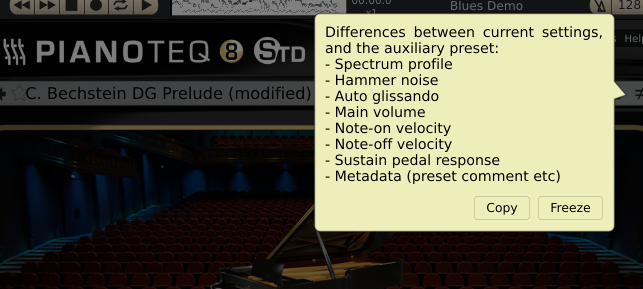
			<content type="html"><![CDATA[<div class="quotebox"><cite>dazric wrote:</cite><blockquote><p>If you have made any tweaks to your presets, some of them may not work so well with the new voicings - as suggested by bani223. I found this to be the case with a previous update. For some of the presets, I just had to go back to the factory defaults and start again.</p></blockquote></div><p>Just updated to v8.2.0 today. Not tested anything so far, just used the preset where I left my last session.<br />Maybe it is an example what happens to a preset after an update:</p><p>A-preset: C. Bechstein DG Prelude (The factory default of some version 8.1.x with my own velocity curves ).<br />B-preset: C. Bechstein DG Prelude (The factory default of the new v8.2.0).</p><p>The list of differences (right-click on A or B symbol) is shown in my screenshot.</p><p><span class="postimg"><img src="https://i.postimg.cc/tCkHG59s/Diff-Bechstein-DG-Prelude-some-81x-vs-820.png" alt="https://i.postimg.cc/tCkHG59s/Diff-Bechstein-DG-Prelude-some-81x-vs-820.png" title="https://i.postimg.cc/tCkHG59s/Diff-Bechstein-DG-Prelude-some-81x-vs-820.png"/></span></p><p>Of course my velocity settings were found ...</p><p>Note-on velocity<br />Note-off velocity<br />Sustain pedal response</p><p>... but these settings were changed just by updating:</p><p><strong><br />Spectrum profile<br />Hammer noise<br />Auto glissando<br />Main volume<br />Metadata (preset comment etc)<br /></strong></p><p>My usual workflow in the past after an update has been to load the new factory preset of Modartt and then to restore just my velocity curves. If a new preset ist not to my liking after this procedure, then I modify the Note-on velocity curve, because it has a strong impact indirectly on impressions like muddiness and so on.</p><p>When I&#039;m still not satisfied afterwards, I switch to another Pianoteq grand piano and start again until I find a favorite.</p>]]></content>
			<author>
				<name><![CDATA[groovy]]></name>
				<uri>https://forum.modartt.com/profile.php?id=1021</uri>
			</author>
			<updated>2024-01-21T18:08:37Z</updated>
			<id>https://forum.modartt.com/viewtopic.php?pid=994814#p994814</id>
		</entry>
</feed>