<?xml version="1.0" encoding="utf-8"?>
<feed xmlns="http://www.w3.org/2005/Atom">
	<title type="html"><![CDATA[Modartt user forum - Audio Issue: Pianoteq blocks other apps from playing sound]]></title>
	<link rel="self" href="https://forum.modartt.com/extern.php?action=feed&amp;tid=10737&amp;type=atom"/>
	<updated>2023-08-03T11:17:57Z</updated>
	<generator>PunBB</generator>
	<id>https://forum.modartt.com/viewtopic.php?id=10737</id>
		<entry>
			<title type="html"><![CDATA[Re: Audio Issue: Pianoteq blocks other apps from playing sound]]></title>
			<link rel="alternate" href="https://forum.modartt.com/viewtopic.php?pid=991747#p991747"/>
			<content type="html"><![CDATA[<div class="quotebox"><cite>marcos daniel wrote:</cite><blockquote><p>If the sound interface has ASIO drivers, it should work. I recommend you to use the native ASIO drivers from the manufacturer.<br />In my experience, ASIO4ALL does not allow to use more than one application at the same time. In the past, I used to play through the laptop&#039;s internal sound chip, and under Windows it was not possible to use Pianoteq along with any other app. In Linux it was possible though.<br />Hope it helps,<br />Marcos</p></blockquote></div><p>Thanks for that suggestion which I’ll follow up on. I’m currently engaged in trying to reorganise things using my (somewhat ancient) hardware. I remembered that my slightly older iPad has a headphone socket and is also up to date with the latest IOS software. I’m still working out the options this might give me</p>]]></content>
			<author>
				<name><![CDATA[grahamD]]></name>
				<uri>https://forum.modartt.com/profile.php?id=9207</uri>
			</author>
			<updated>2023-08-03T11:17:57Z</updated>
			<id>https://forum.modartt.com/viewtopic.php?pid=991747#p991747</id>
		</entry>
		<entry>
			<title type="html"><![CDATA[Re: Audio Issue: Pianoteq blocks other apps from playing sound]]></title>
			<link rel="alternate" href="https://forum.modartt.com/viewtopic.php?pid=991610#p991610"/>
			<content type="html"><![CDATA[<p>If the sound interface has ASIO drivers, it should work. I recommend you to use the native ASIO drivers from the manufacturer.<br />In my experience, ASIO4ALL does not allow to use more than one application at the same time. In the past, I used to play through the laptop&#039;s internal sound chip, and under Windows it was not possible to use Pianoteq along with any other app. In Linux it was possible though.<br />Hope it helps,<br />Marcos</p>]]></content>
			<author>
				<name><![CDATA[marcos daniel]]></name>
				<uri>https://forum.modartt.com/profile.php?id=4155</uri>
			</author>
			<updated>2023-07-29T00:24:20Z</updated>
			<id>https://forum.modartt.com/viewtopic.php?pid=991610#p991610</id>
		</entry>
		<entry>
			<title type="html"><![CDATA[Re: Audio Issue: Pianoteq blocks other apps from playing sound]]></title>
			<link rel="alternate" href="https://forum.modartt.com/viewtopic.php?pid=991606#p991606"/>
			<content type="html"><![CDATA[<div class="quotebox"><cite>marcos daniel wrote:</cite><blockquote><p>Hi, do you use an ASIO sound card?</p></blockquote></div><p>Hi Marcos<br />Thanks for responding. Yes, I use and asio soundcard I downloaded from asioforall. <br />Regards Graham</p>]]></content>
			<author>
				<name><![CDATA[grahamD]]></name>
				<uri>https://forum.modartt.com/profile.php?id=9207</uri>
			</author>
			<updated>2023-07-28T20:02:27Z</updated>
			<id>https://forum.modartt.com/viewtopic.php?pid=991606#p991606</id>
		</entry>
		<entry>
			<title type="html"><![CDATA[Re: Audio Issue: Pianoteq blocks other apps from playing sound]]></title>
			<link rel="alternate" href="https://forum.modartt.com/viewtopic.php?pid=991601#p991601"/>
			<content type="html"><![CDATA[<p>Hi, do you use an ASIO sound card?</p>]]></content>
			<author>
				<name><![CDATA[marcos daniel]]></name>
				<uri>https://forum.modartt.com/profile.php?id=4155</uri>
			</author>
			<updated>2023-07-28T13:25:39Z</updated>
			<id>https://forum.modartt.com/viewtopic.php?pid=991601#p991601</id>
		</entry>
		<entry>
			<title type="html"><![CDATA[Re: Audio Issue: Pianoteq blocks other apps from playing sound]]></title>
			<link rel="alternate" href="https://forum.modartt.com/viewtopic.php?pid=991569#p991569"/>
			<content type="html"><![CDATA[<p>Hi all. I&#039;m new here. I have an very similar query. I have a laptop running windows 10 pretty much dedicated to Pianoteq only. I have recently started an online piano jazz course and am wondering if there is some way I can use the same laptop to listen to the piano via Pianoteq while at the same time listening to my jazz lessons. I have a small mixer, but can&#039;t figure out a way I might use it to listen to both music sources without having to use a separate laptop. I would be very grateful for advice on this.</p>]]></content>
			<author>
				<name><![CDATA[grahamD]]></name>
				<uri>https://forum.modartt.com/profile.php?id=9207</uri>
			</author>
			<updated>2023-07-27T12:27:31Z</updated>
			<id>https://forum.modartt.com/viewtopic.php?pid=991569#p991569</id>
		</entry>
		<entry>
			<title type="html"><![CDATA[Re: Audio Issue: Pianoteq blocks other apps from playing sound]]></title>
			<link rel="alternate" href="https://forum.modartt.com/viewtopic.php?pid=991522#p991522"/>
			<content type="html"><![CDATA[<p>Windows buries the audio settings (also calls it &#039;sound&#039; in places) - a bit of a dog&#039;s breakfast. </p><p>Try this to find the Win settings (otherwise, just lowering stuff is less optimal IMHO and may give less pleasure, other issues and or poorer results later on - also device sharing may have little to nothing to do with buffer size - the below, as suggested by tmyoung will be the way to go, telling Win to allow sharing the device.)</p><br /><p>Click..</p><p>Start<br />Settings<br />System<br />Sound<br />Device Properties (text link)</p><p>then scroll down to </p><p>Additional device properties (pops up a new pane with tabs)</p><p>nearly there..</p><p>Click &quot;Advanced&quot; Tab...</p><p>now you can find the checkbox for </p><p>&quot;Allow applications to take exclusive control of this device&quot;</p><br /><p>You may not want 16bit sound - and the above is easier than it looks (That is how I do that on Win 10 - I hope similar or easier in Win 11??? maybe - if not exactly the same others might know, or it may kind of rhyme and be easy enough to hunt and peck through settings to get the checkbox.)</p><br /><p>Cheers!</p>]]></content>
			<author>
				<name><![CDATA[Qexl]]></name>
				<uri>https://forum.modartt.com/profile.php?id=4633</uri>
			</author>
			<updated>2023-07-25T02:58:16Z</updated>
			<id>https://forum.modartt.com/viewtopic.php?pid=991522#p991522</id>
		</entry>
		<entry>
			<title type="html"><![CDATA[Re: Audio Issue: Pianoteq blocks other apps from playing sound]]></title>
			<link rel="alternate" href="https://forum.modartt.com/viewtopic.php?pid=991504#p991504"/>
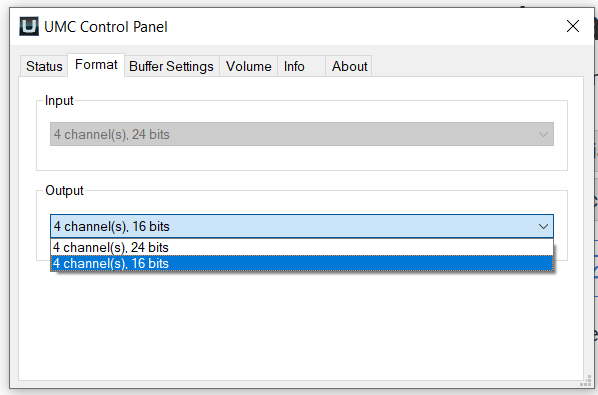
			<content type="html"><![CDATA[<p>Thank you all! <br />I&#039;ve been tinkering with the configuration of the sound interface and Windows. I could not find the exclusive setting for the outputs (only for the mics).I am using the Behringer ASIO driver. <br />I could solve the problem by changing the bit depth of the sound interface from 24 to 16 bits, which is something strange because I never changed anything but the ASIO buffer size. I feel this is nonsense, but it works...</p><p><a href="https://postimages.org/"><span class="postimg"><img src="https://i.postimg.cc/BQsSkWFt/asio.png" alt="https://i.postimg.cc/BQsSkWFt/asio.png" title="https://i.postimg.cc/BQsSkWFt/asio.png"/></span></a><a href="https://postimages.org/es/">image uploader</a></p>]]></content>
			<author>
				<name><![CDATA[marcos daniel]]></name>
				<uri>https://forum.modartt.com/profile.php?id=4155</uri>
			</author>
			<updated>2023-07-23T16:19:02Z</updated>
			<id>https://forum.modartt.com/viewtopic.php?pid=991504#p991504</id>
		</entry>
		<entry>
			<title type="html"><![CDATA[Re: Audio Issue: Pianoteq blocks other apps from playing sound]]></title>
			<link rel="alternate" href="https://forum.modartt.com/viewtopic.php?pid=991497#p991497"/>
			<content type="html"><![CDATA[<p>Yes indeed. Windows and the sound interfaces can work in shared or exclusive modes. The latter is as it sounds, the sound device has exclusive access.</p>]]></content>
			<author>
				<name><![CDATA[Key Fumbler]]></name>
				<uri>https://forum.modartt.com/profile.php?id=6154</uri>
			</author>
			<updated>2023-07-23T07:43:02Z</updated>
			<id>https://forum.modartt.com/viewtopic.php?pid=991497#p991497</id>
		</entry>
		<entry>
			<title type="html"><![CDATA[Re: Audio Issue: Pianoteq blocks other apps from playing sound]]></title>
			<link rel="alternate" href="https://forum.modartt.com/viewtopic.php?pid=991496#p991496"/>
			<content type="html"><![CDATA[<p>While this is only a guess, is the Windows setting for &quot;Let applications take exclusive control of this device&quot; set?&nbsp; If not, are you using a direct asio driver/connection to your device instead of something like the DirectSound interface in the Devices pane of the Audio/MIDI setup window, which could mean PTQ might be taking the device over in the background?</p>]]></content>
			<author>
				<name><![CDATA[tmyoung]]></name>
				<uri>https://forum.modartt.com/profile.php?id=3155</uri>
			</author>
			<updated>2023-07-23T02:19:50Z</updated>
			<id>https://forum.modartt.com/viewtopic.php?pid=991496#p991496</id>
		</entry>
		<entry>
			<title type="html"><![CDATA[Audio Issue: Pianoteq blocks other apps from playing sound]]></title>
			<link rel="alternate" href="https://forum.modartt.com/viewtopic.php?pid=991495#p991495"/>
			<content type="html"><![CDATA[<p>Hi to everyone, I&#039;m experiencing the following problem: when I run Pianoteq, other apps loss their ability to play any sound. I seldom use other audio apps at the same time as PT, so I have noticed this recently. For sure I was able to play along with, for instance, YouTube a couple of months ago. I wonder if anyone is experiencing the same or if it just me. <br />I have a Behringer 204HD and a laptop with Windows 11 and another one with Windows 10 (up to date), the same happens for both of them.<br />Is there any way to solve this?<br />Thanks in advance,<br />Marcos</p>]]></content>
			<author>
				<name><![CDATA[marcos daniel]]></name>
				<uri>https://forum.modartt.com/profile.php?id=4155</uri>
			</author>
			<updated>2023-07-23T01:23:48Z</updated>
			<id>https://forum.modartt.com/viewtopic.php?pid=991495#p991495</id>
		</entry>
</feed>