<?xml version="1.0" encoding="utf-8"?>
<feed xmlns="http://www.w3.org/2005/Atom">
	<title type="html"><![CDATA[Modartt user forum - [Help] Pianoteq and Roland FP-10]]></title>
	<link rel="self" href="https://forum.modartt.com/extern.php?action=feed&amp;tid=10253&amp;type=atom"/>
	<updated>2023-04-18T02:38:08Z</updated>
	<generator>PunBB</generator>
	<id>https://forum.modartt.com/viewtopic.php?id=10253</id>
		<entry>
			<title type="html"><![CDATA[Re: [Help] Pianoteq and Roland FP-10]]></title>
			<link rel="alternate" href="https://forum.modartt.com/viewtopic.php?pid=989528#p989528"/>
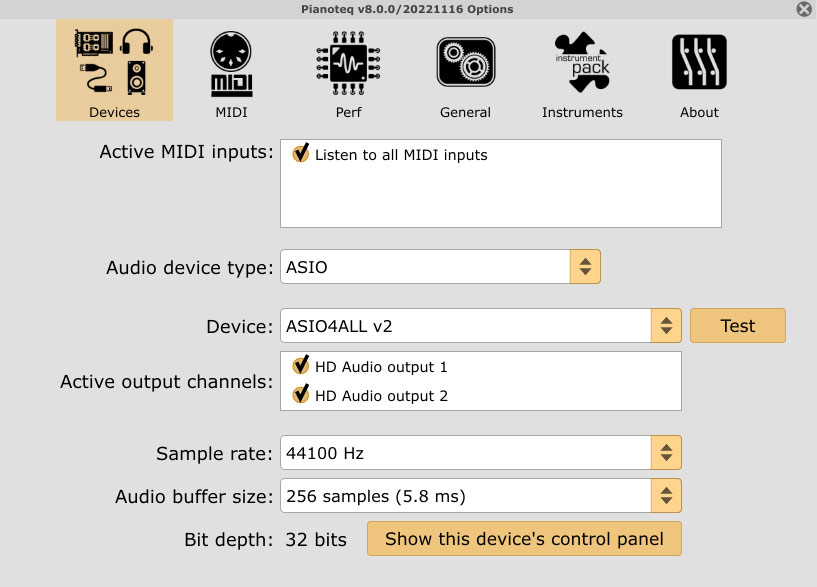
			<content type="html"><![CDATA[<p>Solved (I believe). </p><p>Just saw the user edited another of their posts elsewhere, saying they fixed their issue with a restart. Excellent. </p><br /><p>Adding here also though, that selecting &quot;Listen to all MIDI inputs&quot; should work OK for most use cases. Cheers.</p>]]></content>
			<author>
				<name><![CDATA[Qexl]]></name>
				<uri>https://forum.modartt.com/profile.php?id=4633</uri>
			</author>
			<updated>2023-04-18T02:38:08Z</updated>
			<id>https://forum.modartt.com/viewtopic.php?pid=989528#p989528</id>
		</entry>
		<entry>
			<title type="html"><![CDATA[Re: [Help] Pianoteq and Roland FP-10]]></title>
			<link rel="alternate" href="https://forum.modartt.com/viewtopic.php?pid=989499#p989499"/>
			<content type="html"><![CDATA[<p>Hi Asaf_H, FP-10 as well here.<br />I connected my digital piano (Roland FP-10) with a printer cable.<br />It shows up in hte &quot;Active MIDI inputs&quot; list. There are two items: &quot;Listen to all MIDI inputs&quot; and &quot;Roland digital piano&quot;.<br />But I cannot check the &quot;Roland digital piano&quot;.</p><p>Do you have any idea?</p><p>Thanks!</p>]]></content>
			<author>
				<name><![CDATA[peishengguogps]]></name>
				<uri>https://forum.modartt.com/profile.php?id=9024</uri>
			</author>
			<updated>2023-04-16T22:31:17Z</updated>
			<id>https://forum.modartt.com/viewtopic.php?pid=989499#p989499</id>
		</entry>
		<entry>
			<title type="html"><![CDATA[Re: [Help] Pianoteq and Roland FP-10]]></title>
			<link rel="alternate" href="https://forum.modartt.com/viewtopic.php?pid=988192#p988192"/>
			<content type="html"><![CDATA[<p>You may not need an external audio device, but if you want external speakers and are after a certain quality of sound, you could set a budget and search online or in a music store for monitors. You can get better speakers than most dpianos have for a little outlay, or something better if budget allows. </p><p>The things to do if I was starting over.. </p><p>a<br />If I was sure my computer&#039;s sound-card was not great I&#039;d want to get hold of a reasonable &quot;external audio unit&quot; (there are many - depending on requirements for only a little outlay or a lot of money - take time to research and don&#039;t rush to get one for cheap because it has 1 feature they highlight.. chances are most have similar features now, and with more expensive ones comes possibly things you may not need as much as just desire). </p><p>b<br />Connect dpiano to computer so it can send MIDI (your Roland FX-10 has a USB connection for this, instead of an older MIDI cable). </p><p>c<br />Make sure the audio unit is plugged in (also via a USB connector), and any drivers it came with are installed (follow instructions of the manufacturer when possible.. for example, if they say &quot;Install drivers, then reboot, but do not turn on device until after reboot&quot; it&#039;s probably best not to try doing it differently). </p><p>d<br />If the audio unit came with no &quot;ASIO&quot; drivers (in some cases &#039;bad&#039; ones have existed), then for no charge you can get &quot;<a href="https://www.asio4all.org/">ASIO4ALL – low latency ASIO driver for Windows audio</a>&quot;. ASIO is audio tech for low latency. Maybe you can live without it, but highly advisable for fewer glitches etc.</p><p>e<br />Make sure speakers are connected to the external audio device. </p><p>f<br />With Pianoteq installed and loaded, all things powered up, you should be able to hear your playing. </p><p>g<br />I&#039;d be sure to get a graduated sustain capable pedal, esp. one with 3 pedals if one can be used with the fp-10 (I know they have a single pedal capable of half-pedalling, the dp-10, but not sure if other 3 pedal units will work with this keyboard). </p><p>That&#039;s the basics of the connect setup - beyond that, you can fuss soon enough with settings like &#039;buffer size&#039; within your audio unit&#039;s settings and checking they match with with the same numbers inside the Pianoteq settings. </p><p><a href="https://www.modartt.com/images/faq/asio--.jpg">https://www.modartt.com/images/faq/asio--.jpg</a></p><p>It&#039;s possible to go for a long time with some aspect of your audio setup acting glitchy - hoping that helps you get started. </p><br /><p>This &quot;<a href="https://www.modartt.com/faq">Pianoteq FAQ</a>&quot; page has many helpful hints if stuck for something.</p>]]></content>
			<author>
				<name><![CDATA[Qexl]]></name>
				<uri>https://forum.modartt.com/profile.php?id=4633</uri>
			</author>
			<updated>2023-02-09T02:28:50Z</updated>
			<id>https://forum.modartt.com/viewtopic.php?pid=988192#p988192</id>
		</entry>
		<entry>
			<title type="html"><![CDATA[Re: [Help] Pianoteq and Roland FP-10]]></title>
			<link rel="alternate" href="https://forum.modartt.com/viewtopic.php?pid=988186#p988186"/>
			<content type="html"><![CDATA[<div class="quotebox"><cite>Asaf_H wrote:</cite><blockquote><p>So what you recommend is to connect an external speaker to the computer and use it, and mute the FP-10 itself?</p></blockquote></div><p>Yes, my fp-10 is connected to my PC with usb, and a DAC is connected to my pc .I play with external speakers or headphones on the dac without roland sound.</p>]]></content>
			<author>
				<name><![CDATA[YvesTh]]></name>
				<uri>https://forum.modartt.com/profile.php?id=7147</uri>
			</author>
			<updated>2023-02-08T15:33:00Z</updated>
			<id>https://forum.modartt.com/viewtopic.php?pid=988186#p988186</id>
		</entry>
		<entry>
			<title type="html"><![CDATA[Re: [Help] Pianoteq and Roland FP-10]]></title>
			<link rel="alternate" href="https://forum.modartt.com/viewtopic.php?pid=988185#p988185"/>
			<content type="html"><![CDATA[<p>So what you recommend is to connect an external speaker to the computer and use it, and mute the FP-10 itself?</p>]]></content>
			<author>
				<name><![CDATA[Asaf_H]]></name>
				<uri>https://forum.modartt.com/profile.php?id=8908</uri>
			</author>
			<updated>2023-02-08T15:27:01Z</updated>
			<id>https://forum.modartt.com/viewtopic.php?pid=988185#p988185</id>
		</entry>
		<entry>
			<title type="html"><![CDATA[Re: [Help] Pianoteq and Roland FP-10]]></title>
			<link rel="alternate" href="https://forum.modartt.com/viewtopic.php?pid=988184#p988184"/>
			<content type="html"><![CDATA[<div class="quotebox"><cite>Asaf_H wrote:</cite><blockquote><p>Hi all,</p><p>I&#039;m trying to use the Pianoteq as a sound generator for my FP-10 digital piano.<br />I connected it to my computer, and I am able to see the keys and pedal pressed.<br />However, in the window of the sound output I don&#039;t see the FP-10, therefore all of the sounds are sent from thecomputer audio rather than from the FP-10 speakers.<br />Did anyone encounter this?<br />As far as I saw in the forum, users didn&#039;t find the FP-10 *at all*. It&#039;s not the same problem that I see.</p><p>Any assist will help</p></blockquote></div><p>The FP-10 has no input audio connection, so you can&#039;t use Inside HP of the fp-10 for pianoteq sound. <br />But low cost monitors will be better than Fp-10 HP witch are not very good I think. However FP-10 is very good for the keyboard action.</p>]]></content>
			<author>
				<name><![CDATA[YvesTh]]></name>
				<uri>https://forum.modartt.com/profile.php?id=7147</uri>
			</author>
			<updated>2023-02-08T15:20:06Z</updated>
			<id>https://forum.modartt.com/viewtopic.php?pid=988184#p988184</id>
		</entry>
		<entry>
			<title type="html"><![CDATA[[Help] Pianoteq and Roland FP-10]]></title>
			<link rel="alternate" href="https://forum.modartt.com/viewtopic.php?pid=988183#p988183"/>
			<content type="html"><![CDATA[<p>Hi all,</p><p>I&#039;m trying to use the Pianoteq as a sound generator for my FP-10 digital piano.<br />I connected it to my computer, and I am able to see the keys and pedal pressed.<br />However, in the window of the sound output I don&#039;t see the FP-10, therefore all of the sounds are sent from thecomputer audio rather than from the FP-10 speakers.<br />Did anyone encounter this?<br />As far as I saw in the forum, users didn&#039;t find the FP-10 *at all*. It&#039;s not the same problem that I see.</p><p>Any assist will help</p>]]></content>
			<author>
				<name><![CDATA[Asaf_H]]></name>
				<uri>https://forum.modartt.com/profile.php?id=8908</uri>
			</author>
			<updated>2023-02-08T15:07:11Z</updated>
			<id>https://forum.modartt.com/viewtopic.php?pid=988183#p988183</id>
		</entry>
</feed>